_______________________________________________________________________________________
ORVED S.P.A Rev.01 – 09/2019 – cod. 1500735-00EN – User Manual for
IDEA
vacuum packing machines
Pag. 24 a 76
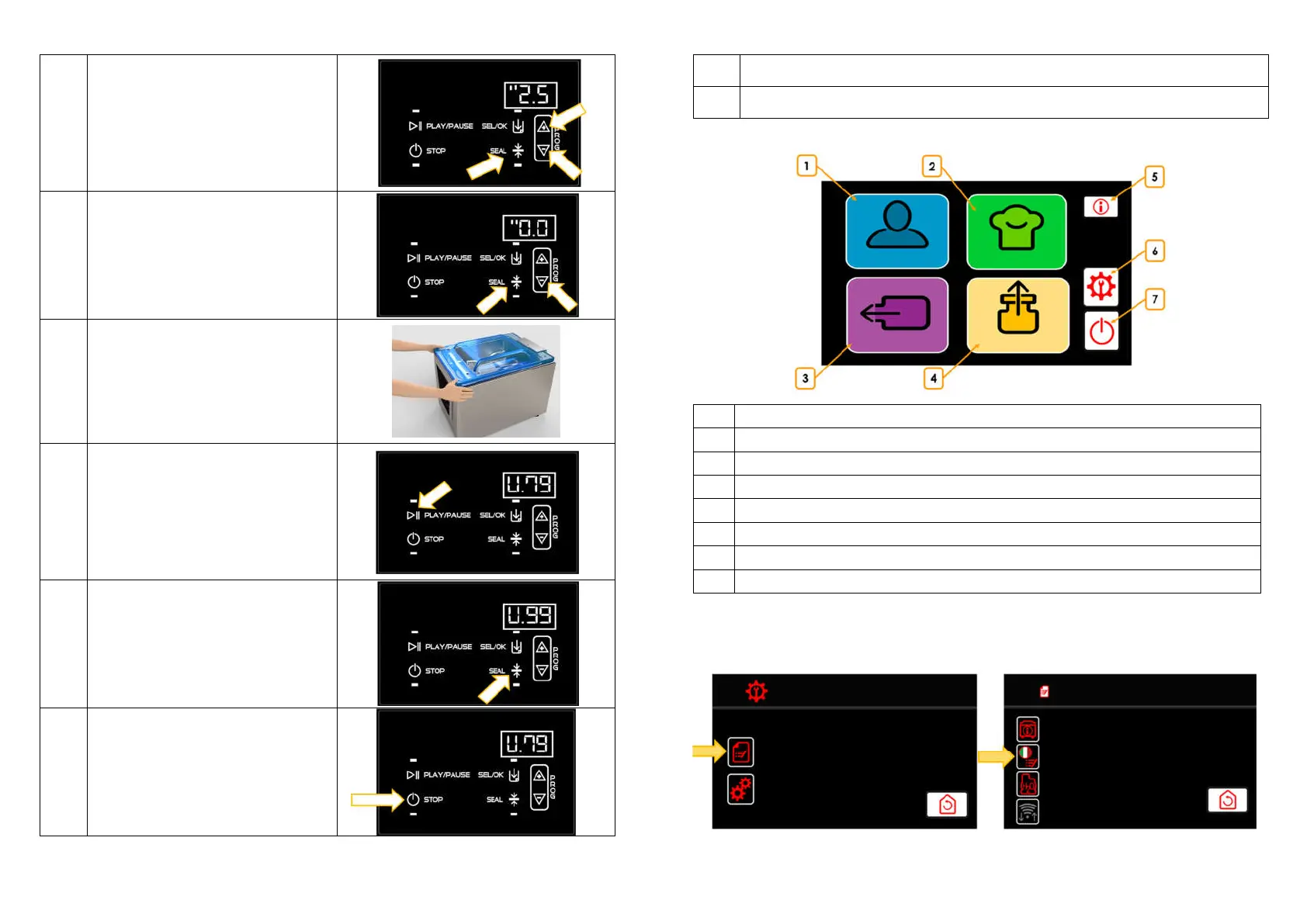
8a
Using a bag, press SEAL button to set the
sealing time between 0,1” and 6,0”,
depending to the vacuum bag in use.
8b
Using a container, press SEAL button to set the
sealing time to 0”.
9
Lower the lid using both hands, by pressing on
the corners.
The vacuum cycle starts automatically.
11
Press PLAY/PAUSE button, to pause the
vacuum phase (to flat the bubbles appeared
into the bag and avoid any product
overflowing) and press it again, to have a
partial air re-entering and start a new
vacuum phase. Multiple time, to achieve
Th operation can be repeated multiple time,
to obtain – step by step – the vacuum level
programmed.
12a
Press SEAL button to switch in advance to
sealing.
13
Pressing STOP button at any time, it is possible
to interrupt the vacuum cycle immediately
and the vacuum chamber is uncompressed.
The lid opens automatically. The machine
comes back to the selected program.
_______________________________________________________________________________________
ORVED S.P.A Rev.01 – 09/2019 – cod. 1500735-00EN – User Manual for
IDEA
vacuum packing machines
Pag. 25 a 76
14a
End of cycle. The lid opens automatically.
Remove the packed products, paying attention not to touch the sealing bar, as it may be still hot
14b
End of cycle. The lid opens automatically. Remove the container.
8 Command panel IDEA 32 Hi-Line – IDEA 42 Hi-Line
N° DESCRIPTION
1
User Cycles: completely editable
2
Chef Cycles: special vacuum cycles for special processing
3
Degas Cycles
4
Jar Cycles
5
Shows information about the screen (if available)
6
Gives the access to Technical menu
7
Helps to stop the machine
8.1 vacuum machine first use
When first starting up the machine, proceed as described below: Access to technical menu (indicated by
number 6 in previous page image).
SERVICE MENU



 To Next Page