DIS-3
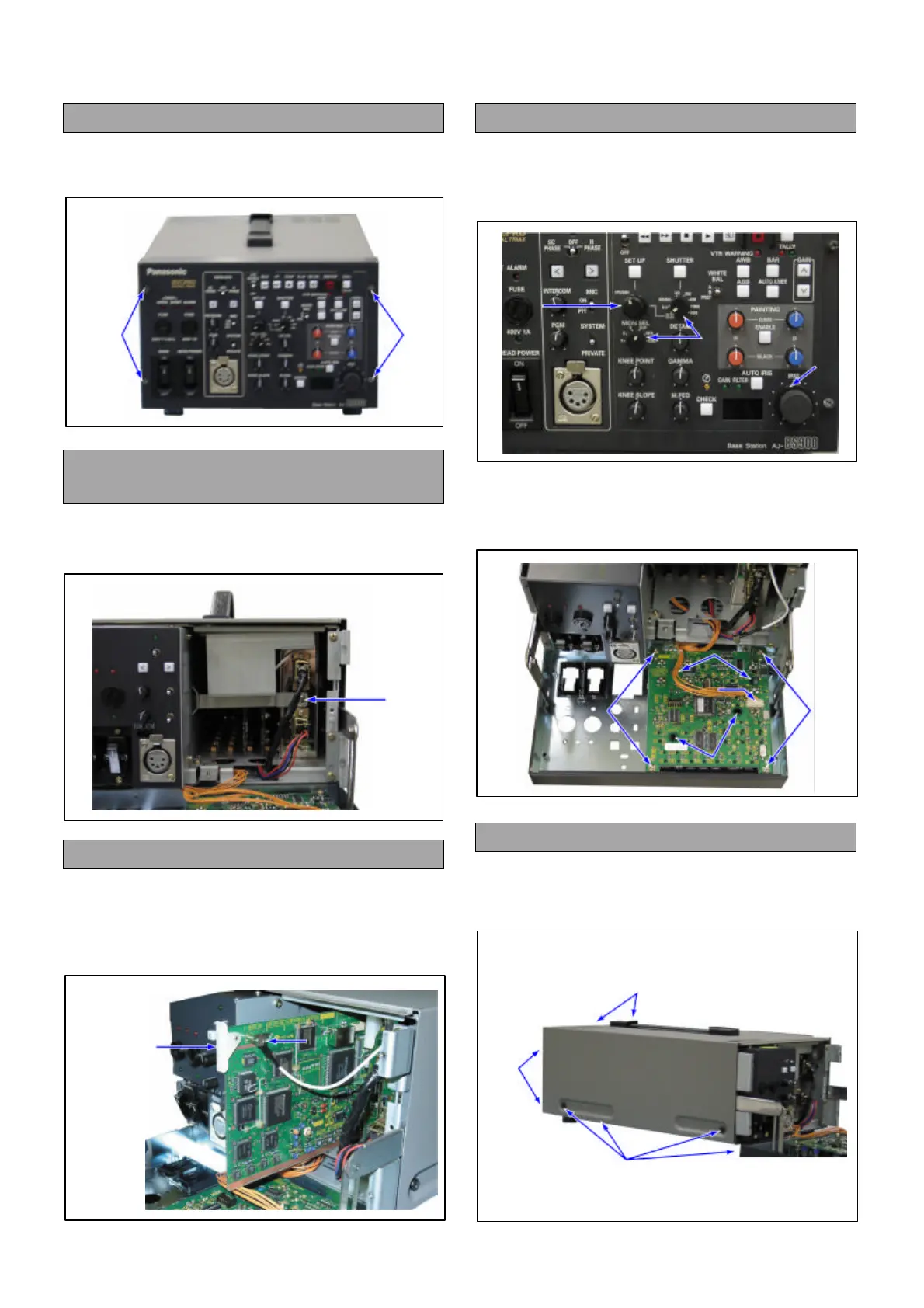
1. Removal of the Front Panel
1. Unscrew the 4 screws (A), and remove the Front
Panel.
2. Removal of the C.B.A. Fixed
Angle
1. Unscrew the screw (B), and remove the C.B.A.
Fixed Angle.
3. Removal of the Card Edge C.B.A.
1. Pull the Card puller, and pull out the C.B.A. a little
way.
2. Disconnect the connector (J1), and the pull out the
C.B.A.
4. Removal of the BS Front C.B.A.
1. Loosen the 3 worm screws (A), and pull out the
Knob.
2. Pull out of the Set Up Knob.
3. Unscrew the 4 screws (C), and remove the
connector (P1).
4. Unscrew the 4 screws (D), and remove the BS
Front C.B.A..
5. Removal of the Top Panel
1. Unscrew the 4 screws (E).
2. Unscrew the 4 screws (F), and remove the Top
Panel.
(A)
(A)
(B)
(J1)
Card Puller
(A)
(A)
SET UP KNOB
(C)
(C)
(D)
(D)
(P1)
(E)
(F)
(F)
Disassembly Procedures for AJ-BS900HP/EN



 To Next Page