Electrical Adjustment for AJ-BS900HEN & CA900HEN
ELE-17
7-3. ENC OUT Level Adjustment
BOARD
BS DIGITAL
TP
ENC1 OUT, ENC2 OUT, ENC3 OUT,
ADJ.
VR8 [SYNC 1]
VR9, VR11, VR13 [CHROMA 1- 3]
VR10, VR12, VR14 [ENC 1- 3]
INPUT
AJ-BS900H Internal Color bar signal : ON
M. EQ
Oscilloscope (with 75
Ω
termination)
SPEC.
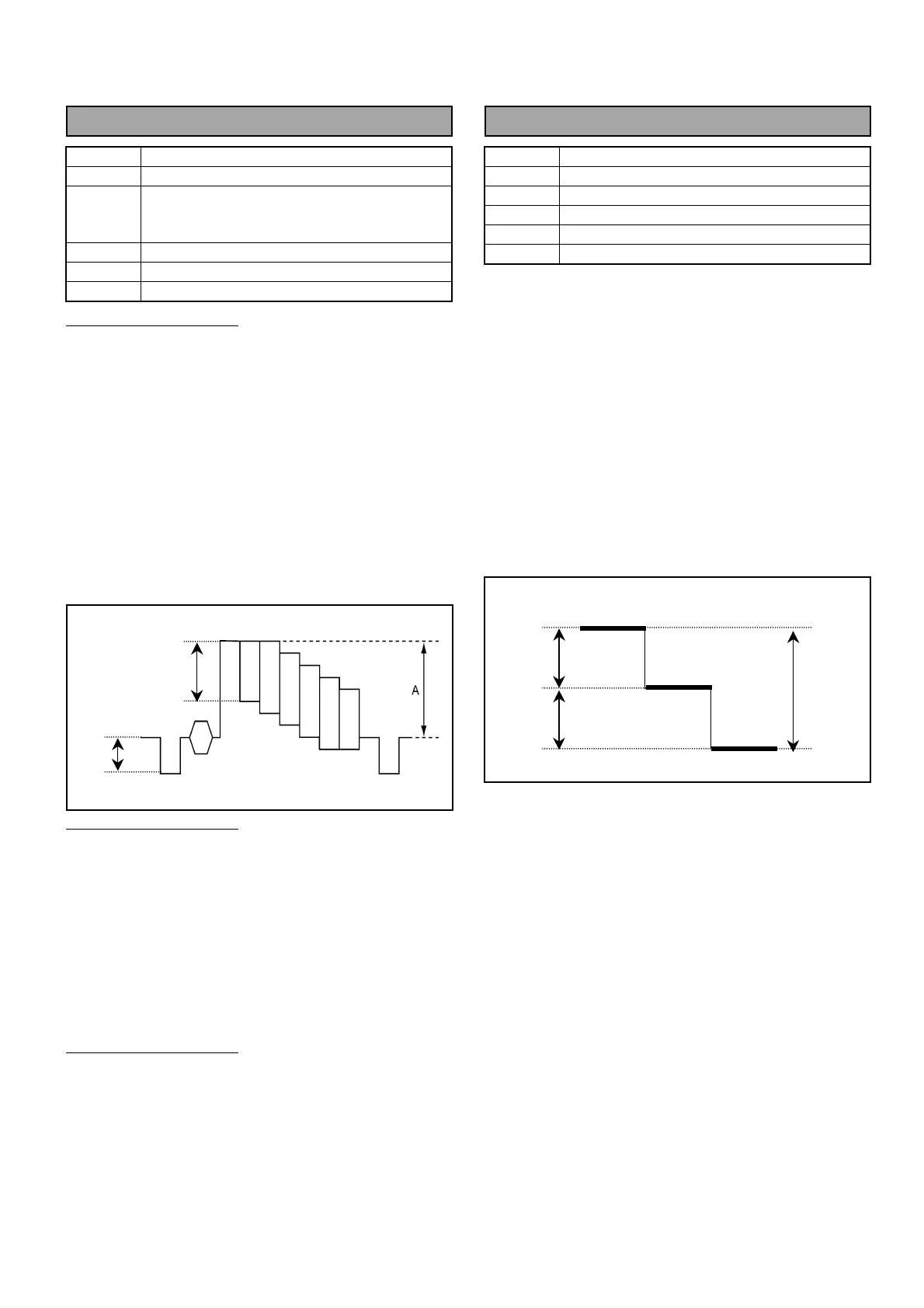
As shown below
ENC 1 OUT Adjustment
1. Connect Oscilloscope to ENC1 OUT and then
adjust VR10 so that the signal level A is 700mV +/-
7mV.
2. Connect Oscilloscope to ENC1 OUT and then
adjust VR8 so that the sync signal level B is
300mV +/- 3mV.
3. Connect Oscilloscope to ENC1 OUT and then
adjust VR9 so that the Color signal level C is the
same level with luminance signal.
ENC 2 OUT Adjustment
4. Connect Oscilloscope to ENC2 OUT and then
adjust VR12 so that the signal level A is 700mV +/-
7mV.
5. Connect Oscilloscope to ENC2 OUT and then
adjust VR11 so that the color signal level C is the
same level with luminance signal.
ENC 3 OUT Adjustment
6. Connect Oscilloscope to ENC3 OUT and then
adjust VR14 so that the signal level A is 700mV +/-
7mV.
7. Connect Oscilloscope to ENC3 OUT and then
adjust VR13 so that the color signal level C is the
same level with luminance signal.
7-4. Stair Signal Level Adjustment
BOARD
BS DIGITAL
TP
VFK1671 : A45 pin
ADJ.
VR3 [STAIR BAL], VR4 [STAIR GAIN]
INPUT
------
M. EQ
Oscilloscope (with 75
Ω
termination)
SPEC.
As shown below
1. Set MON SEL Knob on the front panel of AJ-
BS900H as shown below.
MON SEL : SEQ
2. Extend BS DIGITAL Board with extension board
(VFK1671).
3. Connect Oscilloscope to A45pin on the VFK1671
and then adjust VR4 so that the signal level is
10Vp-p.
4. Connect Oscilloscope to A45pin on VFK1671 and
then adjust VR3 and VR4 so that the step duty is
5Vp-p each.
10Vp-p
5Vp-p
5Vp-p
B
C



 To Next Page