Message displays
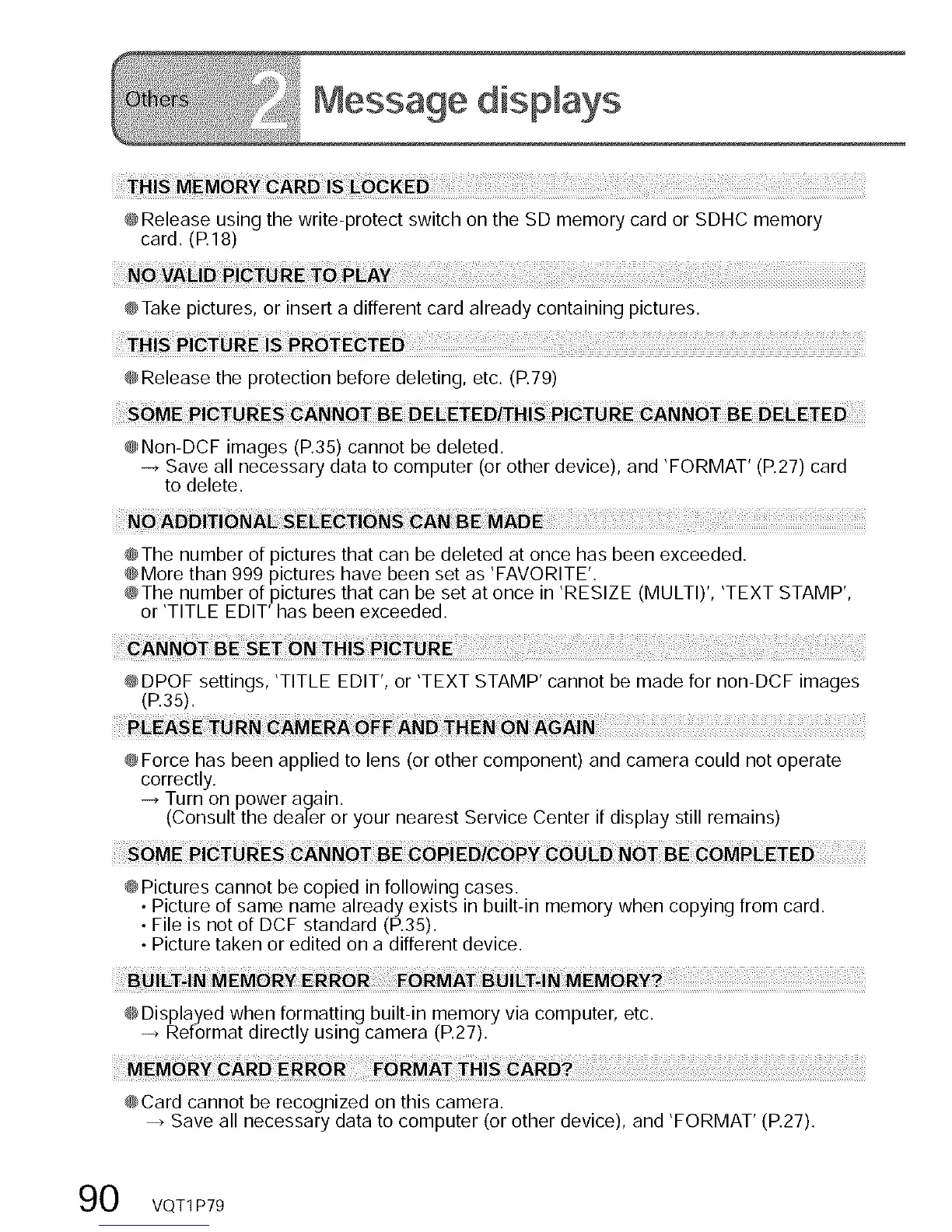
@Release using the write-protect switch on the SD memory card or SDHC memory
card. (R 18)
E P EAY
@Take pictures, or insert a different card already containing pictures.
@Release the protection before deleting, etc. (P.79)
@Non-DCF images (R35) cannot be deleted.
-_ Save all necessary data to computer (or other device), and 'FORMAT' (P.27) card
to delete.
@The number of pictures that can be deleted at once has been exceeded.
@More than 999 pictures have been set as 'FAVORITE'.
@The number of pictures that can be set at once in 'RESIZE (MULTI)', 'TEXT STAMP',
or 'TITLE EDIT' has been exceeded.
@DPOF settings, 'TITLE EDIT', or 'TEXT STAMP' cannot be made for non-DCF images
(P.35).
@Force has been applied to lens (or other component) and camera could not operate
correctly.
-_ Turn on power again,
(Consult the dealer or your nearest Service Center if display still remains)
@Pictures cannot be copied in following cases.
• Picture of same name already exists in built-in memory when copying from card,
• File is not of DCF standard (P.35).
• Picture taken or edited on a different device.
@Displayed when formatting built-in memory via computer, etc,
-_ Reformat directly using camera (P.27).
@Card cannot be recognized on this camera.
-_ Save all necessary data to computer (or other device), and 'FORMAT' (P.27),
0 VQT1 P79



 To Next Page
 Loading...