15
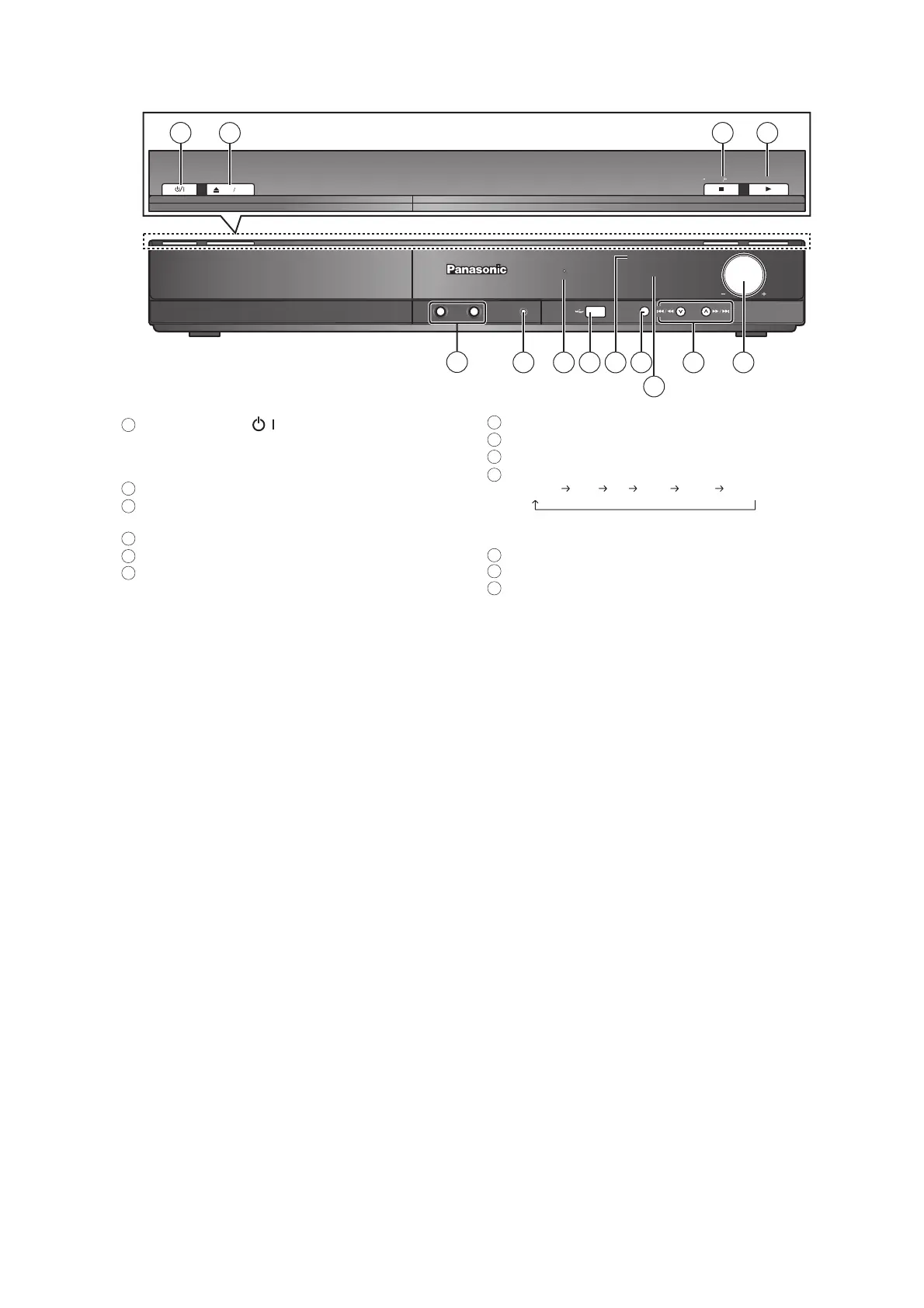
5.2. Main Unit Key Button Operations
TUNE
SELECTOR
MUSIC PORT
VOLUME
SURROUND OUTPUT
MEMORY
OPEN CLOSE
TUNE MODE FM MODE
12
13
8 10
11
76
1
2
3 4
9
1-MIC-2
5
Standby/on switch ( / )
Press to switch the unit from on to standby mode or vice
versa. In standby mode, the unit is still consuming a small
amount of power.
Open/Close the disc tray
Stop playing / Select the tuning mode / Adjust the FM
reception condition
Play discs / Memorize the receiving radio stations
Connect microphones
Connect external music device
The indicator lights when there is surround sound effect.
Connect USB device
Remote control signal sensor
Select the source
DVD/CD USB FM AUX
*
D-IN
*
MUSIC P.
*
(TV) will appear beside AUX or D-IN , indicating the TV audio
setting for VIERA Link HDAVI Control
Display
Skip or slow-search play / Select the radio stations
Adjust the volume of the main unit
1
7
8
9
10
11
12
13
2
3
4
5
6













 To Next Page