54
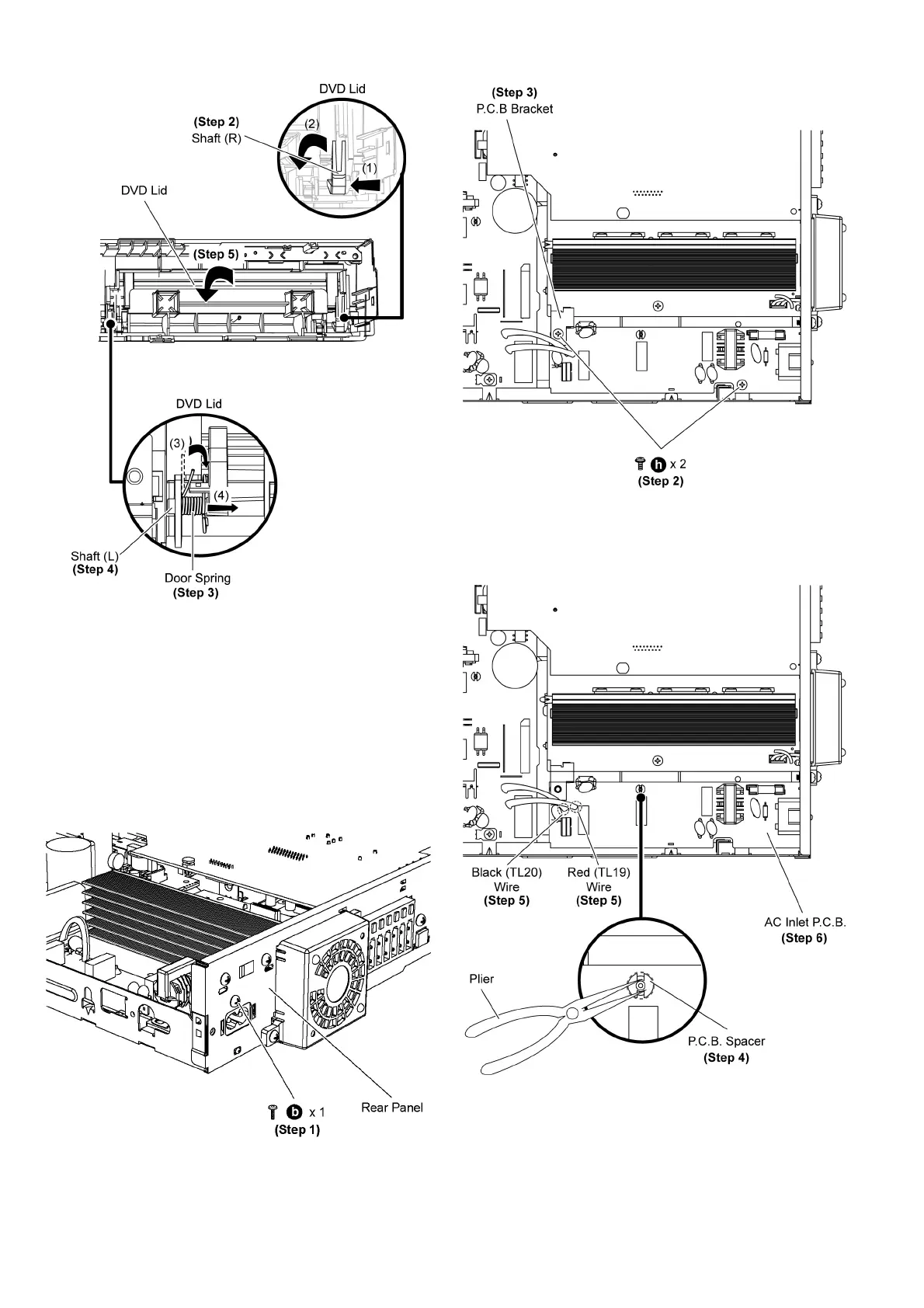
Step 2 Move the shaft (R) of the DVD lid in the direction of
arrow (1) & (2).
Step 3 Lift the door spring of shaft (L) in the direction of arrow
(3).
Step 4 Move the shaft (L) of the DVD Lid in the direction of
arrow (4).
Step 5 Remove the DVD lid in the direction of arrow.
9.11. Disassembly of AC Inlet P.C.B.
• Follow (Step 1) to (Step 3) of Item 9.3.
Step 1 Remove 1 screw at the rear panel.
Step 2 Remove 2 screws on AC Inlet P.C.B.
Step 3 Remove the P.C.B. bracket.
Caution: Keep the AC Inlet shield plate unit in safe place.
Avoid denting it. Place it back during assembling.
Caution: Keep the P.C.B. bracket in safe place. Avoid dent-
ing it. Place it back during assembling.
Step 4 Use plier to release the AC Inlet P.C.B. Spacer.
Step 5 Desolder Black (TL20) and Red (TL19) wire on AC Inlet
P.C .B .
Step 6 Remove AC Inlet P.C.B.













 To Next Page