61
9.17. Disassembly of SMPS P.C.B &
Voltage Selector P.C.B.
• Follow (Step 1) to (Step 3) of Item 9.3.
• Follow (Step 1) to (Step 3) of Item 9.6.
• Follow (Step 7) to (Step 10) of Item 9.6.
• Follow (Step 4) to (Step 6) of Item 9.12.
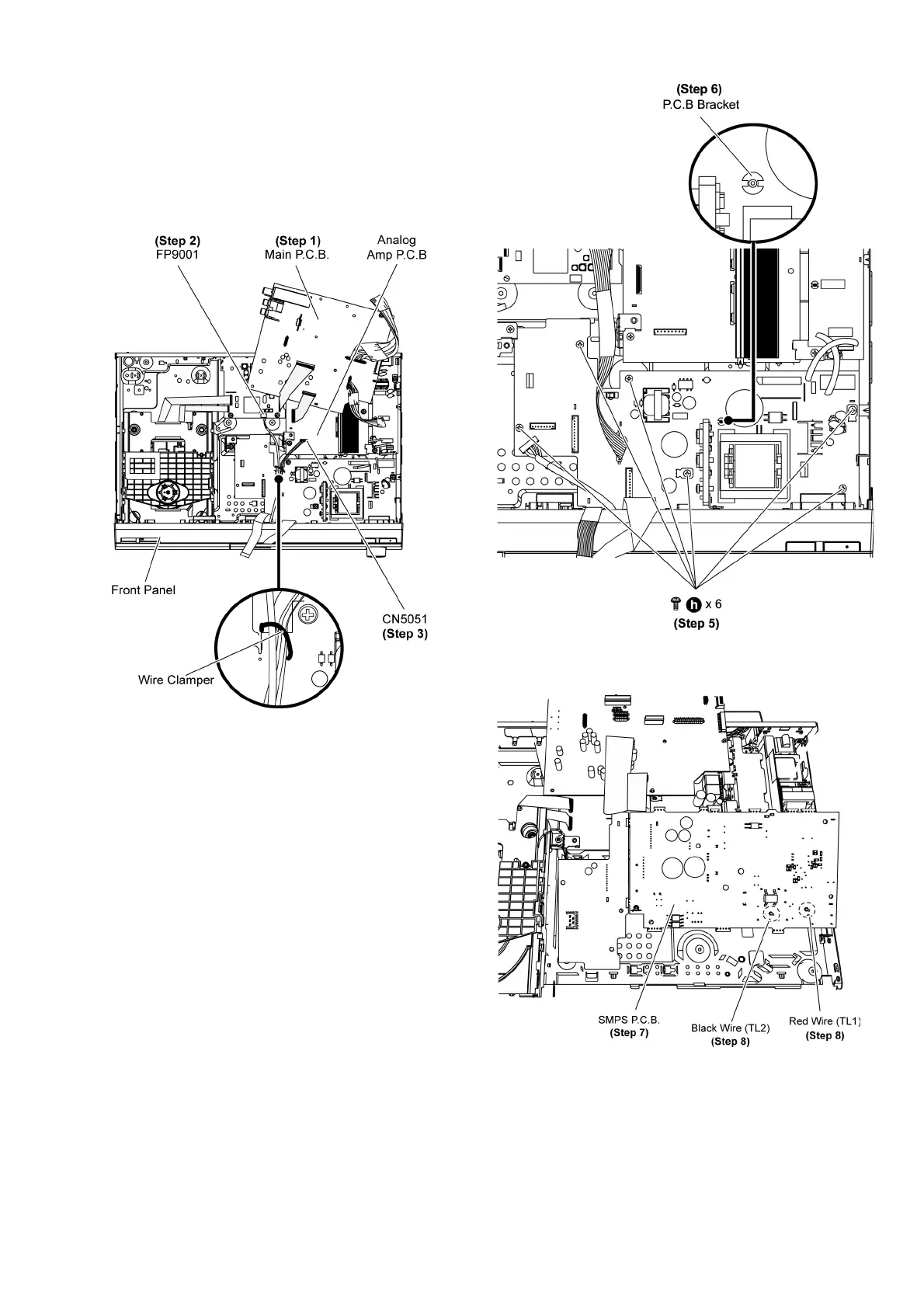
Step 1 Move aside Main P.C.B. and position it according to the
diagram shown.
Step 2 Detach 5P cable at the connector (FP9001) on DVD
Module P.C.B.
Step 3 Detach 4P cable at the connector (CN5051) on Analog
Amp P.C.B.
Step 4 Twist the wire clamper to detach 5P & 4P cables.
Step 5 Remove 6 screws on SMPS P.C.B.
Step 6 Use a plier to release P.C.B spacer.
Step 7 Flip and position SMPS P.C.B according to diagram
show.
Step 8 Desolder Black (TL2) and Red (TL1) wire on SMPS
P. C .B .
Step 9 Remove SMPS P.C.B.













 To Next Page