70
Step 31 Process to check and service Analog Amp P.C.B.
Note: Insulated material (box) is required to support Ana-
log Amp P.C.B.
10.3. Checking & Servicing SMPS &
AC Inlet P.C.B.
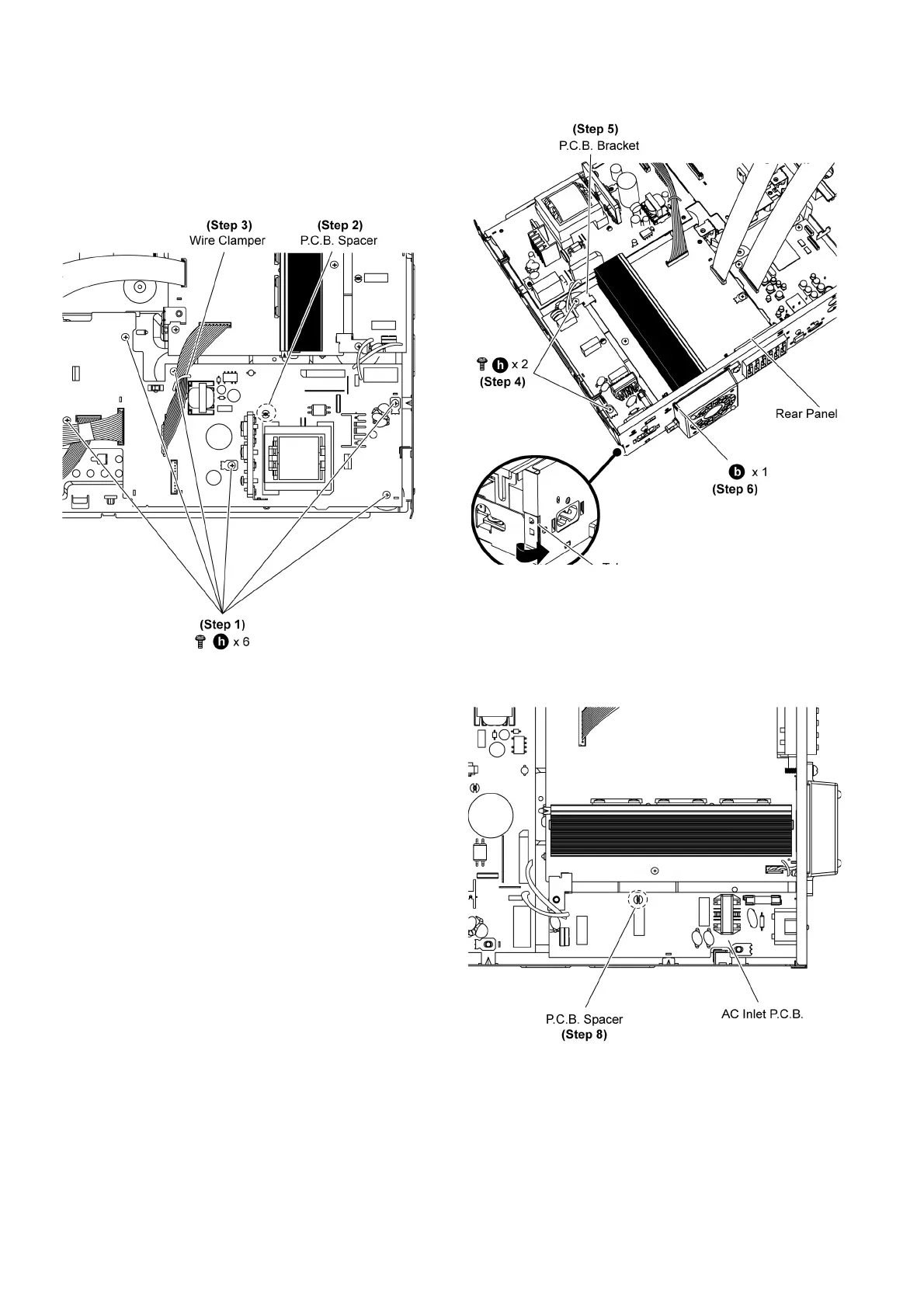
• Follow (Step 1) to (Step 23) of Item 10.2.
Step 1 Remove 6 screws on SMPS P.C.B.
Step 2 Release P.C.B Support of SMPS P.C.B.
Step 3 Twist the wire clamper to release 4P cable (from H5801
to CN5051).
Step 4 Remove 2 screws on AC Inlet P.C.B.
Step 5 Remove P.C.B bracket on AC Inlet P.C.B.
Step 6 Remove 1 screw at the rear panel.
Step 7 Release the tab of the rear panel in the direction of
arrow.
Caution: Keep the P.C.B. bracket in safe place. Avoid dent-
ing it. Place it back during assembling.
Step 8 Release P.C.B. spacer.













 To Next Page