7 Operation Procedures
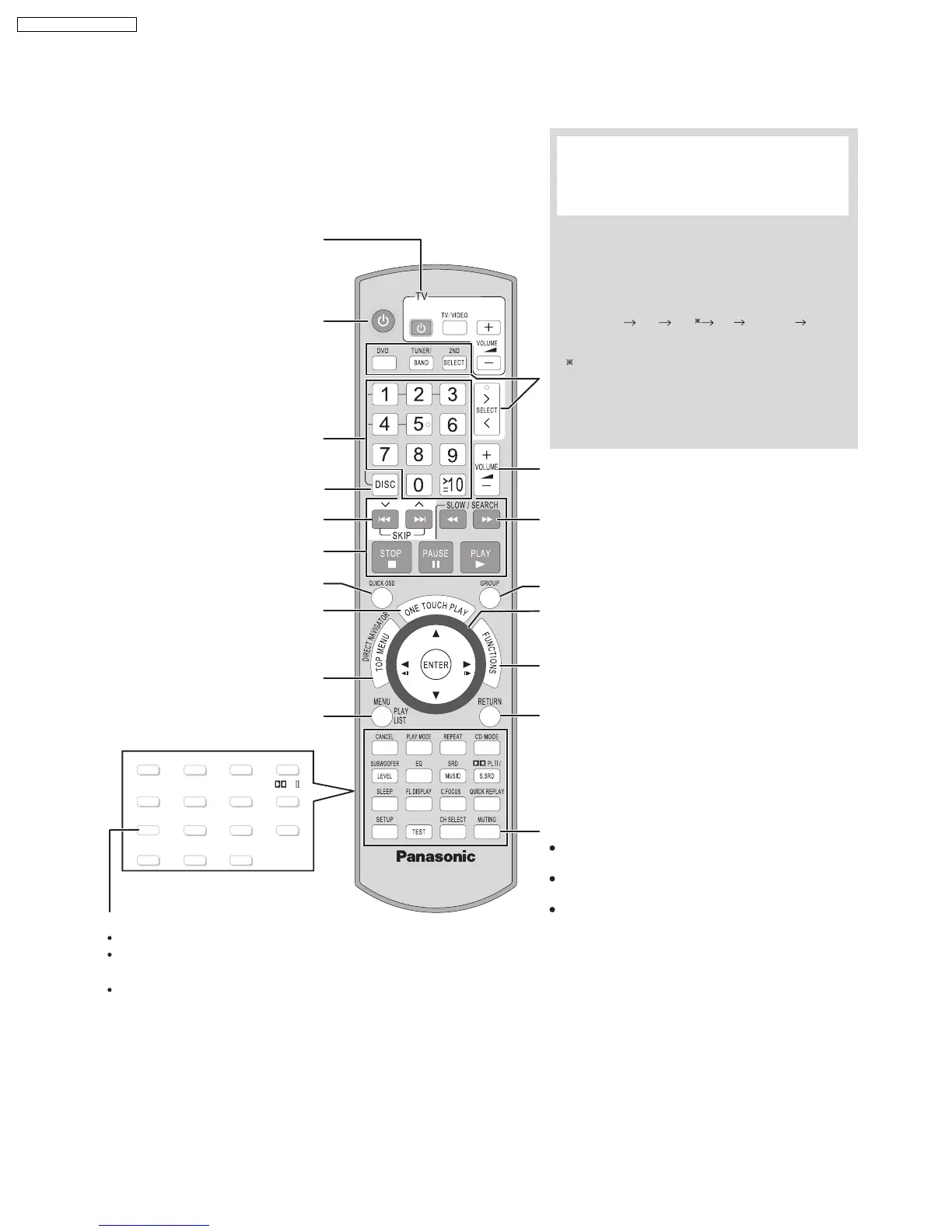
7.1. Remote Control Key Buttons Operations
CANCEL
PLAY MODE
REPEA
T
C.FOCUS
CD MODE
PL /
CH SELECT
SUBWOOFER
TEST
SLEEP
FL DISPLAY
EQ
SRD
QUICK REPLAY
SETUP
LEVEL
Frame-by-frame/Select or register menu items
on the television screen/Browse XM radio categories
Show on-screen menu
Return to previous screen
Adjust the volume of the main unit
Select radio stations/channels manually
Select a group of contents to play
Turn the main unit on/off
Select disc’s title numbers etc./Enter numbers
Basic operations for play
Show a disc top menu or program list
Start up and play a disc automatically
Show a disc menu or play list
Select the disc or show disc information
Display current playback condition
Select preset radio stations/channels
Television operations
The below function is available only when using the
optional Panasonic wireless sound system SH-FX85.
[2ND SELECT]
: Change the source for the second
room
MAIN SOURCE (follows the selected source for the
main room (FM AM) XM OPTION
Return to MAIN SOURCE
If the main room is in FM/AM mode, you can only
select the same mode for the FM/AM tuner of the
second room.
For details, refer to the operating instructions for the
optional Panasonic wireless sound system SH-FX85.
Select the source
[DVD]
: DVD/CD
[TUNER/BAND]
: FM/AM, XM
[>, < SELECT]
: DVD/CD, FM/AM, XM,
AUX, MUSIC P., OPTION
Mute the sound
"MUTING" flashes in the main unit’s display
while the function is on.
To cancel, press the button again or adjust
the volume.
Muting is canceled when you switch on the
unit to standby.
Turn the unit off automatically (Sleep timer)
The maximum setting is 120-min (in 30-min steps).
Press the button again to confirm the remaining time
on unit’s display.
To cancel, select "OFF" on the main unit’s display.
MUSIC
S.SRD
14
SA-PT750P / SA-PT750PC













 To Next Page