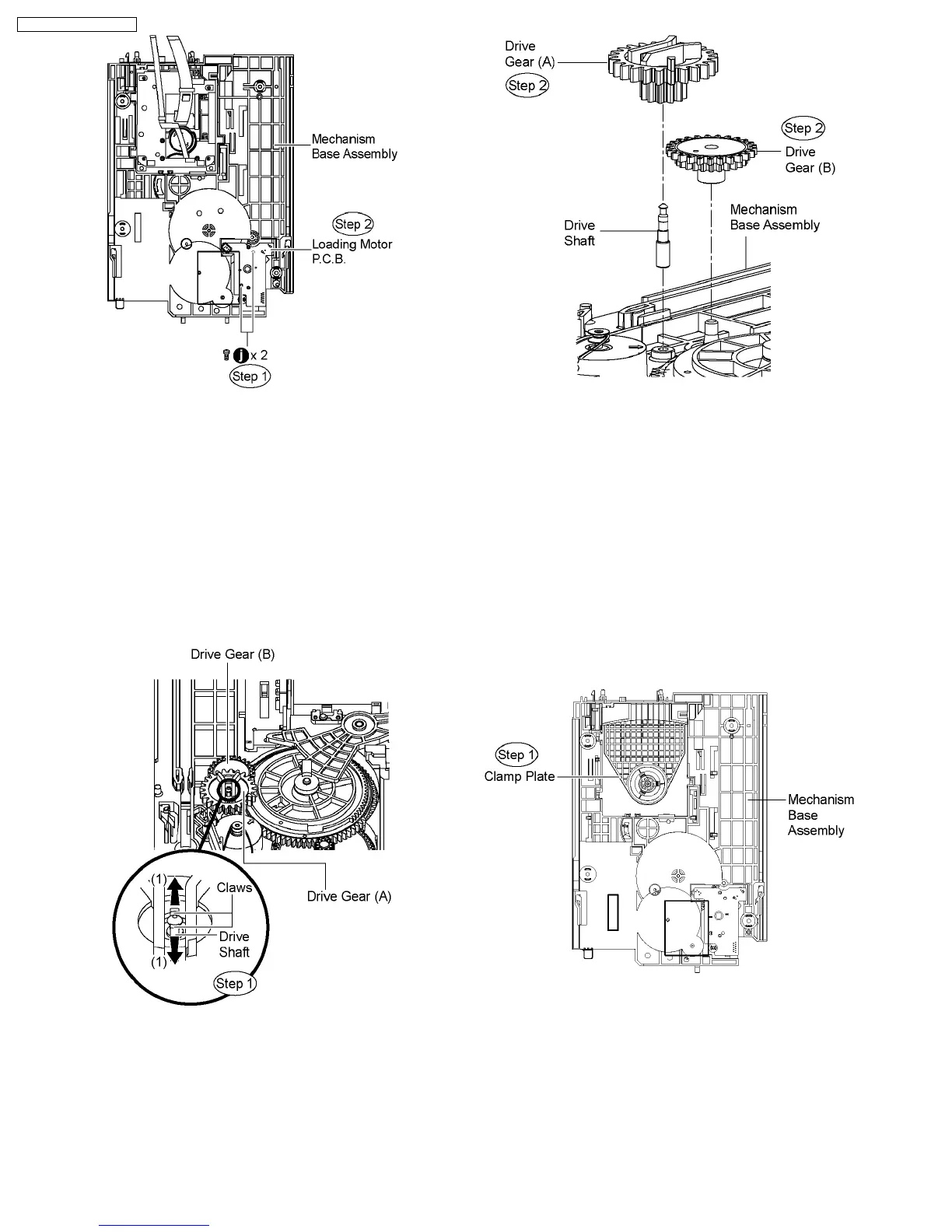
10.33. Disassembly of Drive Gear (A)
& Drive Gear (B)
·
Follow (Step 1) to (Step 3) of Item 10.3.
·
Follow (Step 1) to (Step 3) of Item 10.4.
·
Follow (Step 1) to (Step 4) of Item 10.5.
·
Follow (Step 1) to (Step 4) of Item 10.7.
·
Follow (Step 1) to (Step 4) of Item 10.8.
Step 1 Release the claws in the direction of arrow (1), and then
pull up the drive shaft.
Step 2 Remove the drive gear (A) and drive gear (B) from the
mechanism base assembly .
10.34. Disassembly of Magnet
Holder, Washer, Magnet &
Clamper
·
Follow (Step 1) to (Step 3) of Item 10.3.
·
Follow (Step 1) to (Step 3) of Item 10.4.
·
Follow (Step 1) to (Step 4) of Item 10.5.
·
Follow (Step 1) to (Step 4) of Item 10.7.
·
Follow (Step 1) to (Step 4) of Item 10.8.
·
Follow (Step 1) to (Step 3) of Item 10.30.
Step 1 Flip the mecha base to show the reverse side of the
clamp plate.
Step 2 Release 3 claws at the clamp plate in the direction of
arrow.
Step 3 Remove the magnet holder, washer, magnet & clamper.
70
SA-PT750P / SA-PT750PC













 To Next Page