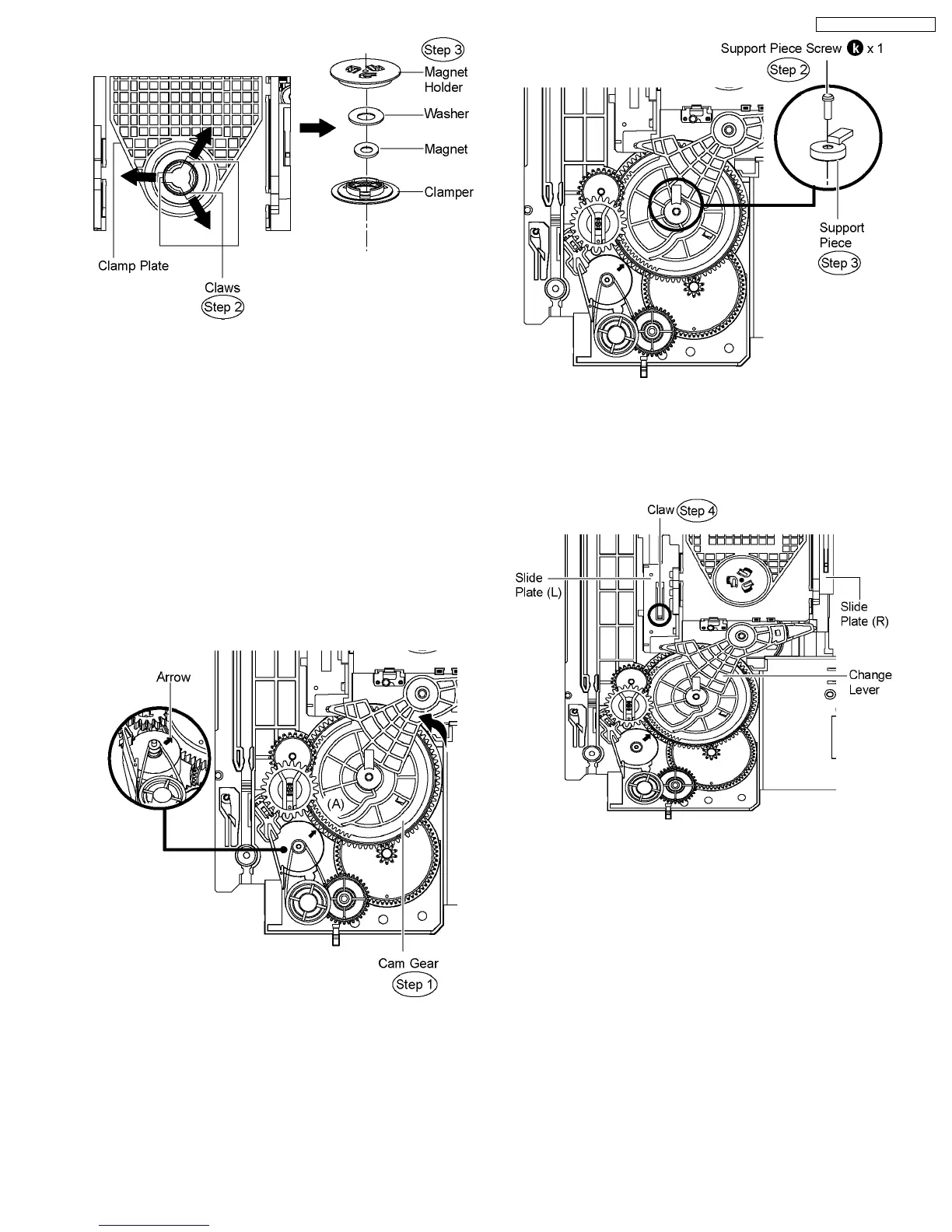
10.35. Disassembly of Support Piece,
Change Lever, Slide Plate (L)
& Slide Plate (R)
·
Follow (Step 1) to (Step 3) of Item 10.3.
·
Follow (Step 1) to (Step 3) of Item 10.4.
·
Follow (Step 1) to (Step 4) of Item 10.5.
·
Follow (Step 1) to (Step 4) of Item 10.7.
·
Follow (Step 1) to (Step 4) of Item 10.8.
·
Follow (Step 1) to (Step 3) of Item 10.30.
·
Disassembly of Support Piece.
Step 1 Rotate the cam gear anti-clockwise. (Align at position
(A) as marking on the gear with arrow.)
Step 2 Remove the support piece screw from the top of support
piece.
Step 3 Remove support piece.
·
Disassembly of Change Lever, Slide Plate (L) & Slide Plate
(R).
Step 4 Press the claw and pull up the slide plate (L).
Step 5 Remove the change lever, slide plate (L) & slide plate
(R) in the direction of arrow.
71
SA-PT750P / SA-PT750PC













 To Next Page