P.C.B.
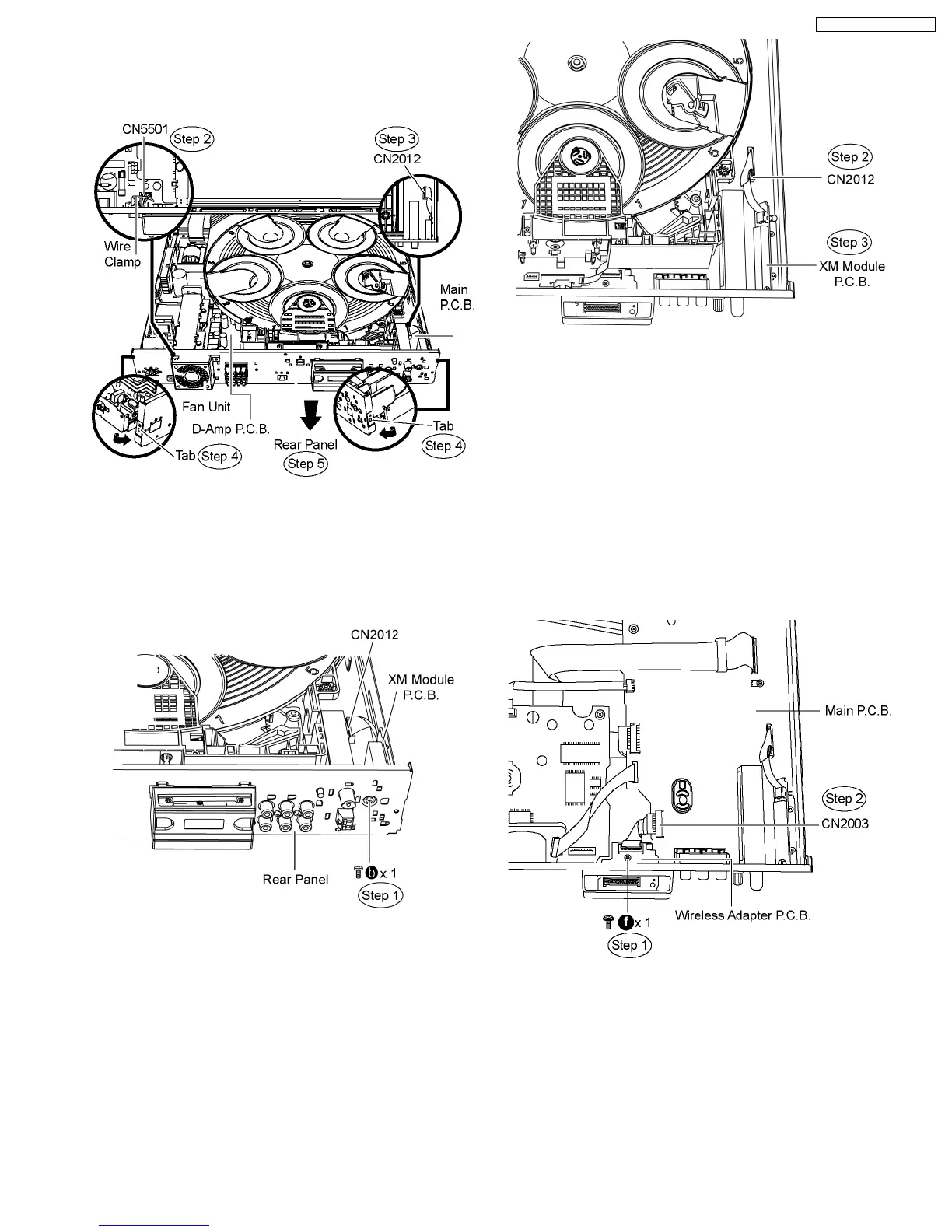
Step 4 Release the tabs of the rear panel in the direction of the
arrow.
Step 5 Remove the rear panel in the direction of arrow.
10.10. Disassembly of XM Module
P.C.B.
·
Follow (Step 1) to (Step 3) of Item 10.3
Step 1 Remove 1 screw from the rear panel.
Step 2 Detach FFC cable from the connector (CN2012) on
Main P.C.B.
Step 3 Lift up and remove the XM Module P.C.B. from the rear
panel.
10.11. Disassembly of Wireless
Adapter P.C.B.
·
Follow (Step 1) to (Step 3) of Item 10.3.
·
Follow (Step 1) to (Step 3) of Item 10.4.
·
Follow (Step 1) to (Step 4) of Item 10.5.
·
Follow (Step 1) to (Step 4) of Item 10.7.
·
Follow (Step 1) to (Step 4) of Item 10.8.
Step 1 Remove 1 screw from Wireless Adapter P.C.B.
Step 2 Detach FFC cable from the connector (CN2003) on
Main P.C.B.
Step 3 Remove 4 screws on rear panel.
Step 4 Release the tab in direction of the arrow.
Step 5 Remove the Wireless Adapter P.C.B.
59
SA-PT750P / SA-PT750PC













 To Next Page