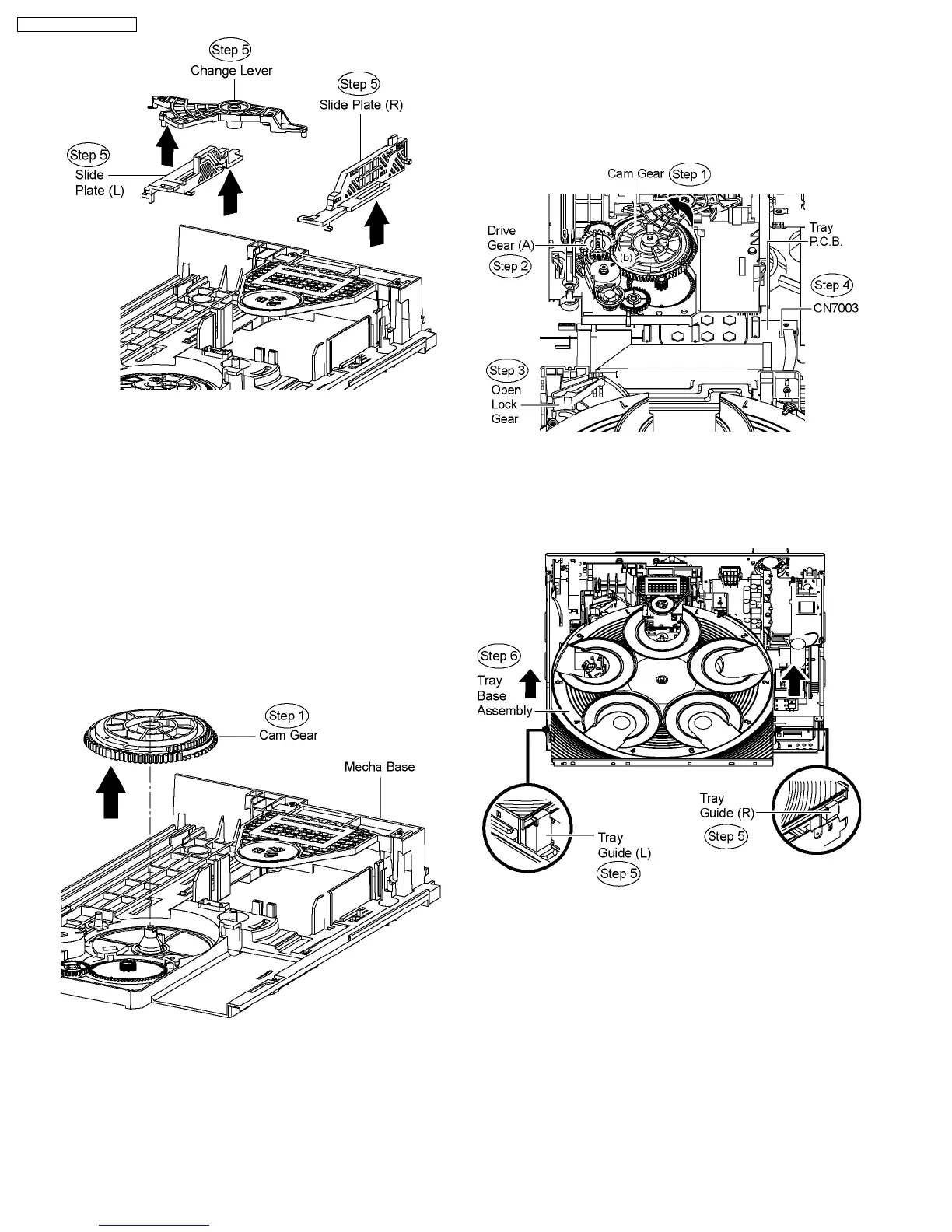
10.36. Disassembly of Cam Gear
·
Follow (Step 1) to (Step 3) of Item 10.3.
·
Follow (Step 1) to (Step 3) of Item 10.4.
·
Follow (Step 1) to (Step 4) of Item 10.5.
·
Follow (Step 1) to (Step 4) of Item 10.7.
·
Follow (Step 1) to (Step 4) of Item 10.8.
·
Follow (Step 1) to (Step 3) of Item 10.30.
·
Follow (Step 1) to (Step 2) of Item 10.33.
·
Follow (Step 1) to (Step 5) of Item 10.35.
Step 1 Remove the cam gear from the mecha base in the
arrow of direction.
10.37. Assembly of Tray Base
Assembly
·
Reverse (Step 1) to (Step 4) of Item 10.8.
Step 1 Rotate the cam gear anti-clockwise. (Align at position
(B) as marking on gear with arrow.)
Step 2 Make sure drive gear (A) is in vertical position.
Step 3 Keep the open lock gear pressed in the position shown.
Step 4 Connect FFC cable at the connector (CN7003) on Tray
P.C.B.
Step 5 Align the tray base assembly to the tray guide (L) & tray
guide (R).
Step 6 Push the tray base assembly in the direction of arrow
shown.
72
SA-PT750P / SA-PT750PC













 To Next Page