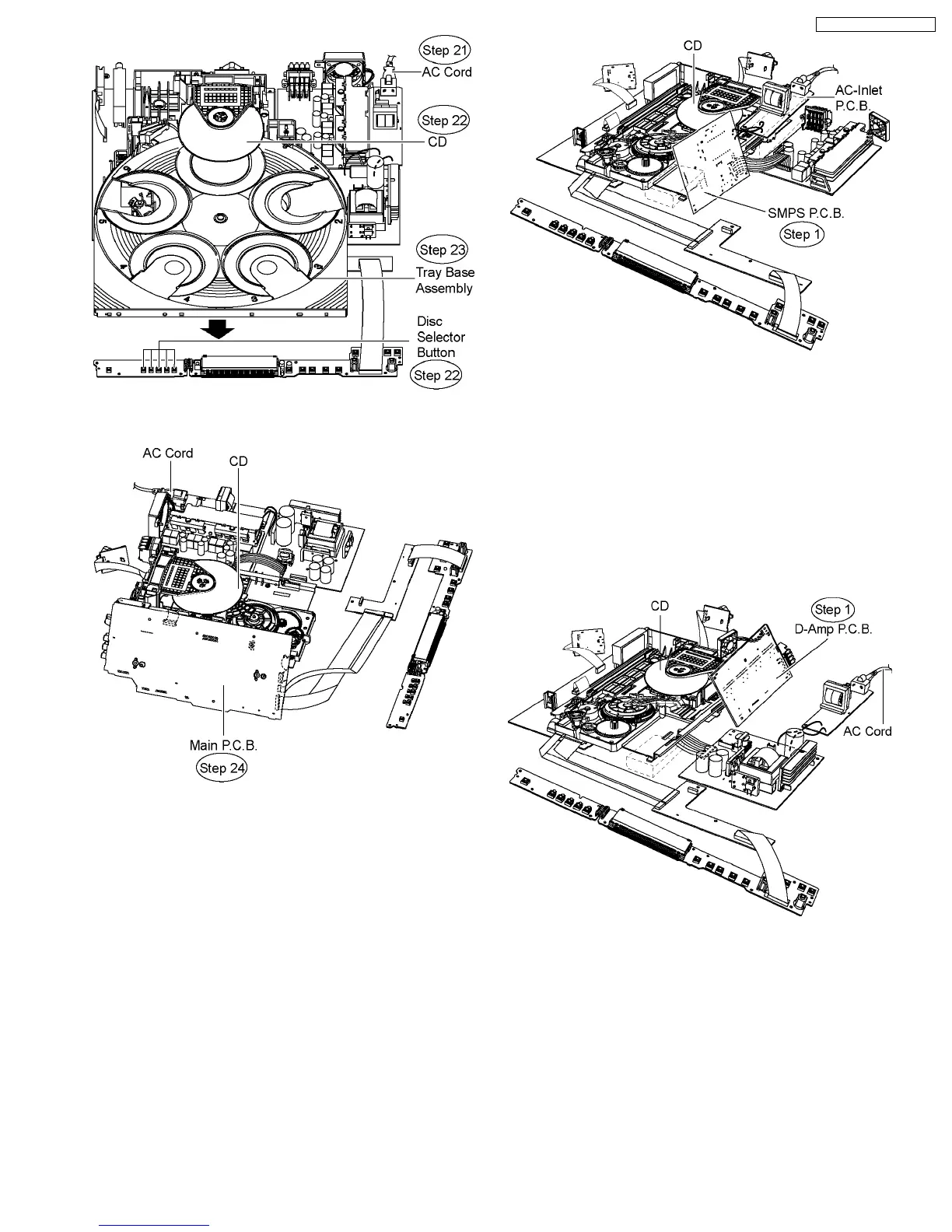
Step 24 Turn over Main P.C.B. vertically and place it according
to the diagram shown below.
12.5. Checking & Repair SMPS
P.C.B.
·
Follow (Step 1) to (Step 23) of Item 12.4.
Step 1 Turn over SMPS P.C.B. vertically and place it according
to the diagram shown below.
Note: AC-Inlet P.C.B can be placed on an object (eg. box) to
avoid its contact with mechanism base assembly.
Caution: Be careful of power heatsinks located on SMPS
P.C.B., which has high temperature after prolonged use,
when servcing the P.C.B.
12.6. Checking & Repair D-Amp
P.C.B.
·
Follow (Step 1) to (Step 23) of Item 12.4.
Step 1 Turn over D-Amp P.C.B. vertically and place it
according to the diagram shown below.
Caution: Be careful of power heatsink located on D-Amp
P.C.B., which has high temperature after prolonged use,
when servcing the P.C.B.
12.7. Checking & Repair DVD
Module P.C.B.
·
Follow (Step 1) to (Step 23) of Item 12.4.
Step 1 Turn over DVD Module P.C.B. vertically and place it
according to the diagram shown below.
75
SA-PT750P / SA-PT750PC













 To Next Page