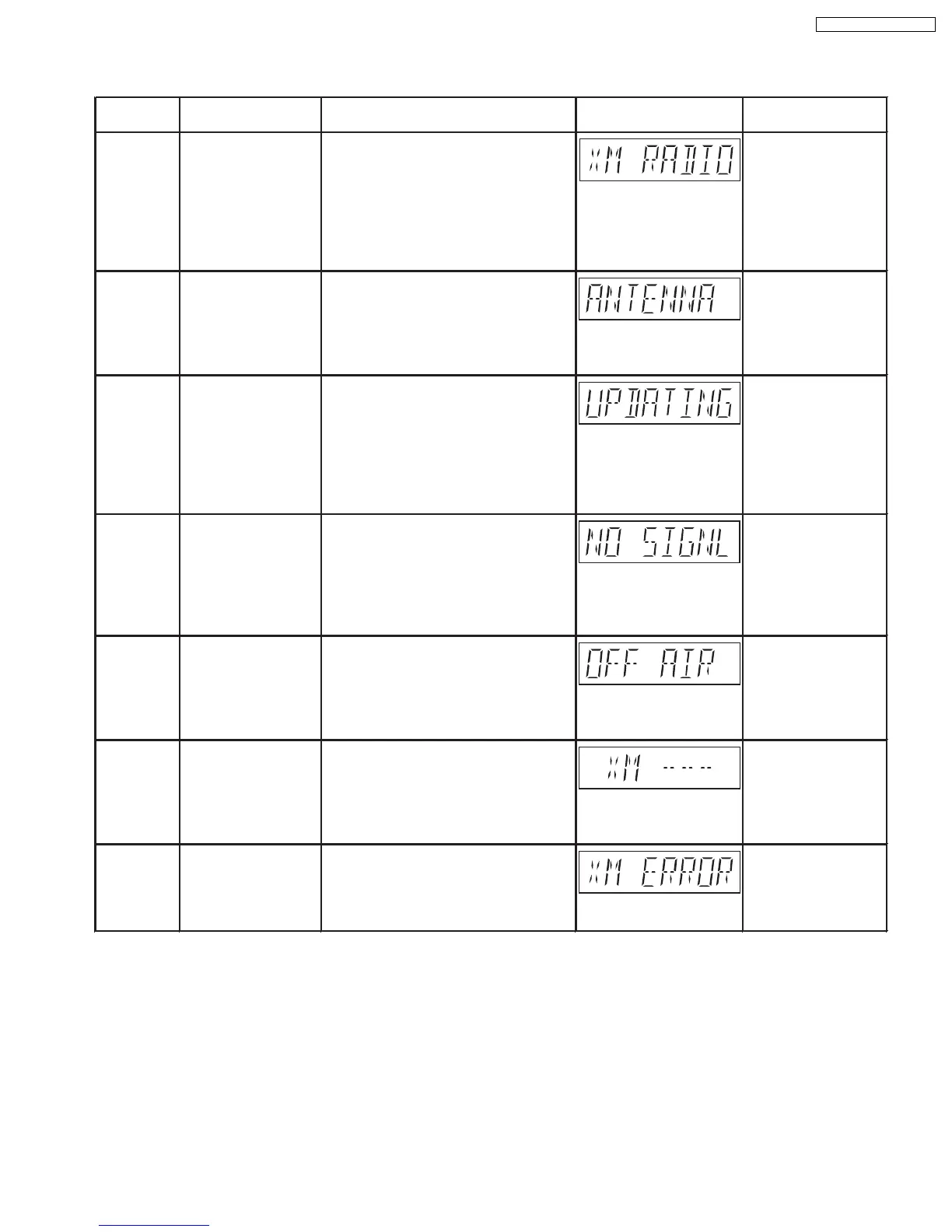
9.5.5. XM Satellite Radio Code Table
Error Code
XM XM Radio Selection It takes a short time for the XM radio to
RADIO power up after selecting the sourceon
the main unit. During this time, the
FL display shows the message.Wait (Flashing)
for a few seconds for the process to
completeIf not, check on the XM
antenna if it is connected or damaged.
ANTENNA
XM connectivity The XM antenna is not properly For more information,
connected or the antenna cable is
refer to operating
damaged. instruction manual
(Flashing) for connection of
antenna.
UPDATING
XM Encryption Code 1) The XM antenna is being updated
with the latest encryption code.
(Wait for few seconds for the updating
to be completed.) (Flashing)
2) The selected XM channel has been
blocked, or isno longer available with
the subscription package.
NO SIGNL
XM Signal receptivity The XM Signal is too weak. For more information,
Re-oriented the XM antenna for better refer to operating
reception. instruction manual
(Flashing) for optimizing the
signal reception.
OFF AIR
XM Channel The selected XM channel is not For more information,
Broadcasting currently broadcasting information.
refer to operating
instruction manual
(Flashing) for selection of the
channels.
XM ---
XM Channel The selected XM channel is not For more information,
Broadcasting available. Selection of a different
refer to operating
channel. instruction manual
(Flashing) for selection of the
channels.
XM ERROR XM Module The XM radio module is performing
Abnormality abnormally. Turn the main unit off and
power on. The XM antenna may be
defective. (Flashing)
Diagnosis Contents Description of Contents Automatic FL Display Remarks
·
Special Note: XM Satellite Radio ID is necessary for the activation of the XM Satellite Radio.
49
SA-PT750P / SA-PT750PC













 To Next Page