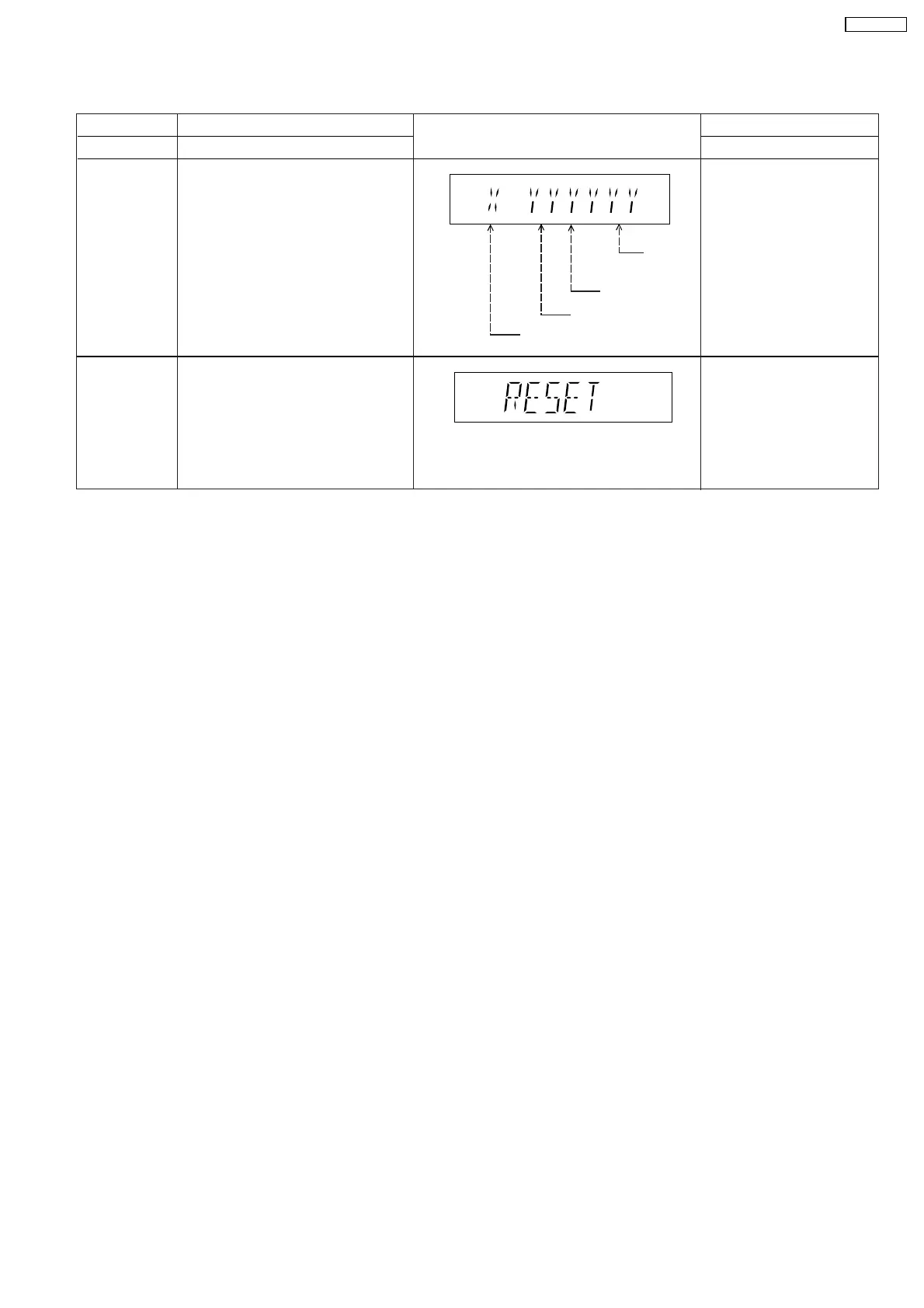
8.2.4. Service Mode Table 4
FL Display
Key Operation
Front Key
Item
Description
Mode Name
DVD Module
P.C.B. Reset
To reset DVD Module P.C.B.
This process is used when the DVD
Module P.C.B. or FLASH ROM
IC is replaced with a new one.
Cancelled automatically
5 seconds later.
While in initialization
mode, press & hold
[STOP] button on the main
unit, follow by [ENTER]
button on the remote
control unit.
DVD Module
P.C.B. firmware
version display
Cancelled automatically
5 seconds later.
In STOP (no disc)
mode, press [STOP]
button on the main unit,
and [8] button on the
remote control unit.
System controller
generation
Destination
System
controller
version
Region No.: 0-8
DVD Module P.C.B. firmware version
is displayed on the FL Display.
The firmware version can be updated
using recovery disc.
Note: It is necessary to check for
firmware version before carrying out
the version up using the disc.
27
SA-VK470EE



 To Next Page