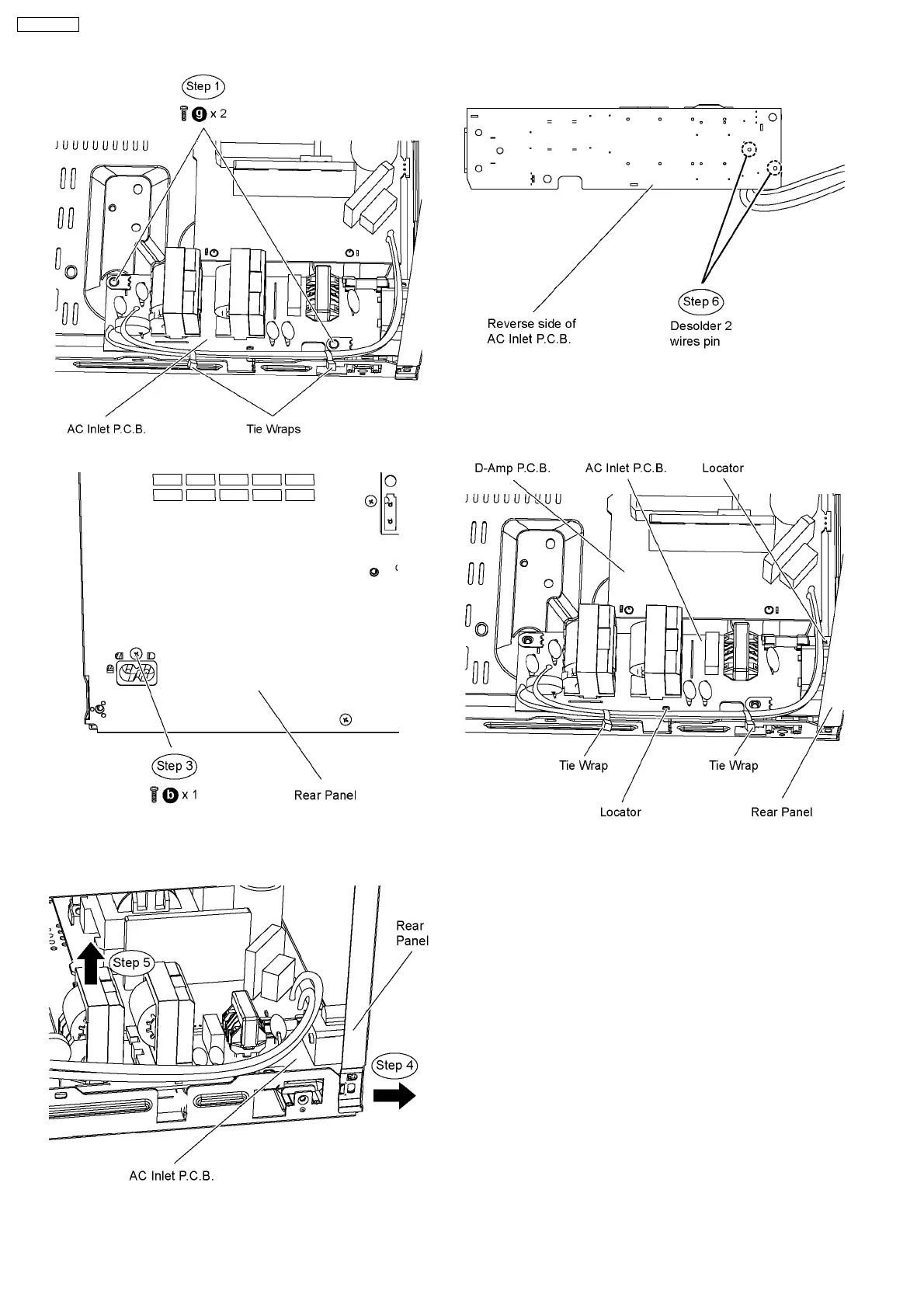
Step 3 Remove 1 screw at the rear panel.
Step 4 Detach the rear panel slightly backward as arrow
shown.
Step 5 Lift up the AC Inlet P.C.B..
Step 6 Flip over the AC Inlet P.C.B. and desolder 2 wires pins
(red and black).
Note 1: During reassembling procedures, ensure the P.C.B. is
seated properly at the locators.
Note 2: Remember to use tie wraps to tie red.black wires
between AC Inlet P.C.B. to the chassis.
9.29. Disassembly of DVD Module
P.C.B.
•
• •
• Follow the (Step 1) to (Step 5) of Item 9.4
•
• •
• Follow the (Step 1) to (Step 11) of Item 9.5
•
• •
• Disassembly of ground plate unit & DVD Module shield
plate unit
Step 1 Remove 3 screws at DVD Module shield plate unit.
Step 2 Remove the ground plate unit.
Step 3 Remove the shield plate unit.
66
SA-VK470EE



 To Next Page