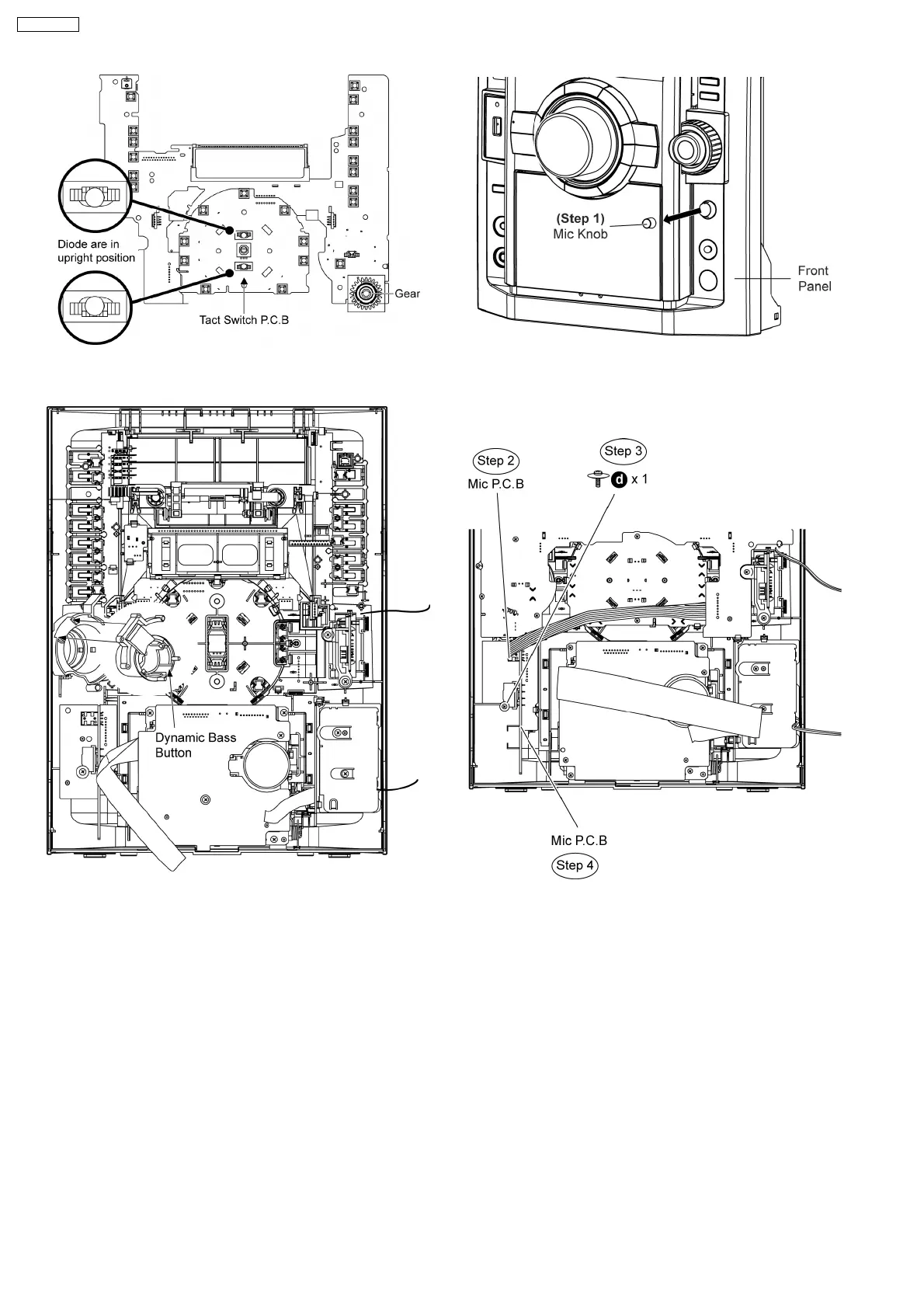
2. During reassembling procedures, ensure that Dynamic
Bass Button is seated properly.
9.9. Disassembly of Mic P.C.B.
•
• •
• Follow the (Step 1) to (Step 5) of Item 9.4
•
• •
• Follow the (Step 5) to (Step 7) of Item 9.5
•
• •
• Follow the (Step 1) to (Step 7) of Item 9.7
Step 1 Remove Mic knob as arrow shown.
Step 2 Detach 7P cable at the connector (CN6702) on Mic
P.C.B..
Step 3 Remove 1 screw on Mic P.C.B..
Step 4 Remove the Mic P.C.B..
9.10. Disassembly of USB P.C.B.
•
• •
• Follow the (Step 1) to (Step 5) of Item 9.4
•
• •
• Follow the (Step 5) to (Step 8) of Item 9.5
•
• •
• Follow the (Step 1) to (Step 7) of Item 9.7
•
• •
• Disassembly of USB bracket.
Step 1 Remove 2 screws at USB bracket.
Step 2 Remove the USB bracket together with USB P.C.B..
50
SA-VK470EE












 To Next Page