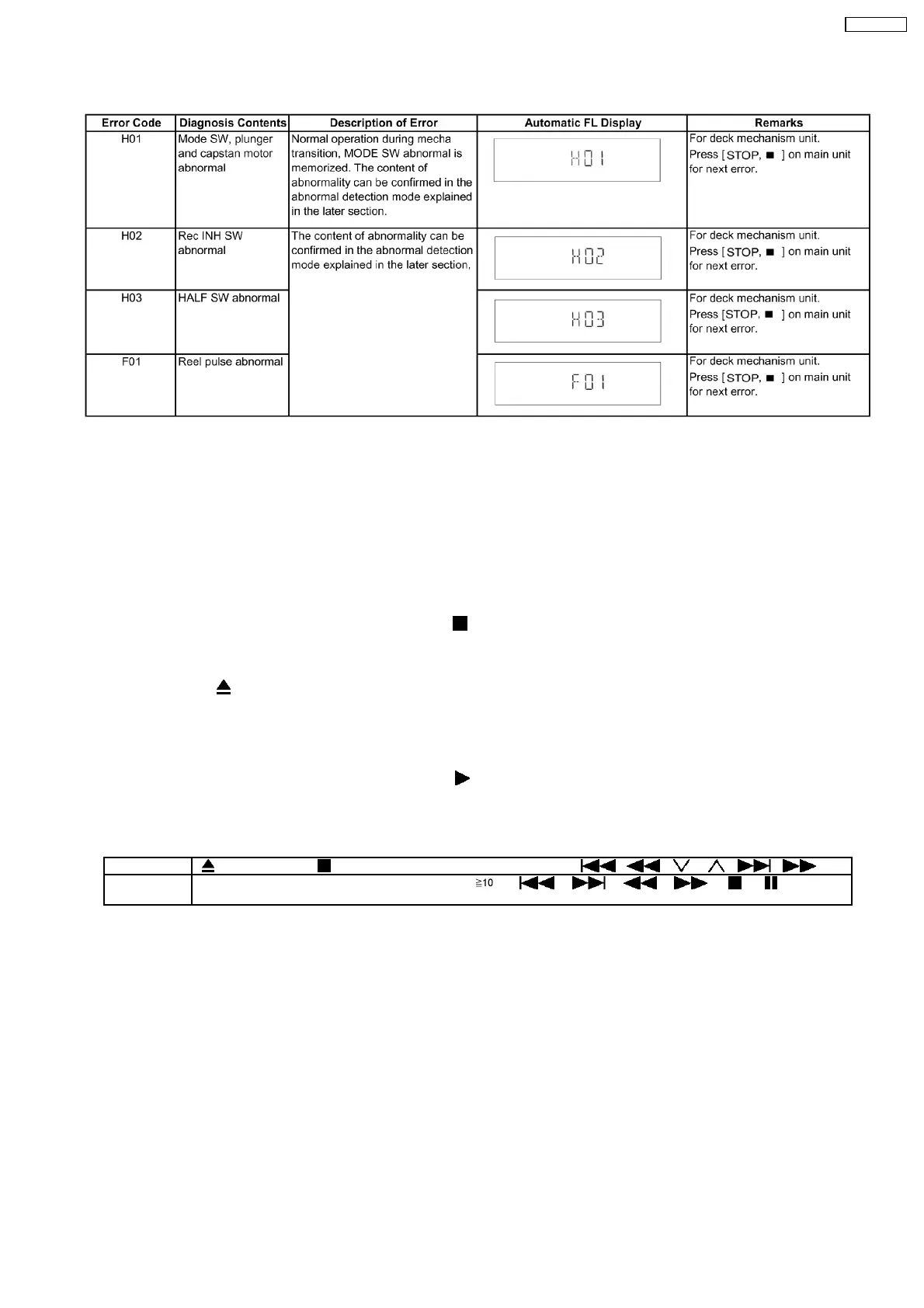
8.4.6. Deck Mechanism Error Code Table
8.5. Sales Demonstration Lock Function
This function prevents discs from being lost when the unit is used for sales demonstrations by disabling the disc eject function.
“LOCKED” is displayed on the unit, and ordinary operation is disabled.
8.5.1. Setting
•
• •
• Prohibiting removal of disc
1. Select the DVD/CD function.
2. At POWER ON condition, press and hold down the
button and the power button on the main unit for at least three
seconds. (The message, “LOCKED” appears when the function is activated.)
Note:
OPEN/CLOSE
button is invalid and the main unit displays “LOCKED” while the lock function mode is entered.
•
• •
• Prohibiting operation of selector and disc
1. Select the DVD/CD function.
2. At POWER ON condition, press and hold down the
button and the power button on the main unit for at least three
seconds. (The message, “LOCKED” appears when the function is activated.)
Note:
The following buttons are invalid and the main unit displays “LOCKED” while the lock function mode is entered.
Main unit OPEN/CLOSE, /-TUNE MODE/—FM MODE, SELECTOR, / / , / /
Remote
controller unit
iPod/USB, FM/EXT-IN, NUMERIC KEYS 0~9, , , , , , , , RETURN,
FUNCTIONS, FL DISPLAY/SLEEP, MUTING
8.5.2. Cancellation
The lock can be cancelled by the same procedure as used in setting. (“UNLOCKED” is displayed on cancellation. Disconnecting
the power cable from power outlet does not cancel the lock.)
8.6. Service Precautions
8.6.1. Recovery after the DVD player is repaired
•
• •
• When the FLASH ROM IC or DVD Module P.C.B. is replaced, carry out the recovery processing to optimize the drive.
Playback the recovery disk to process the recovery automatically.
•
• •
• Recovery disc (Product number: RFKZD03R005) [SPG]
•
• •
• Performing recovery process
1. Load the recovery disc RFKZD03R005 on to the player and run it.
2. Recovery is performed automatically. When it is finished, a message appears on the screen.
3. Remove the recovery disc.
37
SA-VK470EE



 To Next Page