9.5. Disassembly of Mechanism
Unit (CR14)
•
• •
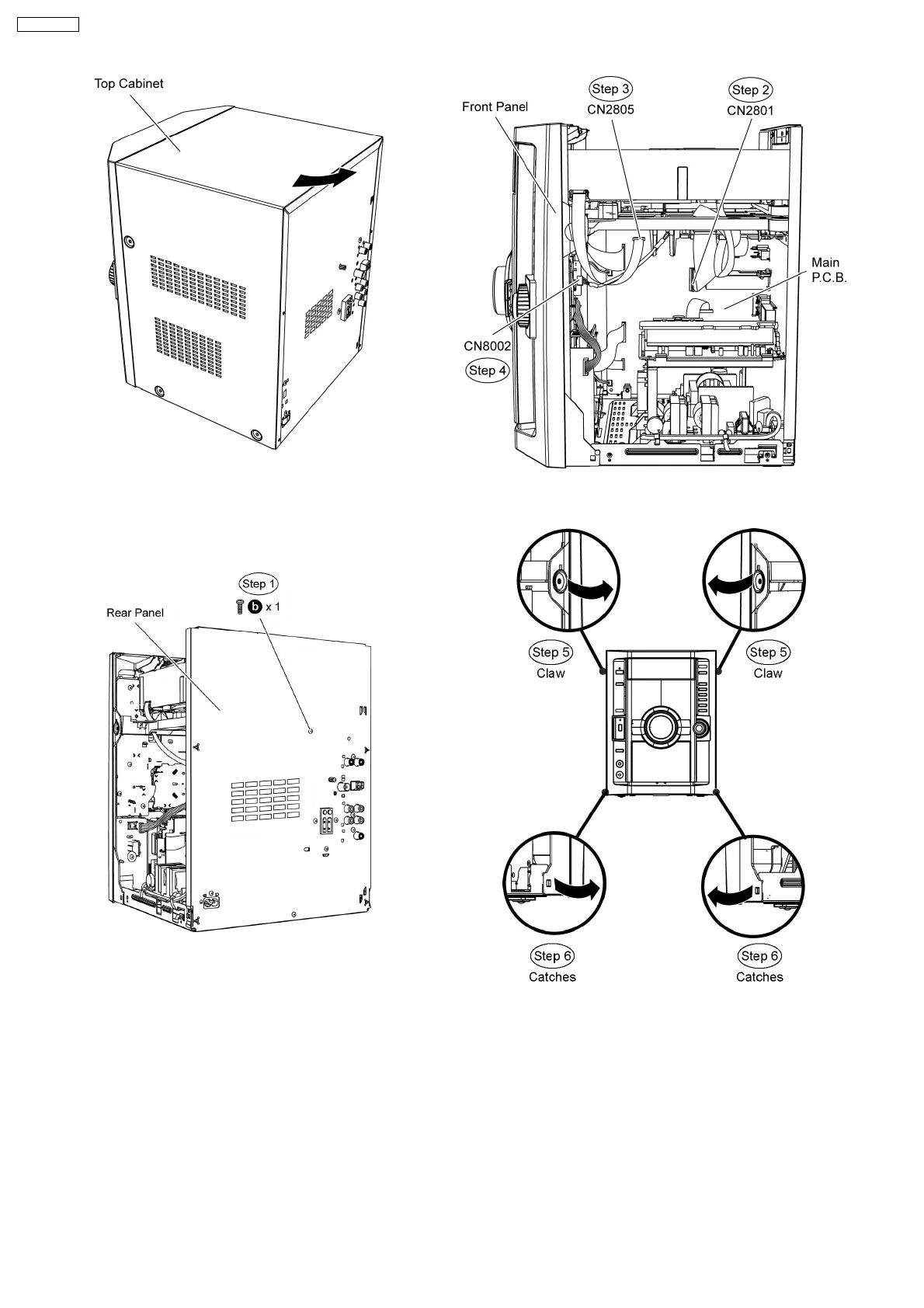
• Follow the (Step 1) to (Step 5) of Item 9.4
Step 1 Remove 1 screw at rear panel.
Step 2 Detach 50P FFC cable at the connector (CN2801) on
Main P.C.B..
Step 3 Detach 11P FFC cable at the connector (CN2805) on
Main P.C.B..
Step 4 Detach 5P cable at the connector (CN8002) on USB
P.C.B..
Step 5 Release the claws outwards on both sides.
Step 6 Release catches at both sides.
Special Note: During reassembling procedure, ensure both the
claws and catches are fully catched.
Assembly is secured upon hearing a click sound.
Step 7 Release the tabs at the bottom of the front panel.
44
SA-VK470EE












 To Next Page