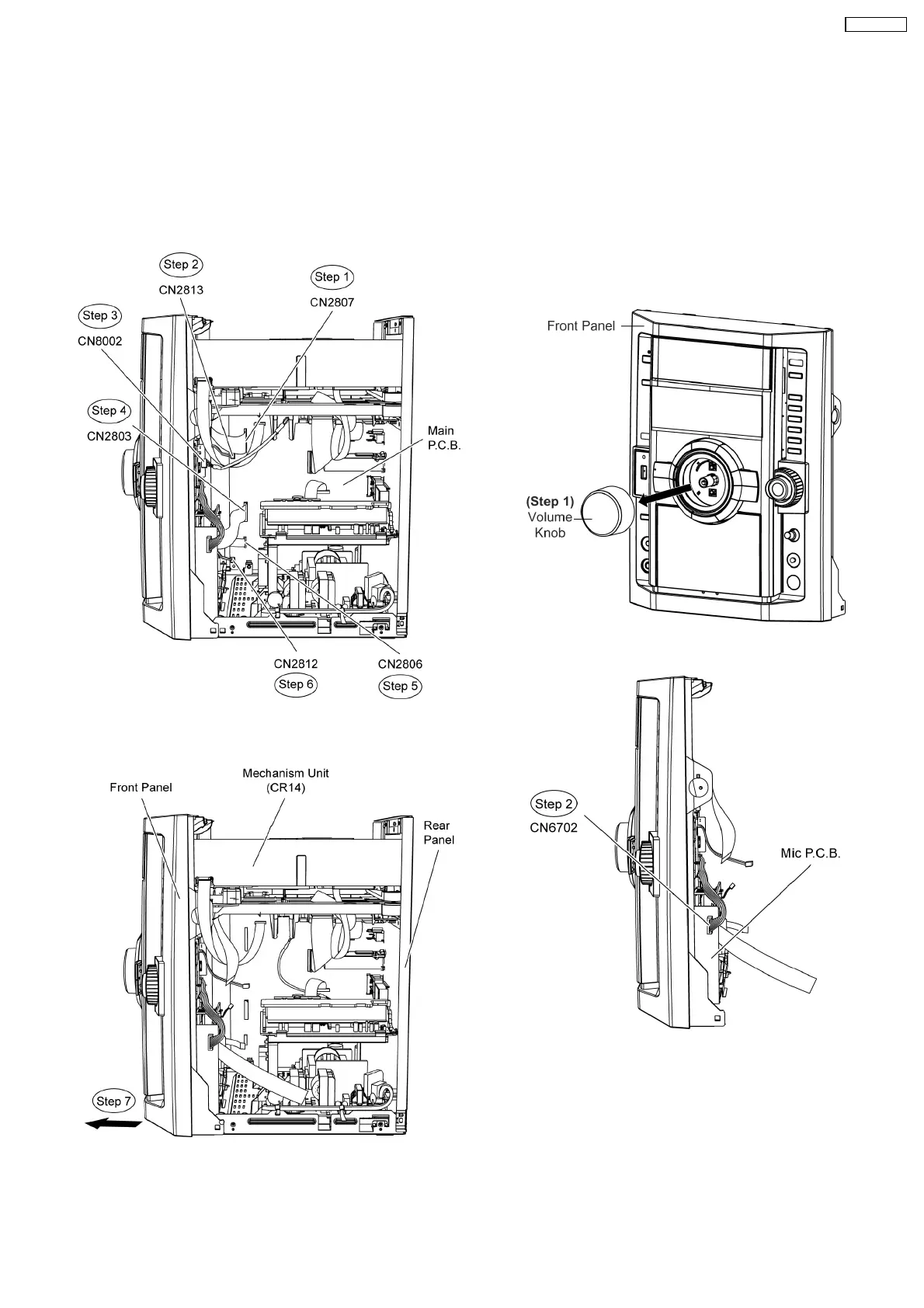
Step 3 Detach 5P cable at connector (CN8002) on USB
P.C.B..
Step 4 Detach 21P FFC cable at connector (CN2803) on Main
P.C.B..
Step 5 Detach 10P FFC cable at connector (CN2806) on Main
P.C.B..
Step 6 Detach 2P cable at connector (CN2812) on Main
P.C.B..
Step 7 Detach the front panel unit in direction of arrow.
9.8. Disassembly of Panel P.C.B.,
Tact Switch P.C.B. & Remote
Sensor P.C.B., Side Bar (L)
LED P.C.B. and Side Bar (R)
LED P.C.B.
•
• •
• Follow the (Step 1) to (Step 5) of Item 9.4
•
• •
• Follow the (Step 5) to (Step 7) of Item 9.5
•
• •
• Follow the (Step 1) to (Step 7) of Item 9.7
Step 1 Remove Volume knob as arrow shown.
Step 2 Detach 7P cable at the connector (CN6702) on Mic
P.C.B..
Step 3 Remove 9 screws at Panel P.C.B..
47
SA-VK470EE












 To Next Page