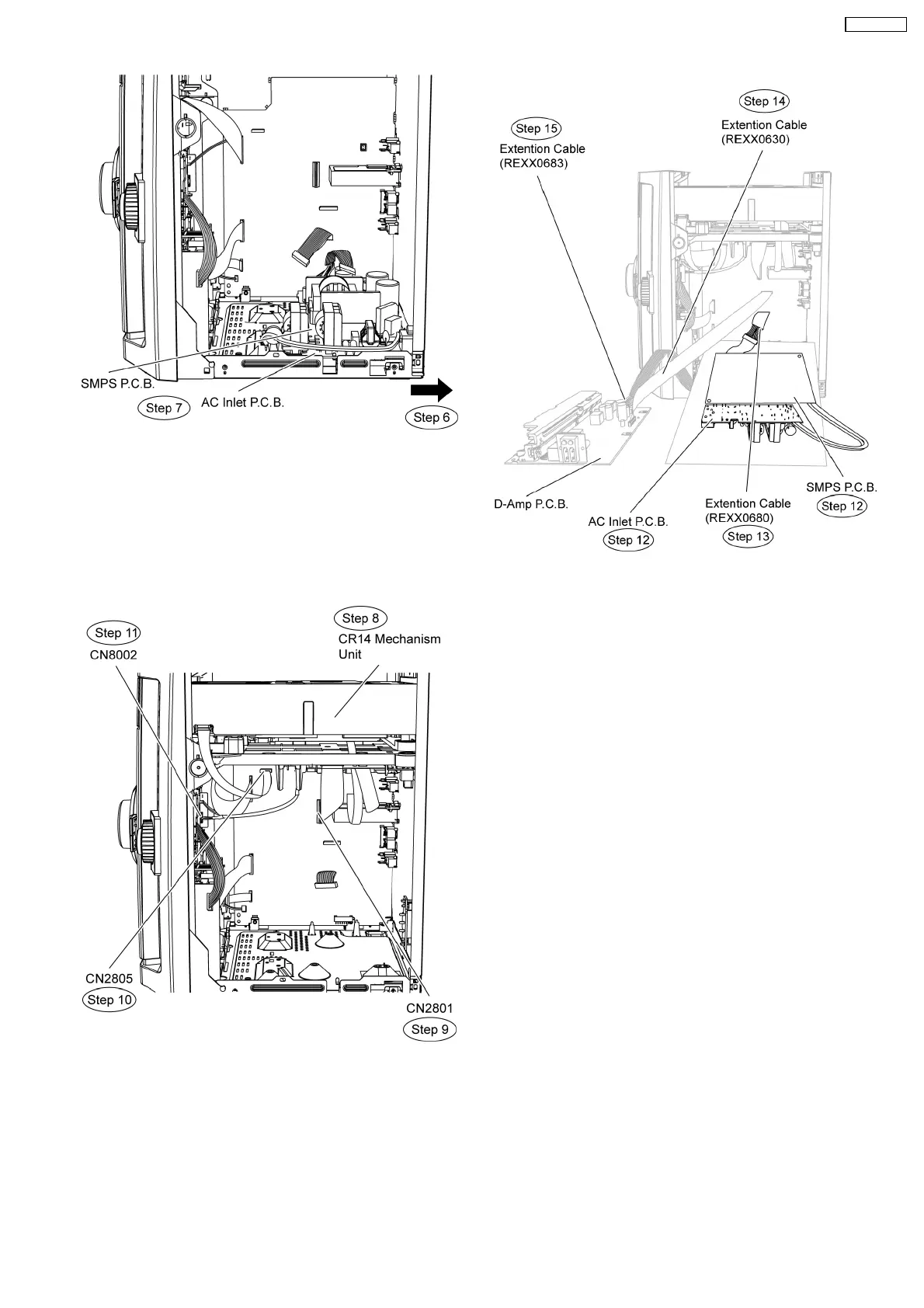
Step 8 Position Mechanism unit (CR14) according to the
diagram show.
Step 9 Connect 50P FFC cable at the connector (CN2801) on
Main P.C.B..
Step 10 Connect 11P FFC cable at the connector (CN2805) on
Main P.C.B..
Step 11 Connect 5P cable at the connector (CN8002) on USB
P.C.B..
Step 12 Position SMPS and AC Inlet P.C.B. according to the
diagram show.
Step 13 Attach original cable with extension cable (REXX0680)
(11P cable from CN2701 to CN5050).
Step 14 Connect extension cable (REEX0930) (17P cable from
CN2808 to CN5050).
Step 15 Attach original cable with extension cable (REXX0683)
(8P cable from H5801 to CN5500).
Step 16 Service and repair AC Inlet P.C.B. and SMPS P.C.B.
respectively.
75
SA-VK470EE












 To Next Page