Before Using Your Camera
1
35
This section explains operation methods for the [A Rec. Mode],
[Q Playback], [R Set-up] and [A Custom Setting] menus.
Below, how to set [HDR Capture] in the [A Rec. Mode 2] menu will be
explained as an example.
1
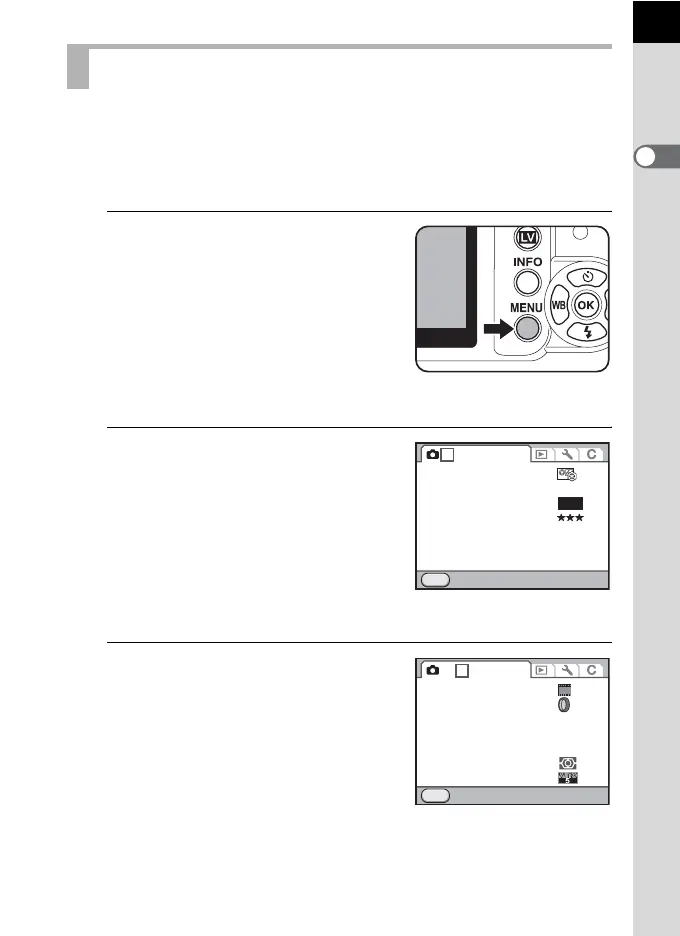
Press the 3 button in
Capture mode.
The [A Rec. Mode 1] menu appears on
the monitor.
If the 3 button is pressed in
Playback mode, the [Q Playback 1]
menu appears. When the mode dial is set
to H (Scene), the [H Scene] menu
appears instead.
2
Press the four-way controller
(5).
Each time the four-way controller (5) is
pressed, the menu will change in the
following sequence: [A Rec. Mode 2],
[A Rec. Mode 3], [A Rec. Mode 4],
[Q Playback 1] ··· [A Rec. Mode 1].
You can also use the e-dial to switch the
menus.
3
Use the four-way controller (23)
to choose an item.
Using the Menus
JPEG
MENU
1 234
12M
Exit
File Format
Custom Image
JPEG Recorded Pixels
JPEG Quality
D-Range Setting
Lens Correction
AF.A
MENU
1 2
3
4
OFF
OFF
Cross Processing
Digital Filter
HDR Capture
Multi-exposure
AF Mode
AE Metering
Select AF Point
Exit
Off



 To Next Page