83
Shooting Functions
4
Selecting the Appropriate Capture
Mode
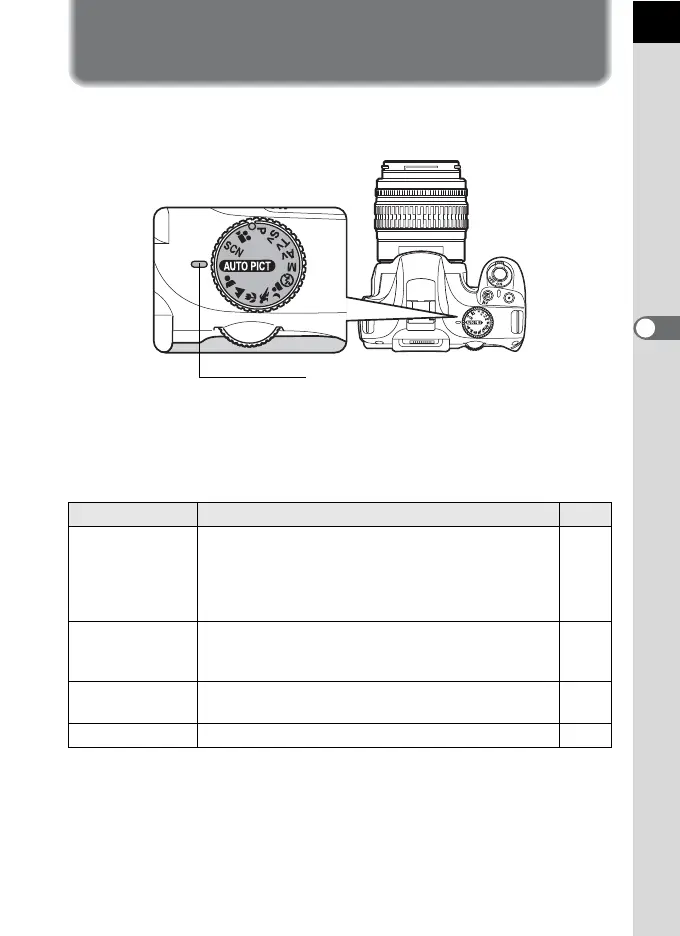
You can switch the capture modes by setting the icons on the mode dial
to the dial indicator.
The a features various shooting modes, enabling you to take pictures
with settings suited for your photographic vision.
In this manual, the capture modes are referred to as follows.
Capture Mode Mode Page
Picture mode
I (Auto Picture)/ = (Portrait)/ s (Landscape)/
q (Macro)/ \ (Moving Object)/ . (Night Scene
Portrait)/ a (Flash Off) (When shooting with Live
View, d (Blue Sky) and K (Sunset) can also be
selected.)
p.84
H (Scene)
mode
A (Night Scene)/ Q (Surf & Snow)/ K (Food)/
K (Sunset)/ n (Stage Lighting)/ R (Kids)/ Y (Pet)/
U (Candlelight)/ E (Museum)/ l (Night Snap)
p.85
Exposure mode
e (Program)/ K (Sensitivity Priority)/ b (Shutter
Priority)/ c (Aperture Priority)/ a (Manual)
p.87
Movie mode C (Movie) p.148
Dial indicator



 To Next Page