40
Getting Started
2
1
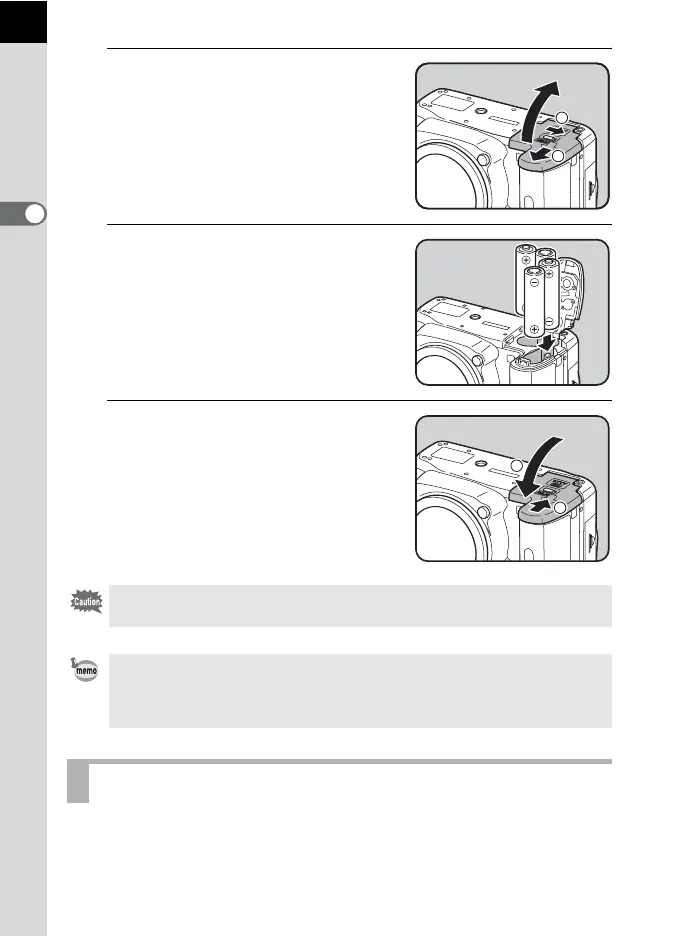
Push and hold the battery
cover unlock lever as shown in
the illustration (1), slide the
battery cover toward the lens
(2) and then flip open.
2
Insert the batteries according
to the +/– indicators in the
battery chamber.
3
Press down on the batteries
with the battery cover (3) and
slide it as shown in the
illustration (4) to close.
You can confirm remaining battery level by checking the w displayed on
the status screen.
Be sure to fully close the battery cover. The camera will not turn on if the battery
cover is open.
• Use the AC adapter kit K-AC84 (optional) when using the camera for a
prolonged period. (p.42)
• Check the orientation of the batteries if the camera does not operate properly
after replacing the batteries.
Battery Level Indicator
2
1
4
3



 To Next Page