43
Getting Started
2
5
Close the battery cover.
Refer to Step 3 on p.40.
6
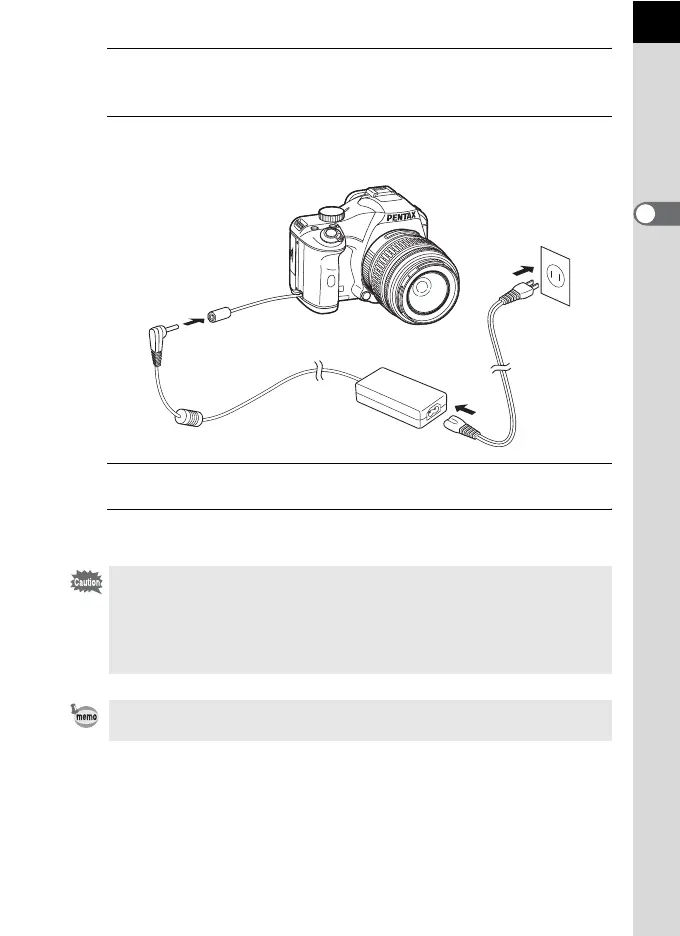
Connect the DC terminal on the AC adapter to the DC
coupler.
7
Connect the AC plug cord to the AC adapter.
8
Plug the AC cord into the power outlet.
• Make sure the camera is turned off before connecting or disconnecting the
AC adapter.
• Make sure connections are secure between the terminals. SD Memory Card
or data may be corrupted if disconnected while the camera is recording or
reading data.
• Keep the electric cable cover closed when not using the AC adapter.
Be sure to read the manual of the AC adapter kit K-AC84 when using the AC
adapter.
6
7
8



 To Next Page