OPC / OPD / OPE
Vision Configurator Software
2015-07
25
7 Vision Configurator Software
The sensor is commissioned and operated using the Vision Configurator
software.
The Vision Configurator software makes it easy to operate the sensor with its user-
friendly interface. Standard functions include making connections to the sensor,
specifying the operating parameters, saving data sets, and displaying data and
error diagnostics.
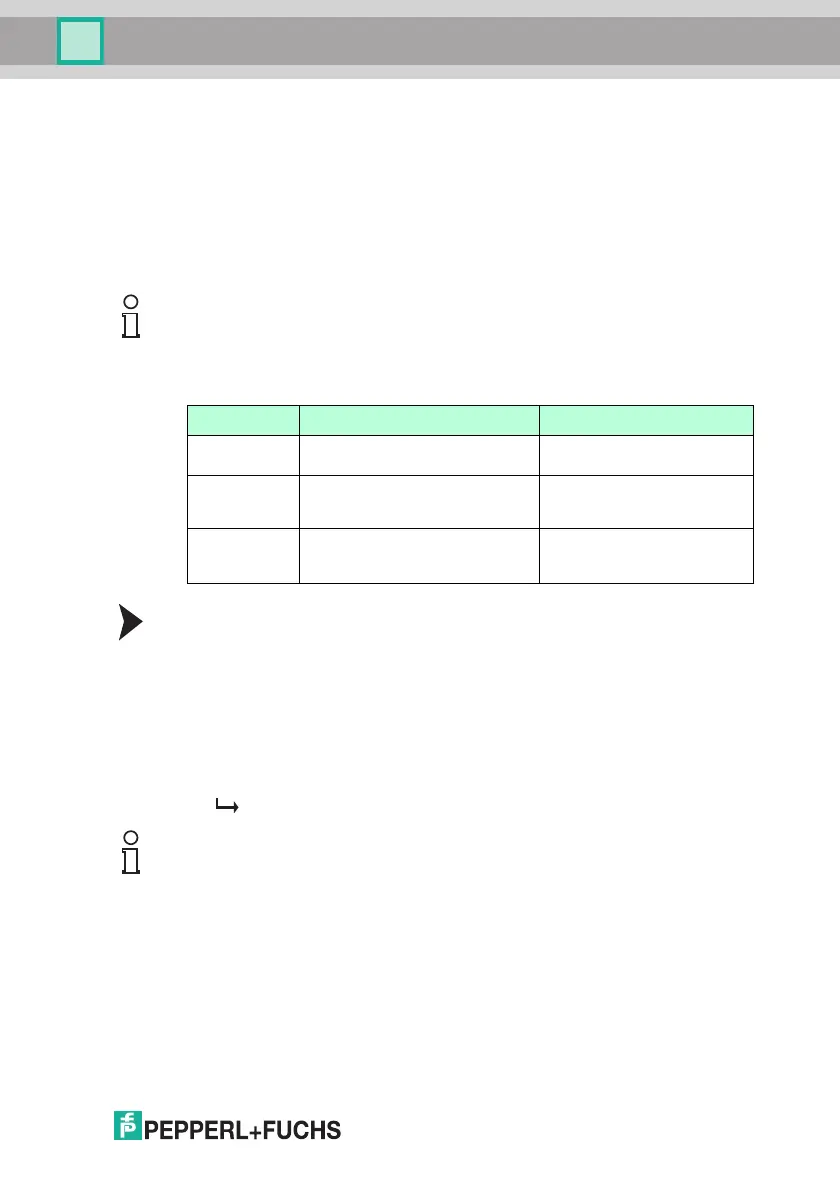
User Rights and Password
Establishing a Network Connection
To establish a network connection with the sensor, proceed as follows:
1. Supply the sensor with power.
2. Start the Vision Configurator software.
3. Select the connected sensor.
4. Check that the correct IP address has been entered.
5. Enter your user name and password.
A connection to the sensor is established.
An up-to-date description of the Vision Configurator software can be found at
http://www.pepperl-fuchs.com.
Note!
The following user roles are predefined with different authorizations in the Vision
Configurator.
User rights Description Password
Default View all information
Create users at same or lower level
A password is not required
User View all information
Sensor configuration
Create users at same or lower level
User
Admin
PFAdmin
View all information
Sensor configuration
Create and delete users
Request the admin password
from Pepperl+Fuchs
Note!
Documenting the Network Configuration
The sensor communicates with the connected machine control system using the
TCP/IP protocol. To ensure proper communication, you must record all the
changes made to the network configuration.



 To Next Page