2015-07
26
OPC / OPD / OPE
Vision Configurator Software
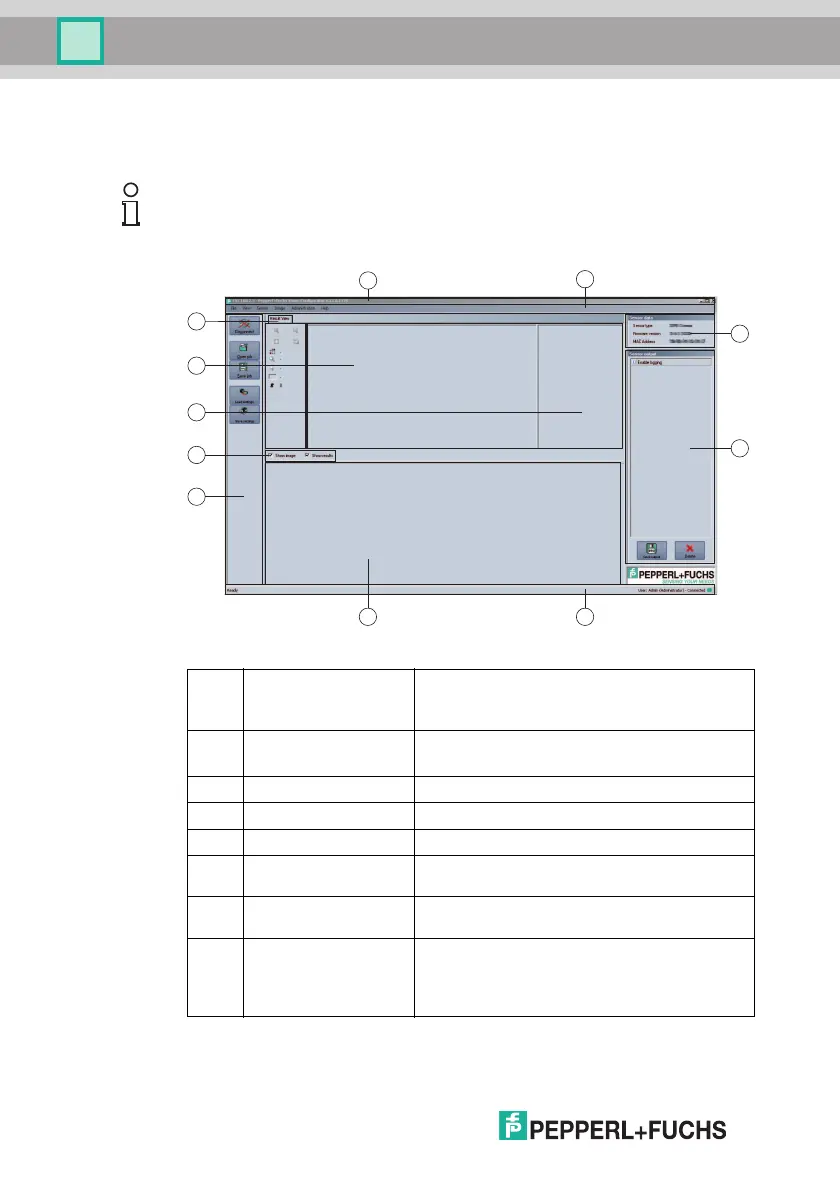
7.1 Application Window Structure
The application screen opens after you log in.
The software is designed to be similar to most Windows applications.
Note!
The individual functions depend on the type of sensor connected and the current
authorization level, so they are not always all visible.
1 Title bar ■ Shows the IP address, the software name, and the
ve rsion number
■ Contains the Minimize/Maximize/Close buttons
2 Menu bar ■ Displays all the menus in the program
■ Provides an overview and helps with navigation
3 Sensor data screen ■ Displays data for the connected sensor
4 Sensor output screen ■ Shows the log display
5 Status bar ■ Displays status information about the application
6 Configuration window ■ Contains the sensor-specific parameters that you
can set
7 Toolbar ■ Contains icon buttons as an extension to the
menu
8 Check boxes ■ Show images: Enables or disables the image
display
■ Show results: Enables or disables the results
area



 To Next Page