PEC Plus user manual Connecting equipment to your PEC Plus
31040003 21
Connecting an alarm system
You can connect an alarm system to your PEC Plus’ alarm terminal. An alarm system can be a siren,
alarm panel, or auto-dialer. Read your system’s installation guide for installation instructions and
information about the type of system: normally open or normally closed. Below are the descriptions for
the alarm terminal.
COMM: common connection
N/O: normally open; closes during alarm conditions
N/C: normally closed; opens during alarm conditions
For the alarm system to sound (or dial out) during an alarm condition, you must enable the alarms.
For more information, read Programming alarm settings on page 58.
The ratings of the siren or alarm system must not exceed the ratings of your PEC
Plus’ alarm relay.
Alarm relay ratings: 0.4 A at 125 VAC; 2 A at 30 VDC, resistive load
0.2 A at 125 VAC; 1 A at 30 VDC, inductive load
To connect an alarm system
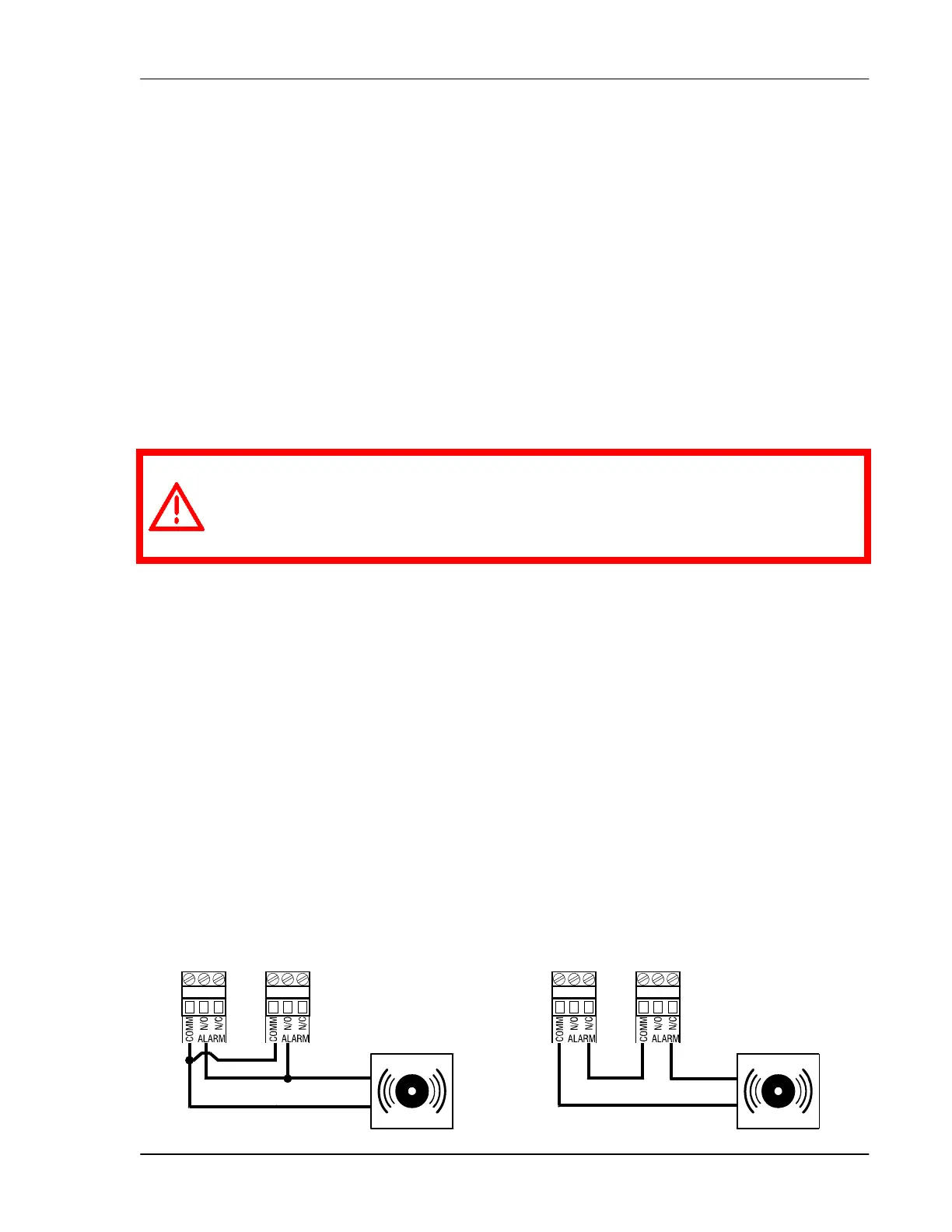
If you are connecting the alarm system to a network of PEC Plus control and your system uses a
normally open connection (closes on alarm), connect the system as shown in the normally open
diagram.
Join all the COMM connections together and all the N/O connections together. Your PEC Plus
alarm relays must be in parallel with each other so any PEC Plus can trigger the alarm system
when an alarm condition occurs.
If you are connecting the alarm system to a network of PEC Plus controls and your system uses
a normally closed connection (opens on alarm), connect the system as shown in the normally
closed diagram.
Join the alarm relays in a continuous loop. Your PEC Plus alarm relays must be in series with
each other so any PEC Plus can trigger the alarm system when an alarm condition occurs.
Normally open system (closed on alarm) Normally closed system (open on alarm)



 To Next Page