PEC Plus user manual Appendix F: Settings worksheets
31040003 91
Actuator settings worksheet
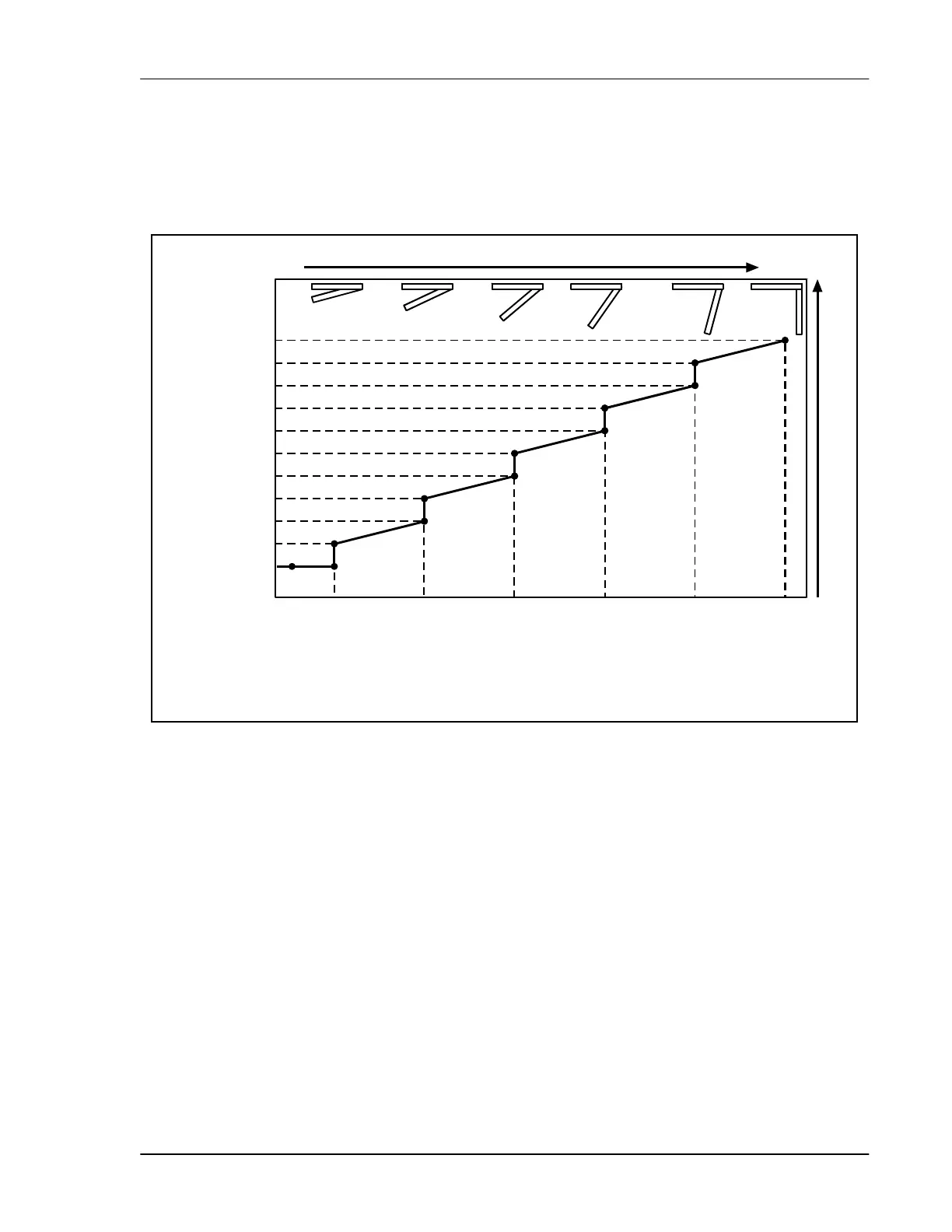
Each actuator has six stages. The settings for the stages include the set point temperature, position,
and differential temperature.
When the temperature is below the minimum set point, the actuator is closed.
When the temperature rises to the minimum set point, the actuator moves to the minimum
position.
As the temperature rises, the actuator moves through the stages until it reaches its maximum
open position. This method lets you gradually open inlets instead of fully opening them when
the temperature rises above a single set point.
In other words, “when the temperature is here (stage set point), I want the actuator to start opening.
When the temperature reaches here (stage differential), I want the actuator to be at this position
(stage position) percent.”
For more information, read Programming actuators on page 49.
0% 100%
Temperature
ctuator position
Stage 0 set point
(min. set point)
Stage 1 set point
Stage 1 differential
Stage 2 set point
Stage 2 differential
Stage 3 set point
Stage 3 differential
Stage 4 set point
Stage 4 differential
Stage 4
position
Stage 2
position
Stage 1
position
Stage 0 position
(minimum
position)
Stage 3
position
Stage 5 set point
Stage 5 differential
Stage 5
position



 To Next Page