Service Modes, Error Codes, and Fault Finding
EN 30 Q528.1E LA5.
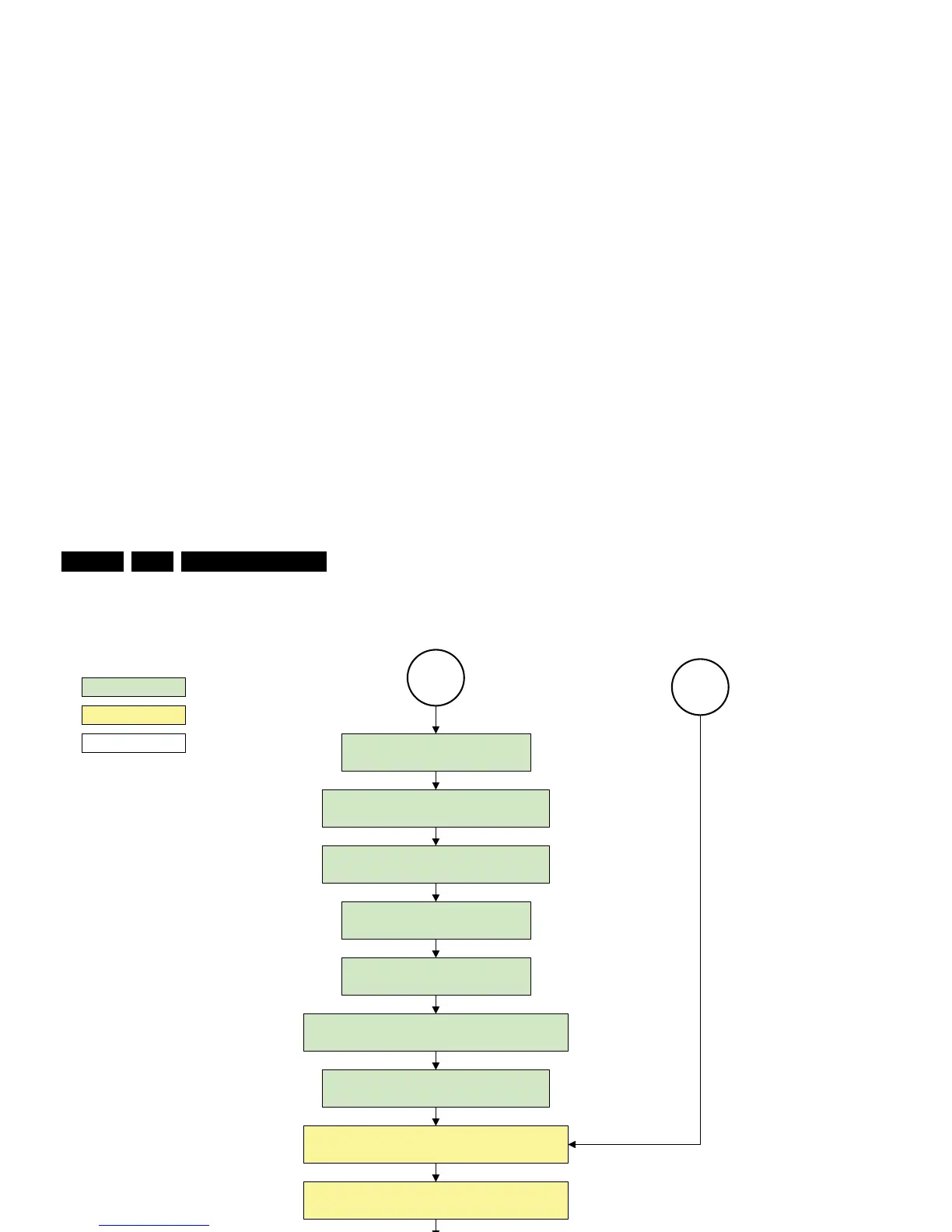
Figure 5-12 “Protection” flowchart
H_16770_115.eps
290307
Protection
action holder: MIPS
autonomous action
action holder: St-by
Redefine wake up reasons for protection
state and transfer to stand-by µP.
Log the appropriate error and
set stand-by flag in NVM
MP
Ask stand-by µP to enter protection state
Flash the Protection-LED in order to indicate
protection state*.
(*): This can be the standby LED or the ON LED
depending on the availability in the set under
discussion .
SP
Switch off LCD lamp supply
Wait 250ms (min. = 200ms)
Switch off LVDS signal
Switch off 12V LCD supply within a time frame of
min. 0.5ms to max. 50ms after LVDS switch off.
Disable all supply related protections and switch off
the +1V8 and the +3V3 DC/DC converter.
Switch OFF all supplies by switching HIGH the POD -
MODE and the ON-MODE I/O lines.
Switch AVC in reset state
switch off the +1V2 DC/DC converter
Wait 5ms
Wait 10ms
Switch the NVM reset line HIGH.












 To Next Page