Mechanical Instructions
EN 10 Q528.1E LA4.
Important: For (older) FTV sets without these "mushrooms", it
is obligatory to use the provided screws, otherwise it is possible
to damage the monitor inside!
4.3 Assy/Panel Removal
4.3.1 Rear Cover
Warning: Disconnect the mains power cord before you remove
the rear cover.
Note: it is not necessary to remove the stand while removing
the rear cover.
Refer to next figures for details.
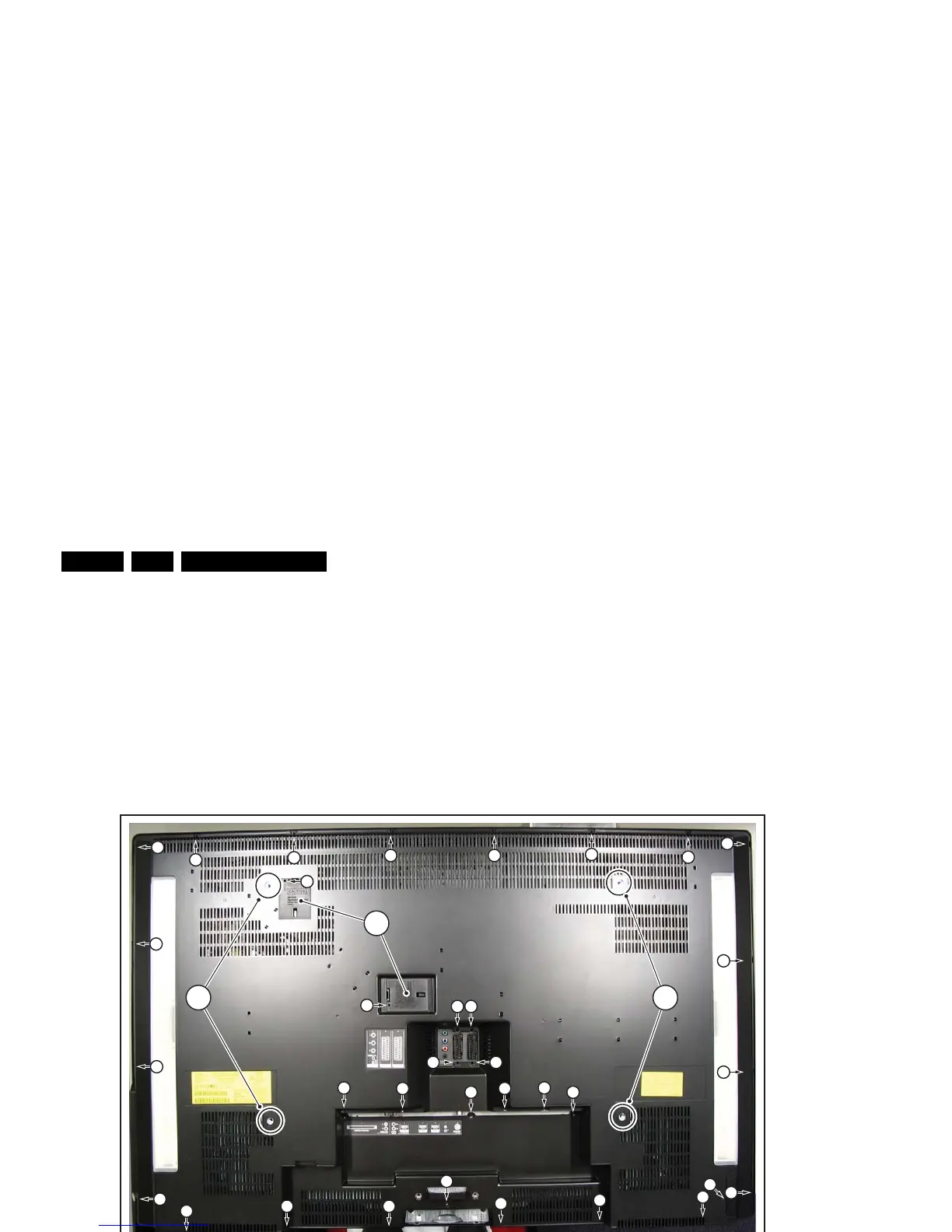
Figure 4-5 Rear Cover Removal
1. Place the TV set upside down on a table top, using the
foam bars (see part “Foam Bars”).
Caution: do not put pressure on the display, but let the
monitor lean on the Front cover!
2. Remove the mushrooms [1].
3. Remove the screws [2].
4. Open the covers [3] on the back cover.
5. Unplug connectors [4].
6. Lift the rear cover from the TV. Make sure that wires and
flat coils are not damaged while lifting the rear cover from
the set.
Figure 4-6 Cover Removal -1-
H_16800_108.eps
110507
2
2
2
2
2
2
2
2
2 2
2
2
2
2
2
2
2 2
2
2
2
2
2
2
2
2
2
2
2
2 2
2
2
2
1 1
3
H_16800_109.eps
090507
4












 To Next Page