Operation
6-3
Changing control
settings
Table 6-3 on page 6-23 is an alphabetical list of the control settings with their
ranges. Table 11-2 on page 11-2 shows the control settings applicable to the
different modes. For more information on control settings as they apply in the
different ventilation modes, see “Ventilation modes” on page 4-7.
Making batch setting changes
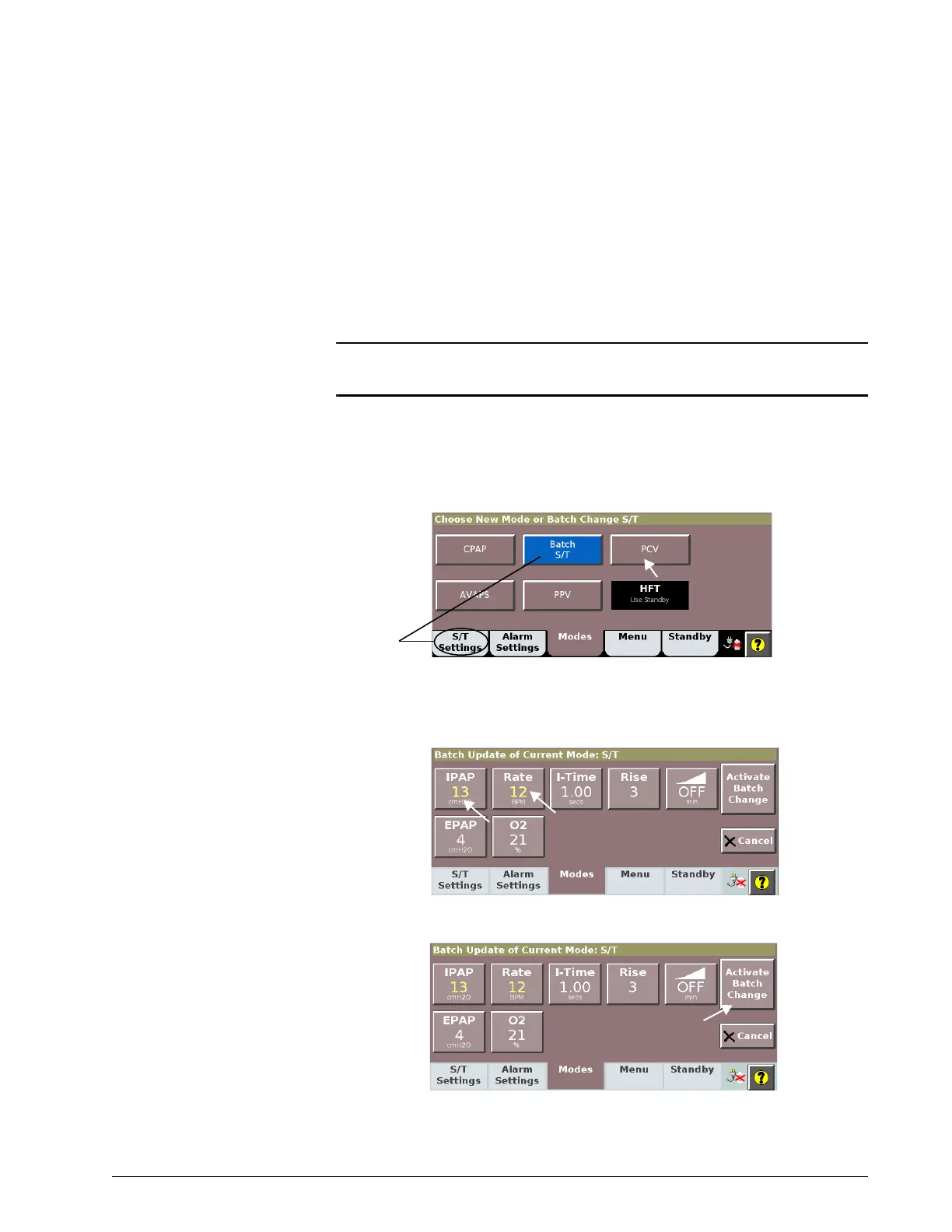
The ventilator allows you to make multiple changes (a “batch” of changes)
at once.
NOTE: During a batch setting change, you cannot change the Ramp Time
setting when a ramp is active.
This process applies to ventilation settings only, not to alarm settings.
1. Open the Modes window.
2. Select the active mode.
3. Adjust settings as desired (see “Changing individual ventilator
settings” on page 6-4). Newly adjusted setting values are shown in
yellow.
4. Select Activate Batch Change to apply.











 To Next Page