PianoDisc Installation Guide 83
. . . . .
Wireless Connections
169.505 Mhz Transmission
170.245 Mhz Transmission
PD Control Box
(back panel)
R
Audio Out
L
Input
(Audio Technica
Transmitter 1)
Input
(Audio Technica
Transmitter 2)
Output
(Audio Technica
Receiver 1)
Output
(Audio Technica
Receiver 2)
WIRELESS AUDIO CONNECTIONS
WIRELESS AUDIO CONNECTIONS
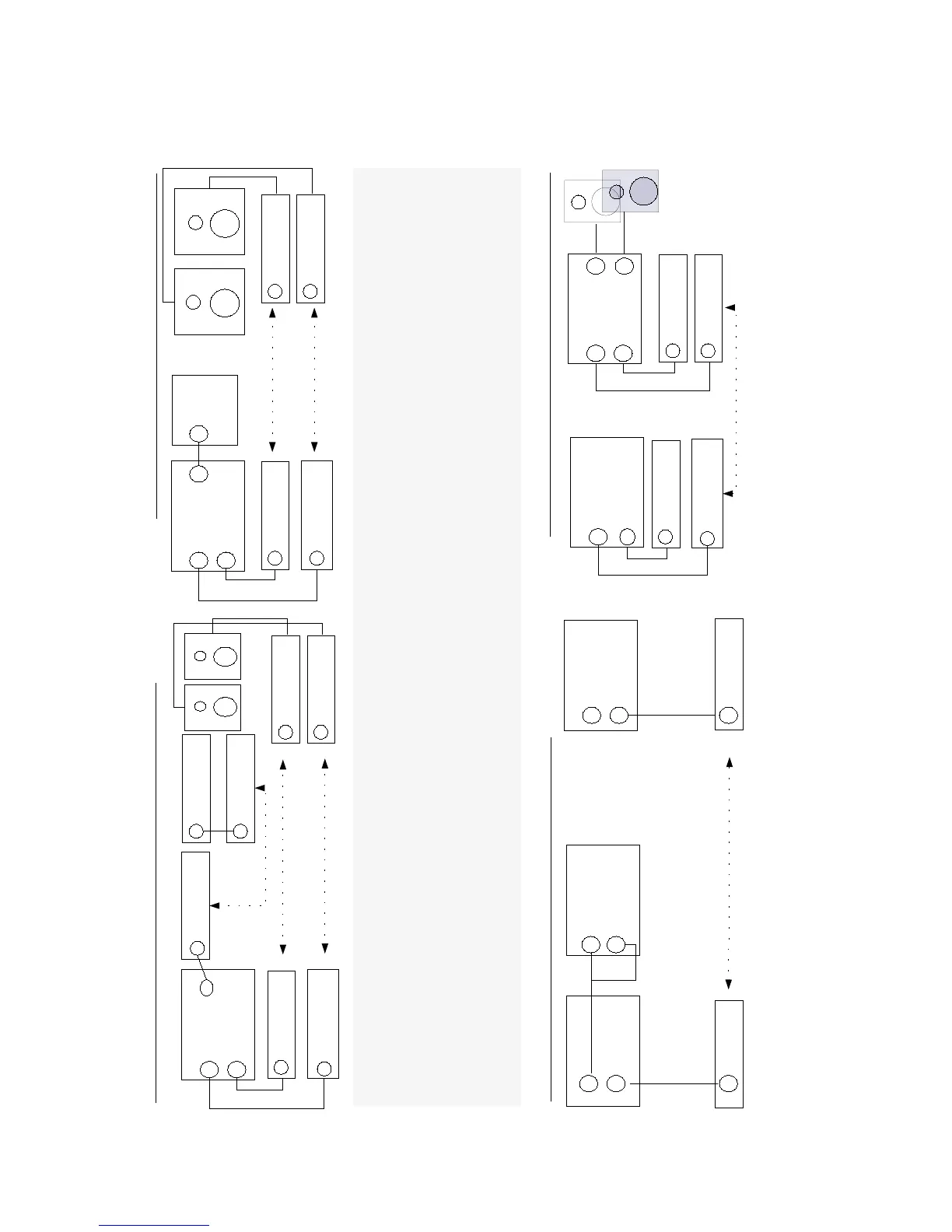
Wireless technology offers many advantages. With it, there is the freedom of placing speakers in a remote location, allowing full attention to be focused on a piano performance ---- enhancing visual appeal, heightening impact and conveying a desirable image
or polish. PianoDisc systems are designed to make audio connections using wired and wireless technology. PianoDisc offers the Audio Technica Wireless system as an audio connection accessory.
To make a wireless audio connection:
Purchase the Audio Technica Wireless system.
Connect the appropriate audio device to the Audio Technica Transmitter.
Connect the appropriate audio device to the Audio Technica Receiver.
NOTE: During calibration of an iQ system, connect the control box to the CPU using a bi-directional SDL cable. After calibration is complete, disconnect the bi-directional SDL cable and move the control box to a remote location on the piano. Using the SDL-to-
MIDI cable, that comes with the iQ wireless option, connect the MIDI-Out port on the iQ control box to the MIDI-In port on the wireless transmitter.
See www.audio-technica.com for more information about Audio Technica products.
Diagram 1: Wirelessly Connecting a PianoDisc System to Remote Speakers and Control Box
169.505 Mhz Transmission
170.245 Mhz Transmission
Output
(Audio Technica
Receiver 1)
Output
(Audio Technica
Receiver 2)
SilentDrive MIDI IN
MIDI JET
Receiver
Audio Out
L
MIDI OUT
Input
(Audio Technica
Transmitter 1)
PD Control Box
(back panel)
R
MIDI JET
Transmitter
Input
(Audio Technica
Transmitter 2)
Diagram 2: Wirelessly Connecting a PianoDisc System to Remote Speakers
Diagram 3: Wirelessly Connecting a PianoDisc System to a Home Audio System
Audio In
PD Control Box
(back panel)
R
L
Output
Audio Technica
Receiver
W
i
r
e
l
e
s
s
T
r
a
n
s
m
i
s
s
i
o
n
CD/DVD Player
(back panel)
L
R
Audio Out
Input
Audio Technica
Transmitter
Diagram 4: Wirelessly Connecting a PianoDisc System to a Home Audio System
Output
(Audio Technica
Receiver 1)
Output
(Audio Technica
Receiver 2)
PD Control Box
(back panel)
Audio In Audio Out
R
L L
R
Input
(Audio Technica
Transmitter 1)
Input
(Audio Technica
Transmitter 2)
Audio Out
CD/DVD Player
(back panel)
L
R
Wireless Transmission
CD Input
Stereo Amplifier
(back panel)
R
L
Y Splitter
Wireless Transmission
MIC IN
PianoAmp
(Soundboard
Pickup)
WARNING: To reduce the risk of feedback, do NOT position the PianoAmp next to or nea r speakers.



 To Next Page