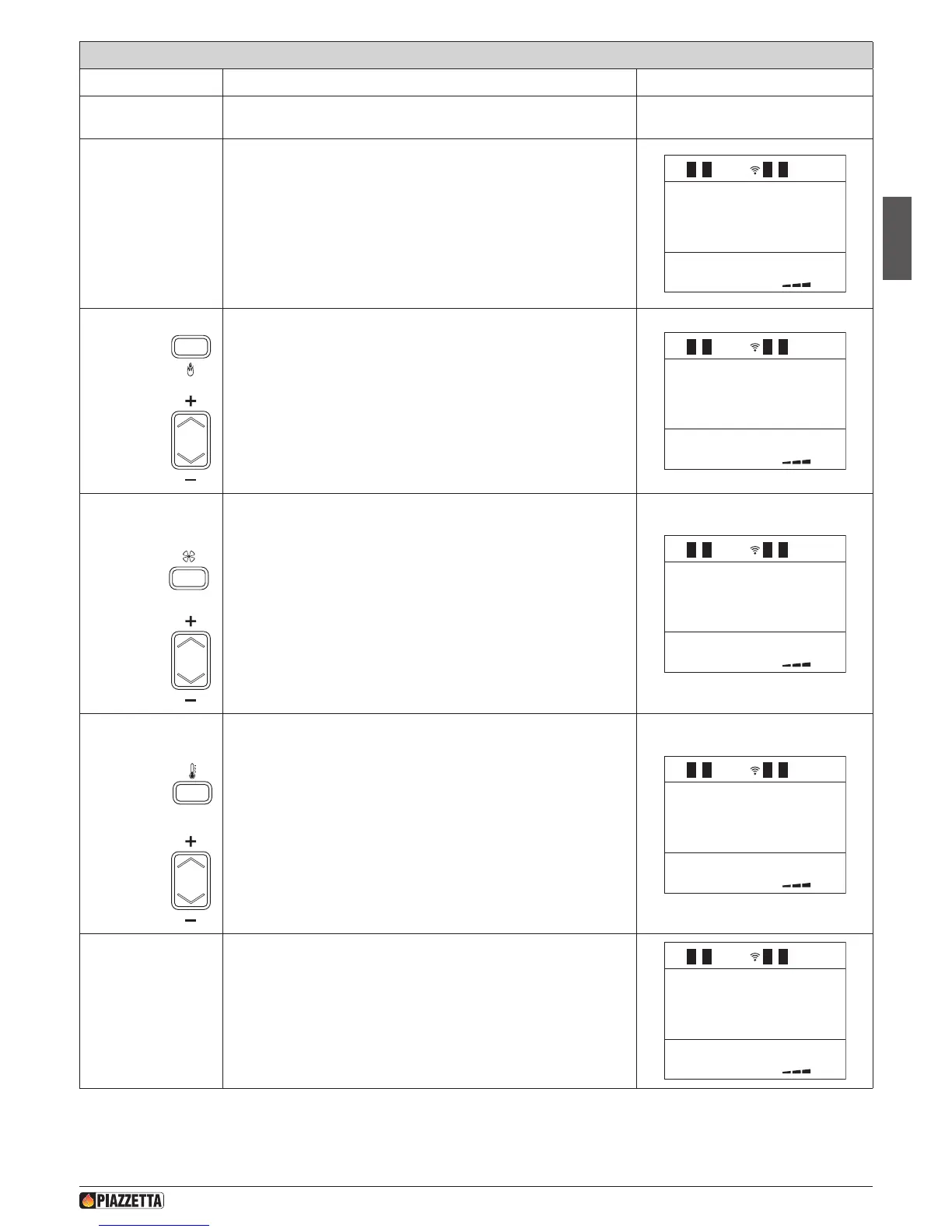
Action Description Display message
The stove goes into steady normal functioning if the start cycle was
successful.
The power, fan speed and room temperature can be adjusted during
normal functioning.
To the side is an example of INITIAL DISPLAY in normal operation.
12:0022
.
c
SET
POWER
SET
VENT-1
SETTEMP-
ROOM
CLEANING
BRAZIER
LIVELLO
P2
12:0022
.
c
1
SET
POTENZA
P3
1
SET
VENT-1
2
1
SETTEMP
AMBIENTE
26
1
.
c
PUL IZIA
BRAC IERE
12:0026
1
.
c
LIVELLO
P2
12:0022
.
c
1
SET
POTENZA
P3
1
SET
VENT-1
2
1
SETTEMP
AMBIENTE
26
1
.
c
PUL IZIA
BRAC IERE
12:0026
1
.
c
POWER
To adjust the power, press the POWER key and select the desired setting
by pressing the SELECT key. After the desired setting has been selected
the remote control returns to the INITIAL DISPLAY.
SET
VENT-1
SETTEMP-
ROOM
CLEANING
BRAZIER
LIVELLO
P2
12:0022
.
c
1
SET
POTENZA
P3
1
SET
VENT-1
2
1
SETTEMP
AMBIENTE
26
1
.
c
PUL IZIA
BRAC IERE
12:0026
1
.
c
LIVELLO
P2
12:0022
.
c
1
SET
POTENZA
P3
1
SET
VENT-1
2
1
SETTEMP
AMBIENTE
26
1
.
c
PUL IZIA
BRAC IERE
12:0026
1
.
c
FAN SPEED
To adjust the Multifuoco setting, press the FAN SPEED key and select the
desired Multifuoco setting using the SELECT key.
It is possible to adjust the two fans separately if SEPARATE FANS has been
set in the fan mode menu. After having pressed the FAN SPEED key once (the
display will show VENT-1) and selected the desired Multifuoco setting for
the left fan, press the FAN SPEED key again (the display will show VENT-2)
and select the desired Multifuoco setting for the right fan. After the desired
Multifuoco setting has been selected the remote control returns to INITIAL
DISPLAY. To maximise the potential of the Multifuoco function, read the
sections “MULTIFUOCO SYSTEM” and “MULTICOMFORT OPERATION”.
SETTEMP-
ROOM
CLEANING
BRAZIER
Press the
TEMPERATURE
key and
LIVELLO
P2
12:0022
.
c
1
SET
POTENZA
P3
1
SET
VENT-1
2
1
SETTEMP
AMBIENTE
26
1
.
c
PUL IZIA
BRAC IERE
12:0026
1
.
c
LIVELLO
P2
12:0022
.
c
1
SET
POTENZA
P3
1
SET
VENT-1
2
1
SETTEMP
AMBIENTE
26
1
.
c
PUL IZIA
BRAC IERE
12:0026
1
.
c
TEMPERATURE
To adjust the temperature setting, press the TEMPERATURE key and select
the desired temperature by using the SELECT key (range from 7°C to
30°C).
When the desired temperature has been reached the readout “OK”
appears and the stove operates at minimum power even if the display
shows the original set power level. The temperature can be read by the
remote control, by the stove or by an external thermostat To choose
whether the remote or the stove will read the temperature, see the section
“MULTICOMFORT”. If using an external thermostat the readout “00”,
appears on the initial display and the readings from the stove and the
remote control are excluded.
1
LEVEL
P2
SET
POWER
SET
VENT-1
During normal stove operation, automatic cleaning of the brazier is
engaged with variable activation times that are set by personnel from
Gruppo Piazzetta. This operation is necessary in order to eliminate ash
deposits or incrustations which do not allow the correct operation of the
stove and must be removed.
The message “CLEANING BRAZIER” will appear together with the
temperature of the smoke probe.
LEVEL
P2
SET
POWER
SET
VENT-1
SETTEMP-
ROOM
CLEANING
BRAZIER
NORMAL FUNCTIONING
H072047UK0 / DT2001513 – 04
29



 To Next Page