Connecting up
02
17
En
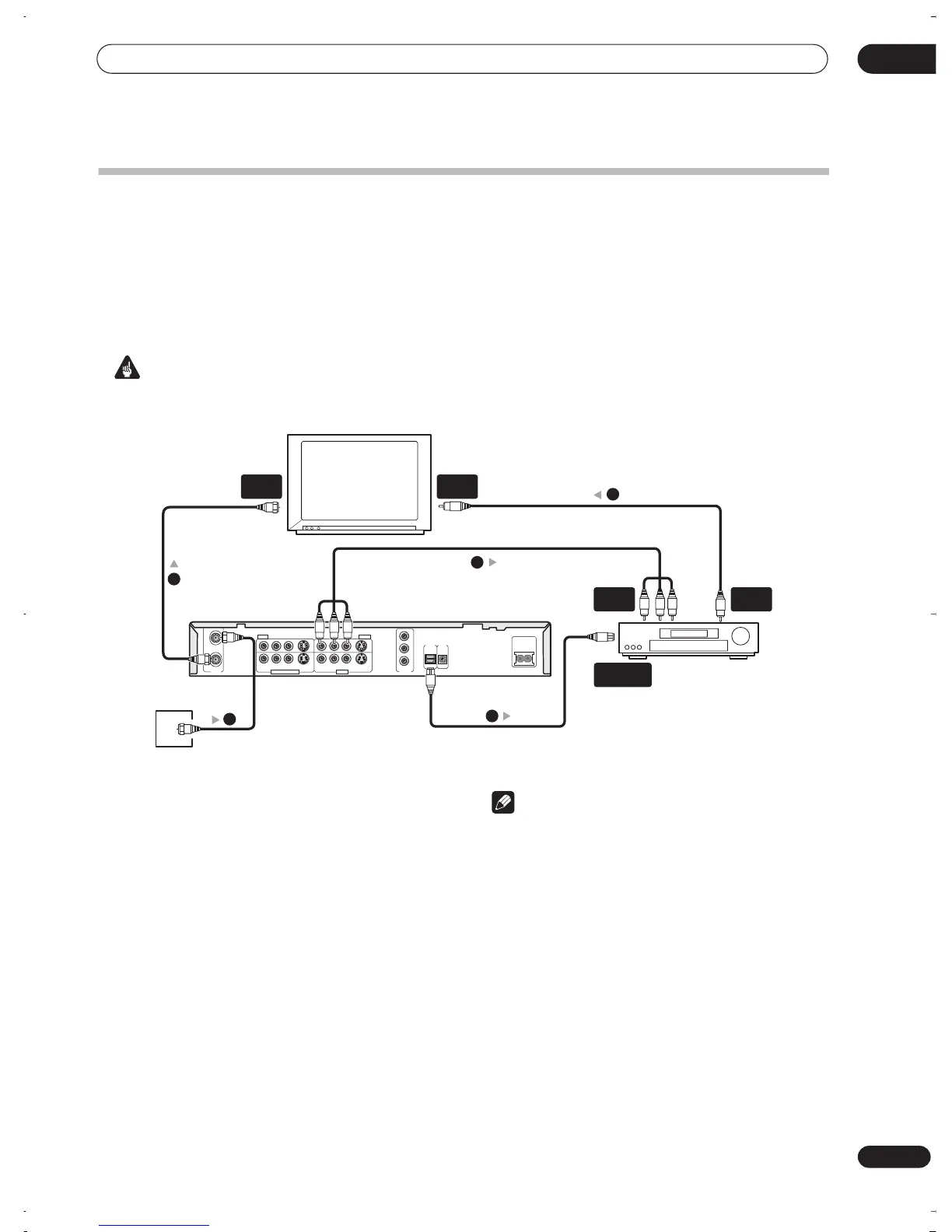
Connecting to an AV amplifier
To enjoy multichannel surround sound you need to connect this recorder to an AV amplifier/receiver using the digital
optical output. In addition to the digital connection, we recommend also connecting using the stereo analog
connection.
You’ll probably also want to connect a video output to your AV amplifier/receiver. Use the standard (composite) video
output (as shown here), or the S-video or component video connections.
See also
Audio Out settings
on page 80 for how to set up the digital audio output. (Noise may be output from your
speakers if the recorder is not set up to work with your AV amplifier/receiver.)
Important
• Do not connect this recorder to your TV ‘through’ your VCR or other component using A/V cables. Always connect
it directly to your TV.
1 Connect RF antenna cables as shown.
This enables you to watch and record TV channels.
2 Connect the AUDIO and VIDEO OUTPUT jacks (1
or 2) on this recorder to a set of audio/video inputs
on your AV receiver.
3 Use an optical digital audio cable (not supplied)
to connect the DIGITAL OUT OPTICAL jack on this
recorder to an optical digital input on your AV
receiver.
This enables you to listen to multichannel surround
sound.
4 Connect the AV receiver’s video output to a
video input on your TV.
Note
• The diagram shows standard video connections, but
you can alternatively use the S-video or component
video connections if they’re available.
• If your AV receiver doesn’t have an optical digital
input, but has a coaxial type, converter boxes that
convert from optical to coaxial are available at
specialist audio dealers.
TV
AV amp/
receiver
COMPONENT
VIDEO OUT
DIGITAL
OUT
AC IN
OPTICAL
CONTROL
IN
Y
P
B
P
R
VHF/UHF
IN
OUT
RL RL
AUDIO
INPUT 1
VIDEO
S-VIDEO
OUTPUT 1
AUDIO VIDEO
S-VIDEO
INPUT 3/AUTO START REC OUTPUT 2
VHF/UHF
IN
VIDEO
IN
VIDEO
OUT
A/V
IN 1
DIGITAL IN
OPTICAL
2
4
1
3
Antenna/cable TV
wall outlet
1
DVR-03_RD.book 17 ページ 2003年9月18日 木曜日 午後9時2分



 To Next Page