The Video/Audio Adjust menu
11
70
En
Chapter 11
The Video/Audio Adjust menu
Using the Video/Audio Adjust menu you can set up the picture quality for the built-in tuner and external inputs, for disc
playback, and for recording.
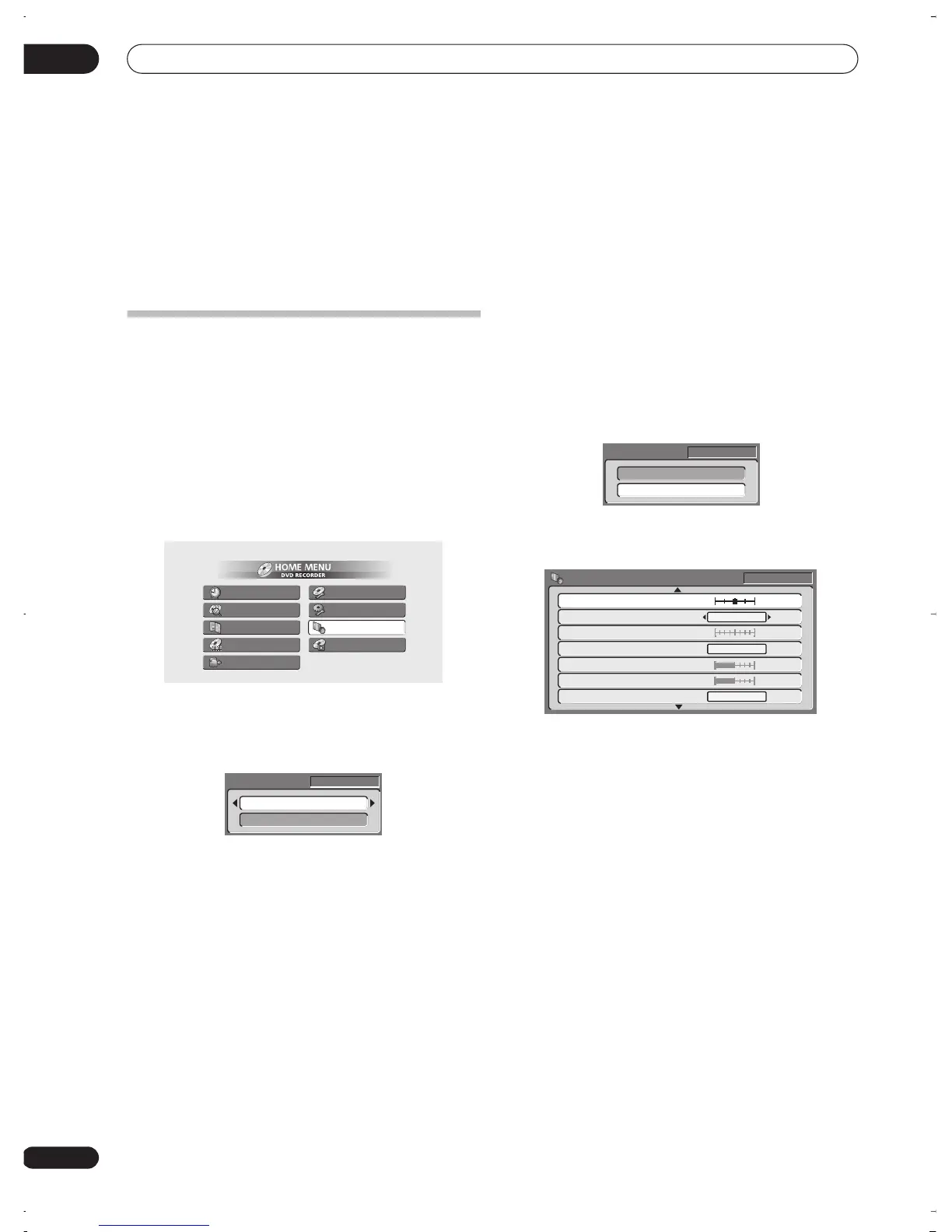
Setting the picture quality for TV and
external inputs
Picture Creation lets you choose a set of picture quality
settings for the built-in TV tuner and for each external
input. There are several preset settings that suit various
sources, or you can create up to three of your own sets.
Choosing a preset
1 With the recorder stopped, press HOME MENU
and select ‘Video/Audio Adjust’.
2 Select ‘Video Adjust’.
3 Use the
/
(cursor left/right) buttons to
change the preset.
• Use the
INPUT SELECT
button to switch between the
built-in TV tuner and the external inputs.
• Use the
CHANNEL +/–
buttons to change the
channel of the built-in TV tuner.
There are 6 presets available:
•
Tuner
– suitable for general TV broadcasts
•
VCR
– suitable for video cassettes
•
LDP
– suitable for Laserdiscs
•
Memory1
– user preset 1
•
Memory2
– user preset 2
•
Memory3
– user preset 3
You can press
DISPLAY
to see the individual settings for
the current preset (
Tuner
,
VCR
or
LDP
).
4 Press ENTER to select the preset.
Creating your own set
There are three user presets in which you can save your
own set of picture quality settings.
1 Follow
Choosing a preset
above and select one of
the user presets (Memory 1, 2 or 3).
2 Select ‘Detailed Settings’.
3 Select the picture quality setting you want to
adjust.
You can adjust the following settings:
•
3-D Y/C
– Adjusts the brightness/colour separation
(NTSC video only).
•
VNR
– Adjusts the amount of noise reduction applied
to the video signal.
•
Detail
– Adjusts how sharp edges appear.
•
White AGC
– Turn on for automatic white level
adjustment.
•
White Level
– Adjusts the intensity of white.
•
Black Level
– Adjusts the intensity of black.
•
Black Setup
– Corrects the standard reference black
level (NTSC video only).
•
Hue
– Adjusts overall balance between red and
green.
•
Chroma Level
– Adjusts how rich the colours
appear.
Timer Recording
Disc History
PhotoViewer
Disc Navigator
DV Record
Disc Setup
Initial Setup
Video/Audio Adjust
Play Mode
Tuner
Detailed Settings
Pr 5
Memory1
Detailed Settings
Pr 5
Memory1
Off Max
Off
Detail
White AGC
Black Setup
Motion
Still
3-D Y/C
VNR
Min Max
Min Max
White Level
Black Level
Pr 5
0 IRE
On
DVR-03_RD.book 70 ページ 2003年9月18日 木曜日 午後9時2分



 To Next Page