Connecting up
02
18
En
Connecting other AV sources
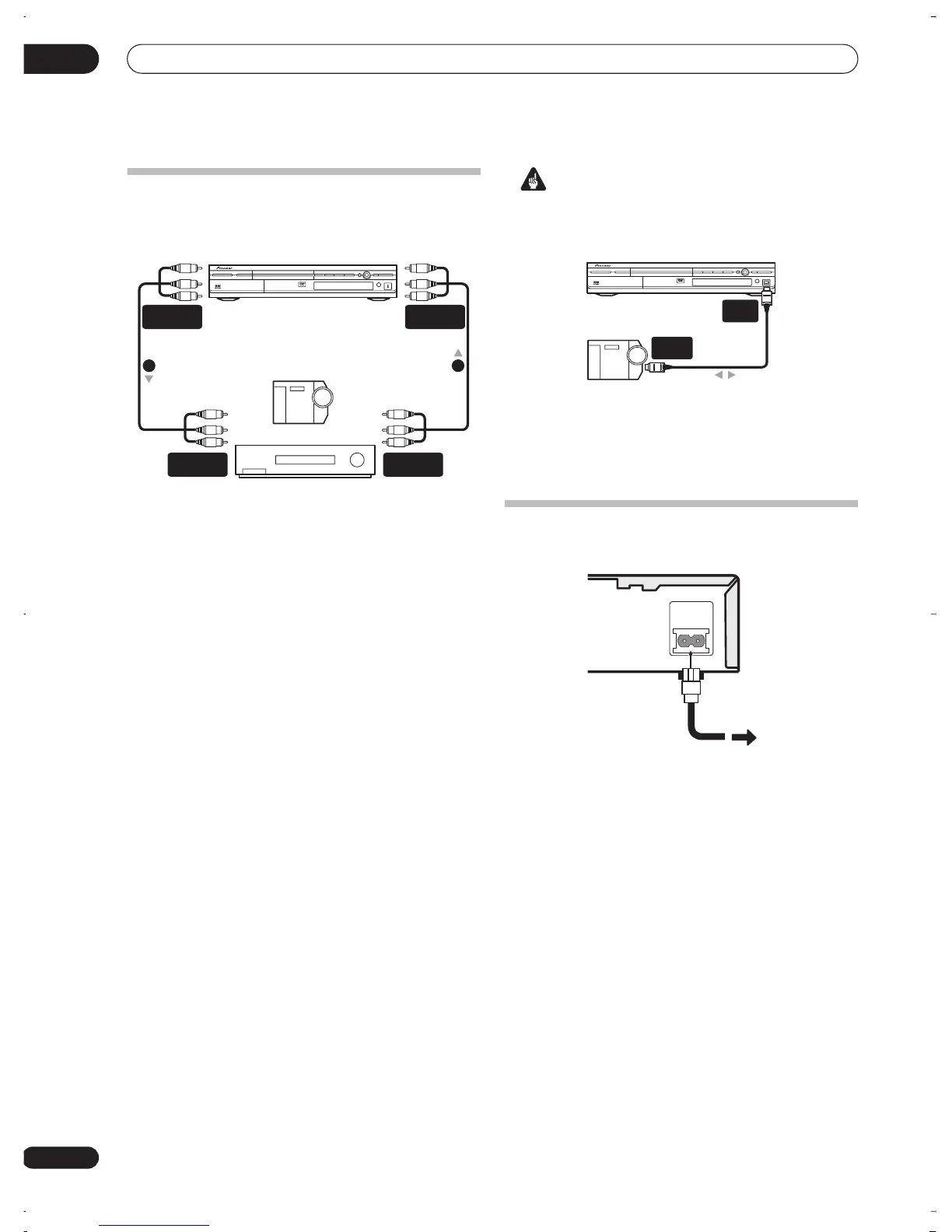
Connecting a VCR or analog camcorder
1 Connect a set of audio and video outputs of your
VCR or camcorder to a set of inputs on this recorder.
This enables you to record tapes from your VCR or
camcorder.
• You can use standard video or S-video cables for the
video connection.
• The front panel connections make convenient
connections for a camcorder input.
2 Connect a set of audio and video inputs of your
VCR or camcorder to a set of outputs on this
recorder.
This enables you to record from this recorder to your VCR
or camcorder.
• You can use standard video or S-video cables for the
video connection.
Connecting a DV camcorder
Using the front panel
DV IN/OUT
jack, it is possible to
connect a DV camcorder or video deck, or DVD-R/RW
recorder and digitally transfer DV tapes or DVD-R/RW
discs to DVD-R/RW.
Important
• This jack is for connection to DV equipment only. It is
not compatible with digital satellite tuners or D-VHS
video decks.
1 Use a DV cable (not supplied) to connect the DV
in/out jack of your DV camcorder/video deck to the
front panel DV IN/OUT jack of this recorder.
Plugging in
After checking all the connections, plug in the recorder.
1 Use the supplied power cable to connect this
recorder to a power outlet.
Analog camcorder
VCR
VIDEO/R/RW
AUDIO/VIDEO
OUTPUT
AUDIO/VIDEO
INPUT
12
AUDIO/VIDEO
INPUT
AUDIO/VIDEO
OUTPUT
DV camcorder
VIDEO/R/RW
DV
IN/OUT
DV
IN/OUT
AC IN
DVR-03_RD.book 18 ページ 2003年9月18日 木曜日 午後9時2分



 To Next Page