Controls and displays
03
21
En
Remote control
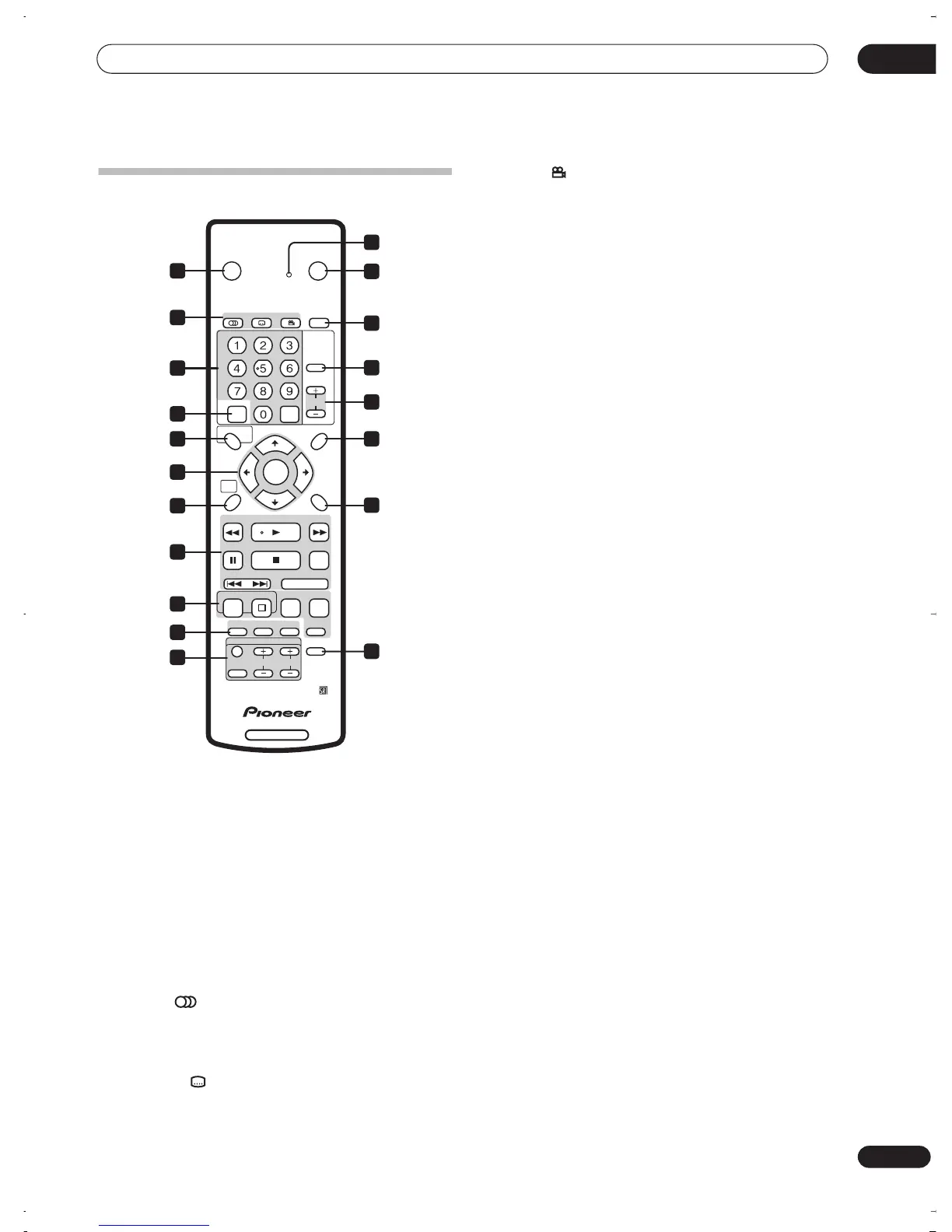
1 Remote control indicator
Lights when setting up the remote control for use with a
TV (page 88) and when setting the remote control mode
(page 75).
2
STANDBY/ON
Press to switch the recorder on/into standby.
3
OPEN/CLOSE
Press to open/close the disc tray.
4 DVD playback functions
AUDIO
(page 41)
Changes the audio language or channel. (When the
recorder is stopped, press to change the tuner
audio.)
SUBTITLE
(page 41)
Displays/changes the subtitles included in
multilingual DVD-Video discs.
ANGLE
(page 42)
Switches camera angles on discs with multi-angle
scenes.
5 PLAY MODE
(page 38)
Press to display the Play Mode menu (for features such
as search, repeat and program play).
6 Alphanumeric buttons and CLEAR
Use the number buttons for track/chapter/title selection;
channel selection, and so on. The same buttons can also
be used to enter names for titles, discs and so on.
Use
CLEAR
to clear an entry and start again.
7 INPUT SELECT
(page 51)
Press to change the input to use for recording.
8 CHANNEL +/–
(page 26)
Press to change the channel of the built-in TV tuner.
9 VCR Plus+
(page 48)
Press, then use the number buttons to enter a PlusCode
programming number for timer recording.
10 DISC NAVIGATOR
(page 33, 56)
/ TOP MENU
(page 28)
Press to display the Disc Navigator screen, or the top
menu if a DVD-Video disc is loaded.
11 PLAY LIST
(page 57)
/ MENU
(page 28)
Press to switch between Original and Play List content on
VR mode discs, or display the disc menu if a DVD-Video
disc is loaded.
12
///
(cursor buttons) and ENTER
Used to navigate all on-screen displays. Press
ENTER
to
select the currently highlighted option.
13 HOME MENU
(page 30)
Press to display the Home Menu, from which you can
navigate all the functions of the recorder.
14 RETURN
Press to go back one level in the on-screen menu or
display.
15 Playback controls
(page 27)
REV SCAN / FWD SCAN
(page 35)
Press to start reverse or forward scanning. Press
again to change the speed.
PLAY
Press to start playback.
PAUSE
Press to pause playback or recording.
STOP
Press to stop playback.
DVD RECORDER
STANDBY/ON
OPEN/CLOSE
TOP MENU MENU
RETURN
DISC NAVIGATOR PLAY LIST
HOME
MENU
DISC
HISTORY
NAVI
MARK
CASE
SELECTION
CHP
MARK
EASY
TIMER
INPUT
SELECT
INPUT
SELECT
ABC
AUDIO SUBTITLE ANGLE PLAY MODE
DEF
GHI JKL MNO
PQRS TUV WXYZ
VCR Plus+ CLEAR
DISPLAY
ENTER
CLEAR
TV CONTROL
CHANNEL
CHANNEL
VOLUME
REC
PREV
PAUSE STOP
OK CM SKIP
REV SCAN PLAY FWD SCAN
NEXT STEP/SLOW
STOP REC
REC MODE TIMER REC
+
1
3
5
8
11
14
2
9
10
12
13
15
16
19
4
17
7
18
6
DVR-03_RD.book 21 ページ 2003年9月18日 木曜日 午後9時2分



 To Next Page