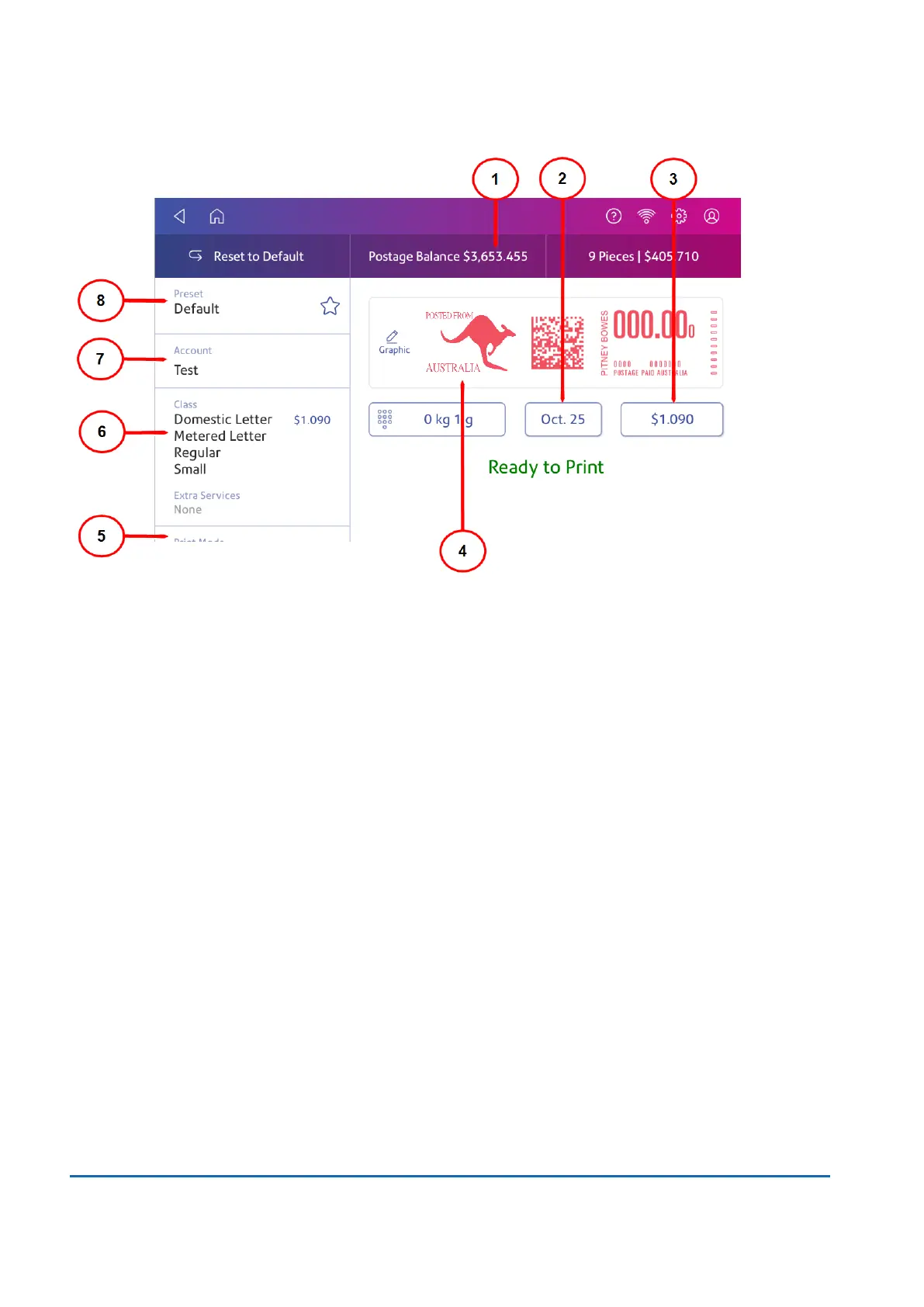
On this screen, you can:
1. View Postage Balance - View the balance of funds you have left in your device.
2. View Date -Tap the date to view the date options.
3. View Total postage amount - View the total postage amount.
4. Preview or add Graphic - Tap Graphicto preview or add graphics. You can also add a custom
text message.
5. View Print Mode - View the available printing modes such as printing a graphic only, printing
the date and time, or seal envelopes without printing postage.
6. View Class - Tap Class to view available postal classes and any extra services.
7. View Account - Tap Account to charge back postage to departments or clients. Run reports
showing how you spent your postage over specific time periods.
8. View Preset - Tap Preset to store a group of commonly-used settings. Presets can store
settings such as a postage class, an account, and a graphic.
Australia Post requirements
Your device (Postal Security Device) has a license with the Australia Post. Therefore you must follow
a few basic requirements.
15 • Product Information
Pitney Bowes User Guide November 2021 111












 To Next Page