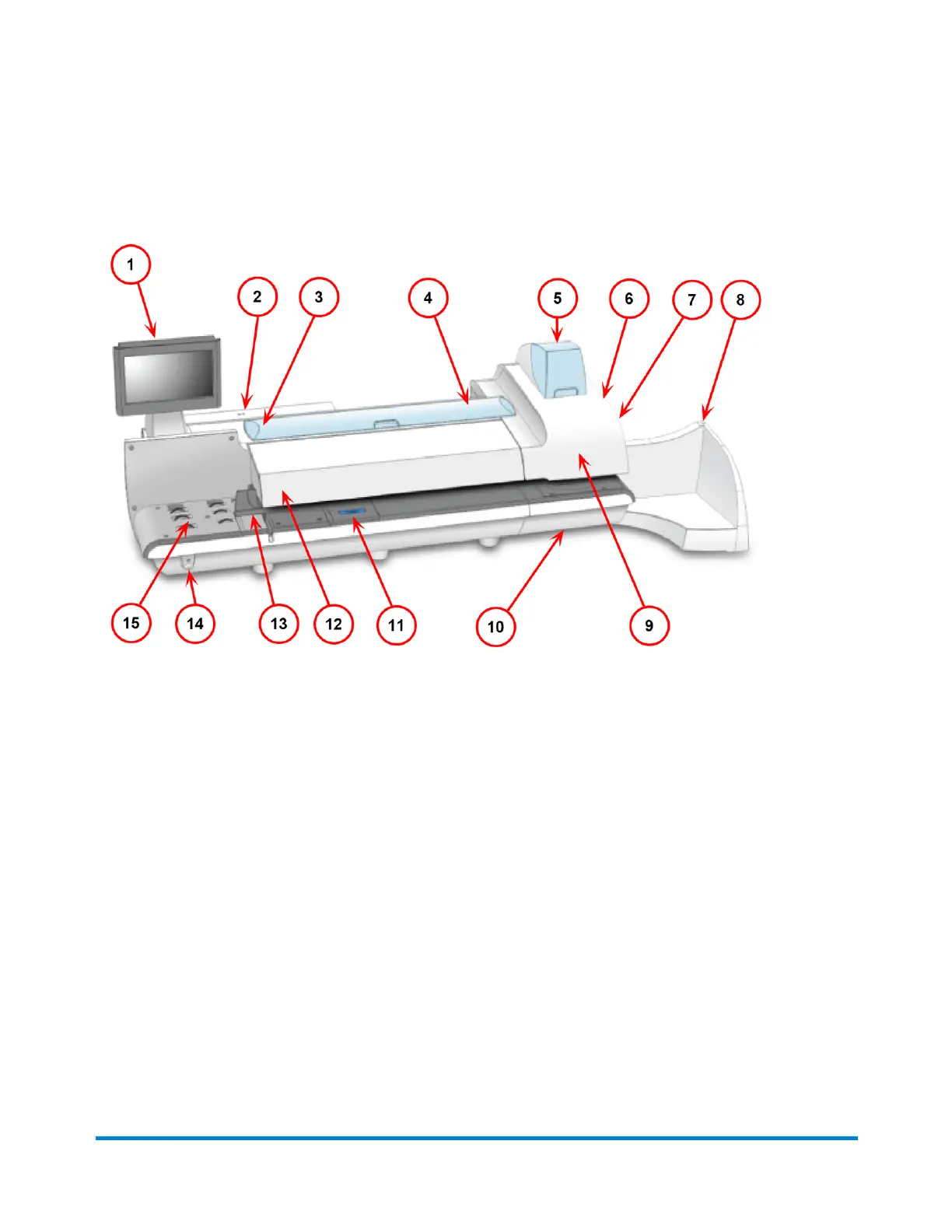
Parts of the SendPro MailCenter
1. The touchscreen allows you to communicate with the device and the built-in postage meter
(Postal Security Device).
2. The Postal Security Device (PSD) contains the funds and performs all of the calculations
necessary to print postage that comply with the latest Canada Post standards. It is located
beneath the PSD cover on the back of the device.
3. The envelope sealant bottle contains the E-Z Seal® used for moistening envelopes. It is located
under the main cover, on the left.
4. The device uses tape to print reports and postage pieces of mail that are outside the limits
specified for mailing materials. SendPro MailCenter 1000 and SendPro MailCenter 2000
systems use adhesive tape only. SendPro MailCenter 3000 systems can use either adhesive or
gummed tape. The tape is located under the supplies cover, on the right.
5. The ink cartridges contain the ink used to print postage, as well as any additional items (graphic
ad, text message, return address, etc.) you want to appear on your mailpiece.
6. The tape sealant bottle is an optional feature for SendPro MailCenter devices. It contains the E-
Z Seal used for moistening gummed tape. The tape sealant bottle is located to the right of the
printer module, behind the stacker.
Getting Started
Pitney Bowes User Guide April 2024 10












 To Next Page