3 - 18
Shutter Assembly
1. Removal
Note: Refer to Shutter Disassembly and Reassembly procedures on page
3- for instructions on how to disassemble and reassemble the
Shutter Assembly.
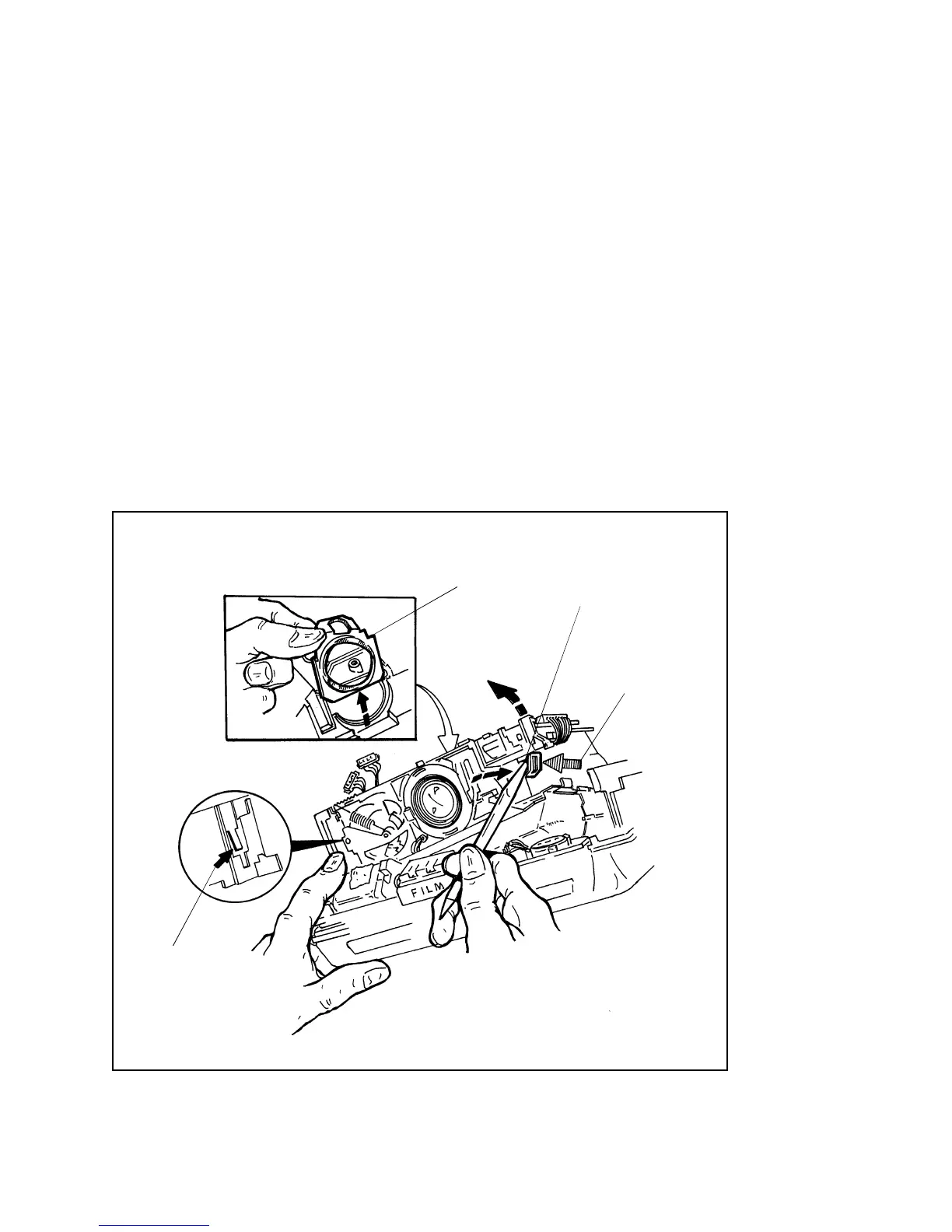
a. Using a greenstick, gently pry out the catch A on the Bellows/Cone
Assembly, just enough to release it from the tab B on the right (Strobe)
end of the Shutter Baseblock (Figure 3-14). Gently lift up the right end
of the Shutter Assembly until the locking catch C at the left end
releases. Then lift the Shutter Assembly straight up and out of the
Bellows/Cone Assembly.
b. Remove the Rear Lens Baffle (Figure 3-14), being careful not to let it
fall down inside the Bellows/Cone Assembly.
Figure 3-14. Removing Shutter Assembly from Bellows/Cone Assembly
CATCH C
REAR LENS
BAFFLE
TAB B
BELLOWS/CONE
ASSEMBLY
CATCH A



 To Next Page
 Loading...