39
Polyend Synth Manual
38
Polyend Synth Manual
Grid Page Settings accessed in the main menu, under the ‘Grid’ options. Press (Screen) knob to
open the main menu and Turn the knob to navigate.
Option Global / Synth Knob Description
Layout Global C1
Select from a collection of available pad layouts; Florida Man, 3X3,By The Lake, New
Flag, The Big One, 5050 Sheet, The Truck, 5050 Bottom, The Beach, Blue, Yellow,
Purple
Scale Global C2
Chromatic, Minor, Major, Dorian, Lydian Major, Lydian Minor, Locrian, Phrygian,
Phrygian Dominant, Mixolydian, Melodic Minor, Harmonic Minor, BeBop Major, BeBop
Dorian, BeBop Mixolydian, Blues Minor, Blues Major, Pentatonic Minor, Pentatonic Major,
Hungarian Minor, Ukrainian, Marva, Whole Tone, Diminished, Super Locrian, Hirajoshi, In
Sen, Yo, Iwato, Kumoi, Overtone, Double Harmonic, Indian, Neapolitan Major, Neapolitan
Minor, Enigmatic
Root Global C3 C, C#, D, D#, E, F, F#, G, G#, A, A#, B
Mode Per Synth Param 1, 2, 3
Note
Ch Scale
Follower. Only available if another synth is set to a chord option.
Chord
Ch Pack. Custom chord packs.
Chord Per Synth Param 4, 5, 6
Selects the Chord types when a Chord Mode is selected or selects from the library of
custom chord packs. Chord Types available (see below); None, Pow4th, Pow5th, Minor,
Major, Dim, Aug, Sus2, Sus4, Maj7, Min7, Dom7, Min7b5, Maj6, Min6, MinMaj7, Maj9,
Min9, Maj11, Min11, Maj13, Min13
Root Per Synth Param 7, 8, 9
Sets the root note octave range for each synth between C0-C8. The default is C1. Also
this can be changed using a shortcut by Pressing [Screen] for a selected Synth + Turn
(Screen) knob when in a synth display page.
Mapping Per Synth
Page 2
Param 1, 2, 3
Wrap maps notes bottom left to right and continues in order up the rows. The Row+
option will map the rst bottom row left to right in note order and also increment up each
pad per row in semitone increments as dened in Row+ i.e. Row+1 is 1 Semitone.
Polyphony:
Remember to congure a synth’s voices when using chords. For example a triad would need 3 voices to play the
chord. This setup is in the main menu under ‘synths’.
Notes & Chords
4
Notes & Chords
4
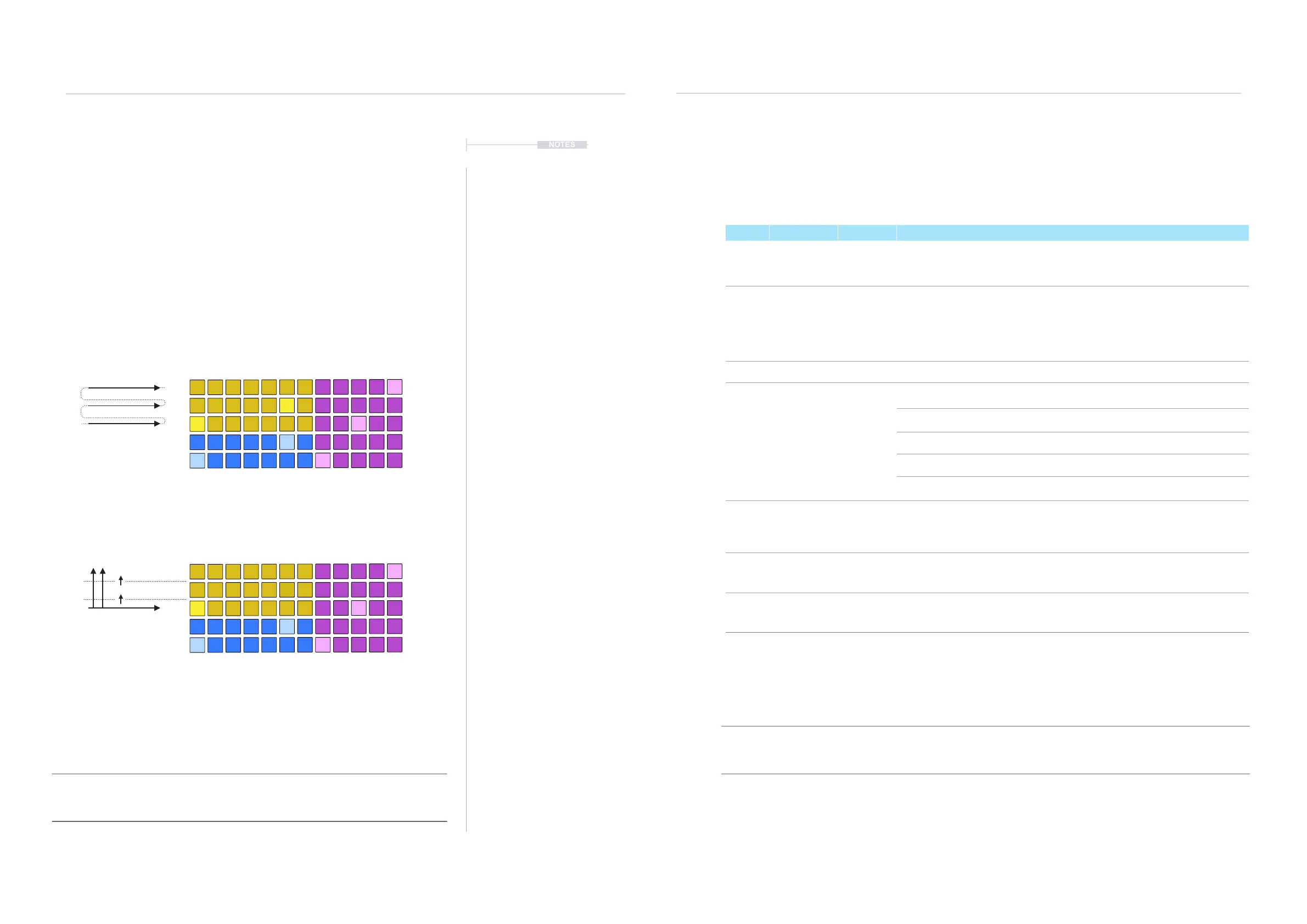
Grid mapping
Notes played on the pads will depend on the grid layout and the mapping.
Wrap will lay notes out bottom left to right in note order of the scale and will
continue up each row. Row+X will lay notes bottom left to right in note order
for the rst row and then will increment per column in X semitones. This
setting is found in page 2 of the Grid settings.
NOTES
Wrap:
Synth 2 - Yellow - Florida Man Layout
Chromatic Scale - Root C, Wrap.
Examples
Row+1:
Synth 2 - Yellow - Florida Man Layout
Chromatic Scale - Root C, +1 Semitone.
The ‘Row’ option offers a semitone offset range of +1 to +11 increments up per row within
each column based on the selected scale and root.
+ 1 Semitone
+ 1 Semitone
C1
C1
C2
C#
C#
C#
C#
G
G
F
F
F
F
F G
A
E
E
E
E
E
G#
D
D
D
D
D
F#
F#
G#
F#
F#
F# G#
A#
D#
D#
D#
D#
D#
G B
Grid Behavior:
The grid pad sensitivity and aftertouch Behavior can be adjusted. These are found in the
system settings. See the system section for details.



 To Next Page