41
Polyend Synth Manual
40
Polyend Synth Manual
Notes & Chords
4
Notes & Chords
4
NOTES
4.3 Polyphony & Voices
Synth is a multi-engine polyphonic synthesizer. Polyphony is the ability to
play multiple notes at the same time, each generating its own pitch. For
example playing a chord. Polyphony is implemented using voices. A voice
is a discrete audio channel. Voices are allocated in Synth using the ‘Synths’
option in the main menu where a maximum of 8 voices can be allocated
across the 3 synth slots.
▌ SETTING UP SYNTH VOICES
1. Determine the use for each synth. For example, a bass synth may be ok
with 1 voice to operate a monophonic synth. A melody with triad chords
will require 3 voices and so forth. The GRAIN Synth engine has a
paraphonic mode option allowing chords to be played with one voice.
2. Open the main menu. Hold (Screen) knob to select the main menu and
Turn (Screen) to navigate through the options.
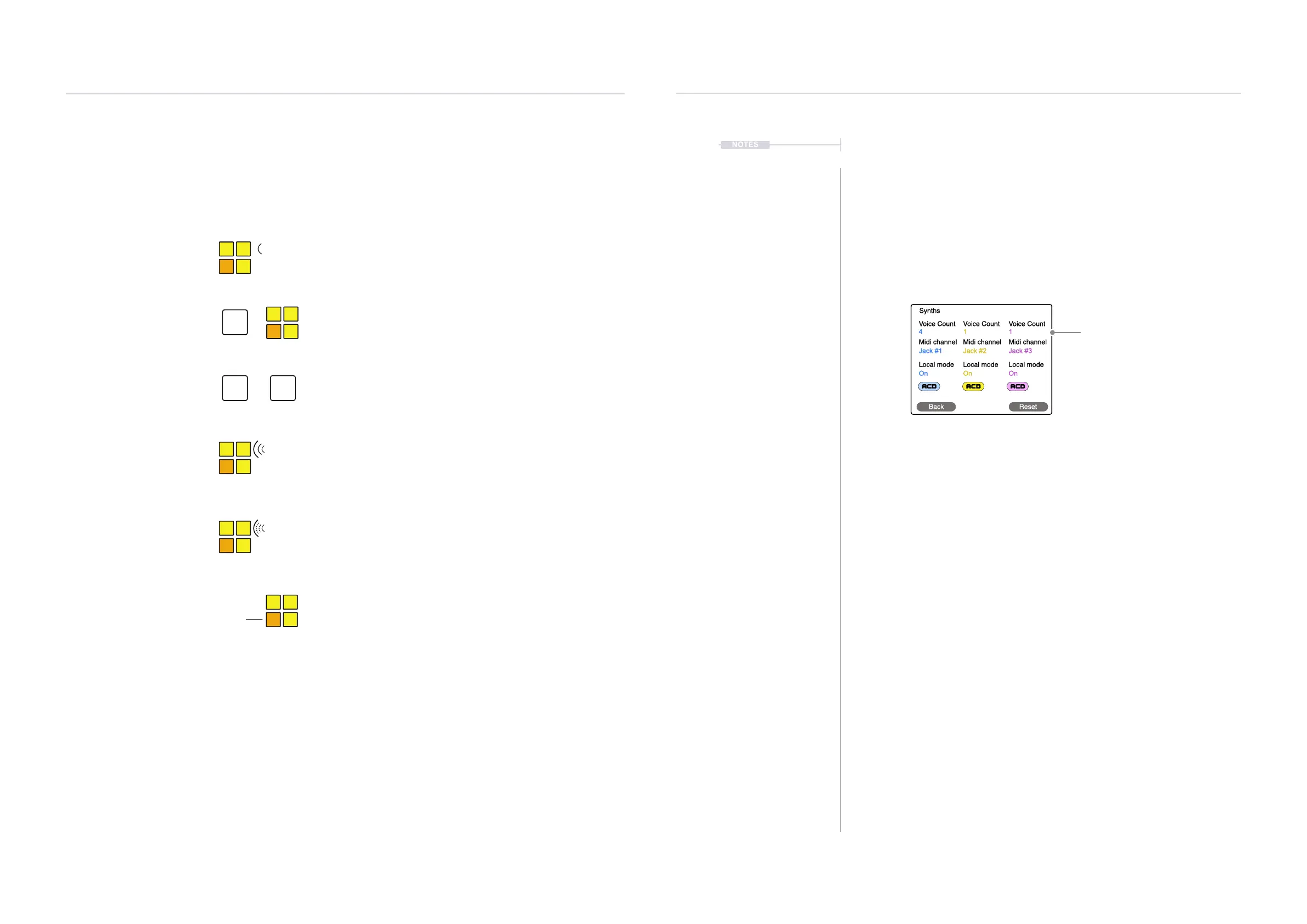
3. Highlight the ‘Synths’ option and Press (Screen) to select. The synth’s
page will open.
4. The 9 touch rotary knobs are used to edit the 9 parameters on the page.
The top row of knobs are used to change the Voice Count for each of
the 3 synths. Set the value to suit the application of each synth. A
maximum of 8 voices can be allocated in total for all 3 synth’s.
5. The allocation of voices as well as the other synth options in the
‘Synths’ page are saved with the Scene.
Voice Count
4
Jack #1
On
Voice Count
1
Jack #2
On
Voice Count
1
Jack #3
On
Midi channel Midi channel Midi channel
Local mode Local mode Local mode
Synths
Back Reset
Voice allocation per Synth
4.2 Playing Notes on the Grid
The pads will be lit to represent the colour for each synth. Synth 1, Blue, Synth 2, Yellow and Synth
3, Purple. The root notes will also be identied for each pad. All pads will represent a note based on
the scale and octave range selected for each synth.
☞
☞
☞
To play a note or chord.
To apply velocity while playing.
To apply aftertouch while playing.
Note orientation.
Root
To play & sustain notes / chords
+
To release sustained a note
Shift
Shift Shift
Press the [Pad] or pads for the notes to play. The polyphony
played will be based on the voice settings.
Press the [Pad] or pads. Pads are velocity sensitive so pressure
applied will affect the output sound volume level. The pad colour
shade will initially change to reect the velocity applied.
Press the [Pad] or pads. Aftertouch or pressure can be continually
applied after initially pressing a pad. The aftertouch settings and
macro will determine what parameter is affected. The pad colour
brightness will also change to reect the pressure applied.
The pad colours represent the notes in the synth’s scale. The
alternate coloured pads represent the root note. Example, Synth 1
is Yellow Pads with an Orange pad dening the root note.
Hold [Shift] + Press the [Pad] or pads for the notes to play or to
release a single note. Pads are velocity sensitive so the pressure
applied will affect the output sound.
Double tap [Shift] to release all sustained notes. Also to release
only specic notes, Hold [Shift] + Press the [Pad] or pads.
C C#
E F



 To Next Page