37
Polyend Synth Manual
36
Polyend Synth Manual
Grid Layout
The layout format for the 3 synths can be selected in the grid sub-menu of
the main menu. The selected layout is saved with the scene.
NOTES
Notes & Chords
4
Notes & Chords
4
4.1 Grid Layout
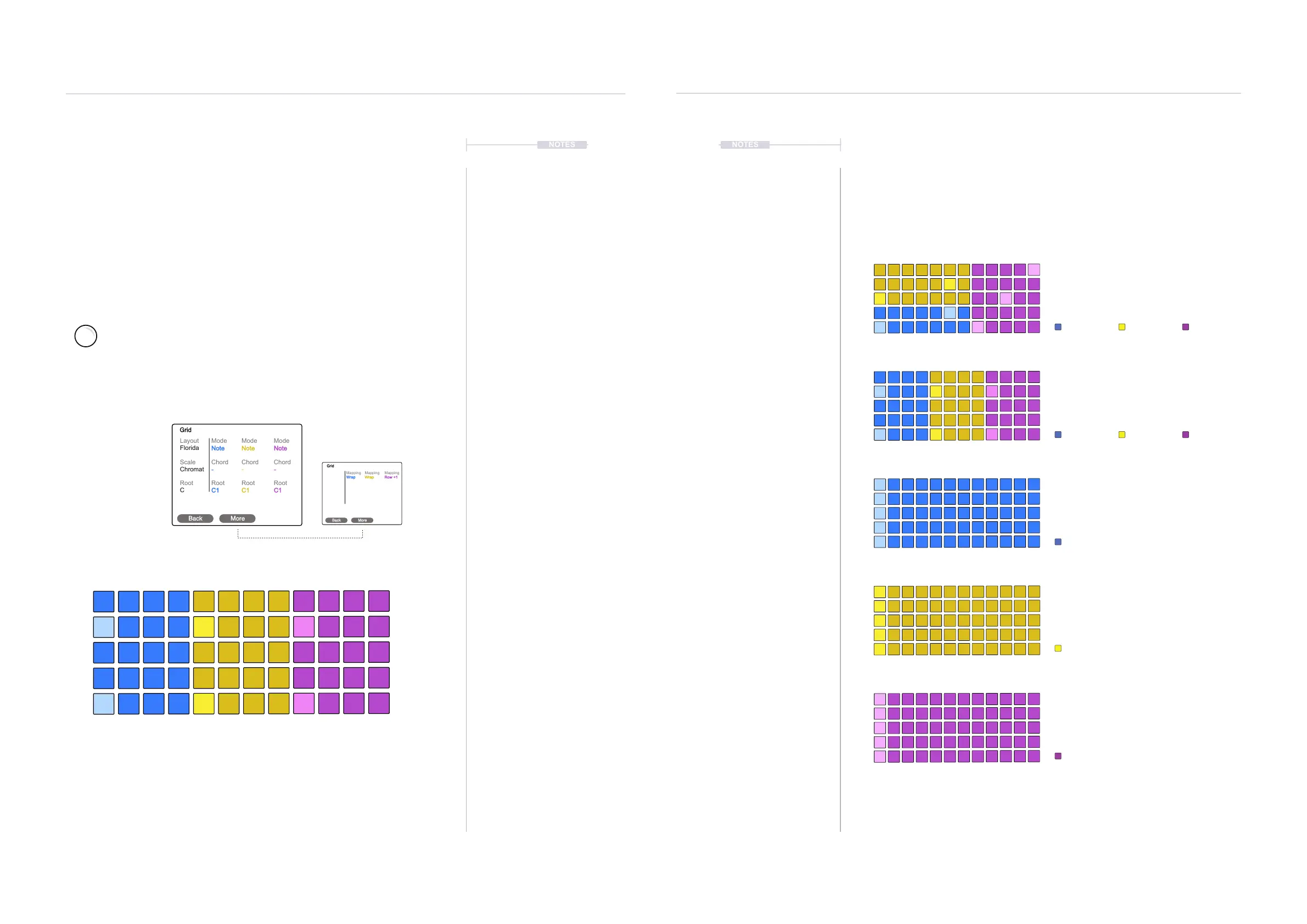
Synth user interface is based in a 5 x 12 pad grid which is used for playing
synth presets. The grid is customisable to match your preferred style and
also to take advantage of using all 3 synth engines at the same time. The
synths, modes, chords, scales and root notes are congurable.
Conguring the Grid
Conguration is found in the main menu, under the grid options. The main
menu is accessed with the screen knob. The grid settings are saved with
the scene.
Layout
Scale
Root
Florida
Chromat
C
Mode
Chord
Root
Note
-
C1
Mode
Chord
Root
Note
-
C1
Mode
Chord
Root
Note
-
C1
Grid
Back More
Mapping
Wrap
Mapping
Wrap
Mapping
Row +1
Grid
Back More
Press the (Screen) Knob to open the main menu. Turn (Screen) to scroll and
navigate the menu. Press (Screen) to select a highlighted option or sub-menu.
Turn to highlight ‘Grid’ - Press (Screen) knob to select.
The [Screen] Buttons can be used to navigate back up in the menu or to
change pages.
The 9 Macro knobs change the
displayed parameter values.
Florida Man
All 3 Synths laid out across the grid pads.
Synths are organised in a mixed arrangement.
This is the default layout.
Synth 1.
Synth 1.
Synth 1.
Synth 2.
Synth 3.
Synth 2.
Synth 2.
Synth 3.
Synth 3.
3 x 3
All 3 Synths laid out across the grid pads.
Synths are organised in a vertical arrangement.
Blue
A single synth laid out across all of the grid
pads. Synths notes are organised in a
horizontal arrangement.
Yellow
A single synth laid out across all of the grid
pads. Synths notes are organised in a
horizontal arrangement.
Purple
A single synth laid out across all of the grid
pads. Synths notes are organised in a
horizontal arrangement.
The parameters available to edit will depend on the layout. If only one synth layout is
selected then only the parameters for the selected synth are presented on the display and
therefore accessible to edit.
C1, C2, C3 knobs edit
the generic settings.
Synth 1 - Blue
Vertically Orientated
Root
e.g. C, Octave can be set per synth Note C1, Note C2 etc. Pad is brightly lit.
Scale
e.g. Chromatic, pads represent all notes in the selected scale.
Pads are lit white while playing notes. If a synth is set to a chord mode and
another synth set as a follower, the pad for last chord played will be lit red.
C1
C#
F
A
E
G#
D
F#
A#
D#
G
B
C2
C1
C2
C1
C2
Synth 2 - Yellow
Vertically Orientated
Synth 3 - Purple
Vertically Orientated
C1
C2
C3
NOTES
Layout Examples



 To Next Page