13
Polyend Synth Manual
12
Polyend Synth Manual
Overview
1
Overview
1
NOTES
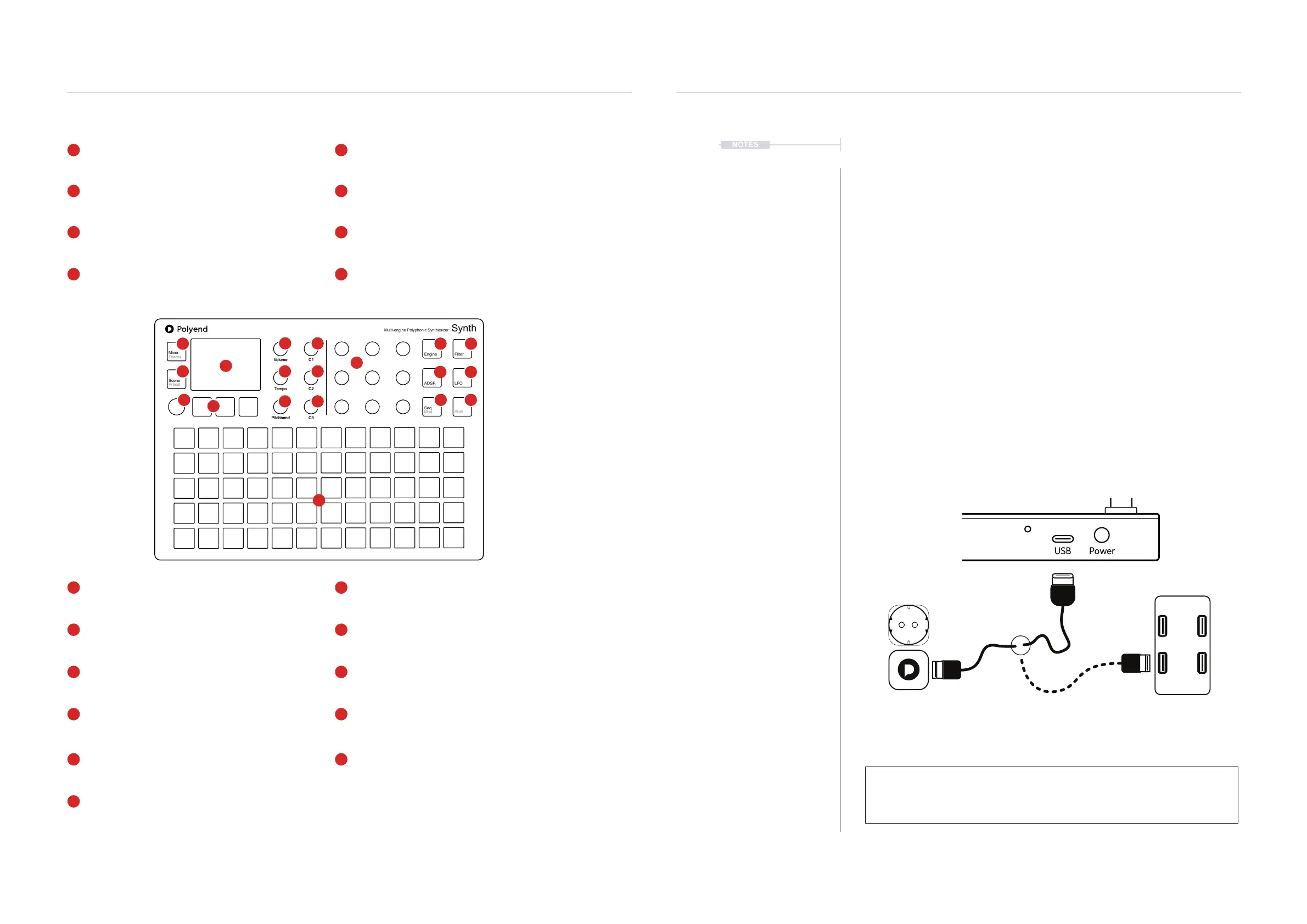
LCD Display
Hi Resolution Display.
Synth Engine / Multi Function Buttons
Each [Screen] button selects one of the 3 synth engines
or selects a dened option in a function menu.
Multi-Functional Screen Knob
Clickable encoder. Click to select the main menu.
Turn to change synth function pages. (Screen)
Parameter Knobs
9 Dynamic knobs control the respective parameter set
for the function displayed on the screen.
Grid Pads
5 x 12 Silicone [Pads]. Congurable for playing and
controlling the 3 synth engines.
Master Volume
Control of primary master (Vol) dB level.
Tempo & Swing
Adjusts the global (Tempo). Range is 10 to 400 beats
per minute. Use Shift to adjust swing 25%-75%
Synth Engine Filter Parameters
Opens the lter page for the selected synth engine.
Engine is selected with [Screen] buttons.
Sequencer Mode & Modulation Routing
Opens the sequencer mode page for the selected
synth engine. Shift to adjust modulation amounts.
Macro 1 & Combo Control.
Adjust synth macros or relative common parameters
for all or selected synth engines using one (C1) Knob.
Macro 2 & Combo Control.
Adjust synth macros or relative common parameters
for all or selected synth engines using one (C2) Knob.
Macro 3 & Combo Control.
Adjust synth macros or relative common parameters
for all or selected synth engines using one (C3) Knob.
Mixer & Effects
Opens the mixer page for Level and Pan of all the
synth engines. Shift to open the ModFX parameters.
Scene & Preset
Opens the [Scene] manager to load & save. Use
[Shift] + [Scene] to open the synth preset browser.
Synth Engine Osc Parameters
Opens the oscillator page for the selected synth
engine. Engine is selected with [Screen] buttons.
Pitchbend
Adjusts the (Pitchbend) value -100 to +100 only while
turning the knob. Resets to 0 when the knob is released
Synth Engine ADSR Envelope Parameters
Opens the Filter and Amp Envelope pages for the
selected synth engine. Selected synth with [Screen].
Synth Engine LFO Parameters
Opens the Low Frequency Oscillator pages for the
selected synth engine. Selected synth with [Screen].
Shift
Use [Shift] in conjunction with a control to access a
secondary function, e.g. the button grey text option.
The 5 x 12 grid pads are velocity sensitive. All knobs
with the exception of the left side screen knob are
touch sensitive.
Mixer
Effects
Engine Filter
Scene
Preset
ADSR LFO
Seq
Mod
Shift
Volume
Tempo
Pitchbend
C1
C2
C3
Multi-engine Polyphonic Synthesizer
Synth
1
4
5
10
15
5
7
15 16
16
18
9 10
11 12
13 14
6
11
7
12
17
8
13
18
9
14
19
8
17
19
6
4
2
2
3
3
1
1.3 Start Up
Synth is a low power user and can therefore be powered from the supplied
mains USB adapter or from a rechargeable battery power bank. When
restarting Synth the previously open scene will be be re-opened
▌ POWERING ON / OFF SYNTH
1. Connect the supplied USB-C Mains cable between Synth and the
supplied USB plug. Also Synth can operate with a portable USB power
bank*. Synth requires a 5V, 1A rated supply.
2. Ensure the SD Card is installed correctly for Synth to operate.
3. Quickly press the small power button located on the rear left (looking
from the top). Synth will start up and the previous scene reopened.
4. To power off, press and hold the small power button located on the rear
left (looking from the top) until the ‘Powering Down’ message appears
and the timer bar ends. Synth will power off.
Supply is 5V, 1A from the supplied mains to USB adapter.
Alternatively use a battery power bank.
Start up instantaneous current is approx 1.2A with normal state around 0.5A
* It is recommended by Polyend to use a standard power bank without smart
features. Intelligent / smart power banks or PC / Mac power may have features
that interfere with the continuous supply required by Synth. A USC - C to USB - B
cable is supplied.
Out MIDI Out MIDI In Micro SD
USB Power



 To Next Page