99
Polyend Synth Manual
98
Polyend Synth Manual
NOTESNOTES
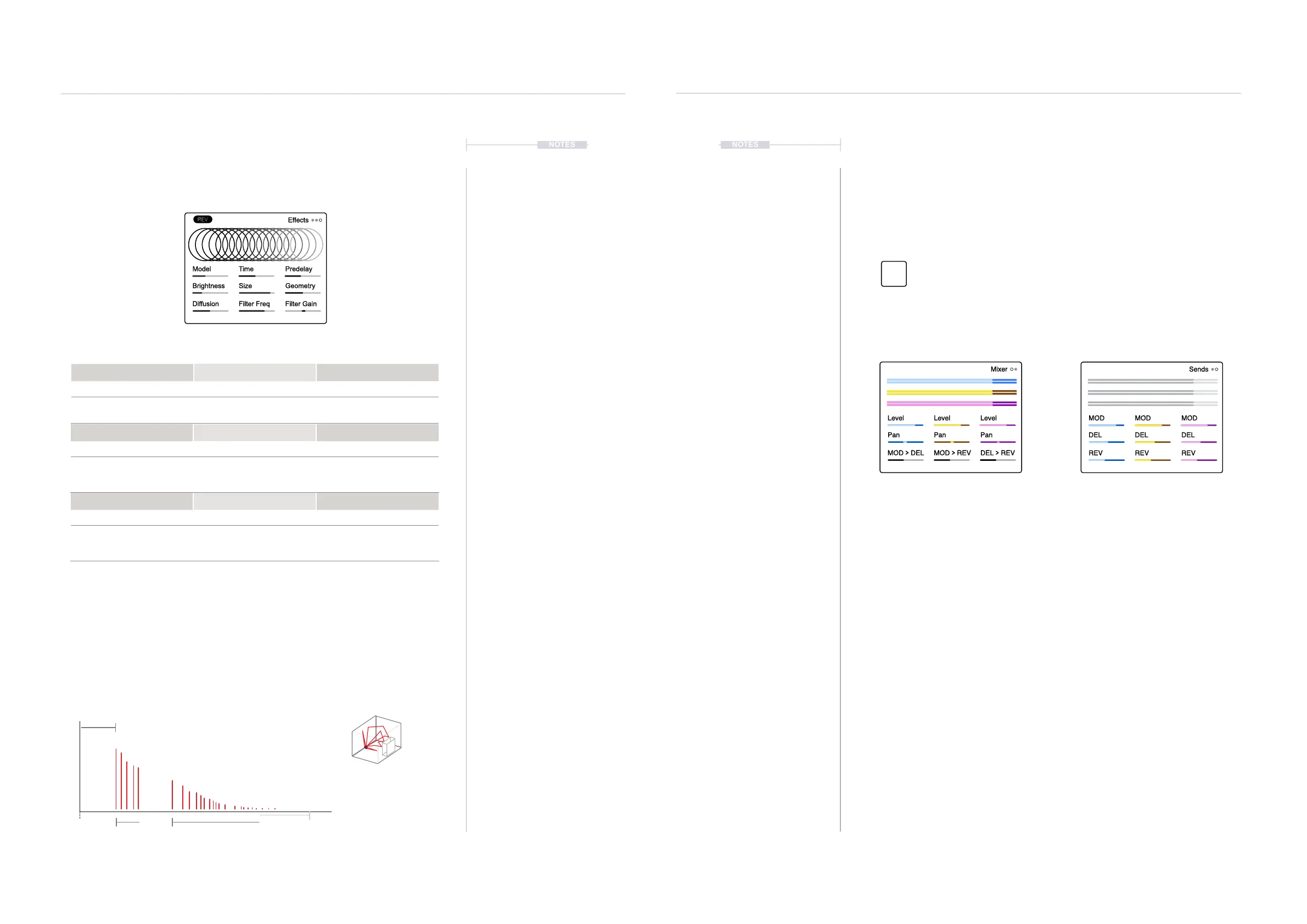
6.5 REV Effect
The master REV effect is available in the Effects section under page 3
along with its associated parameters.
Reverb Concepts.
A reverb emulates the audio Behavior of spaces. Think of how the sound
reects in a large cathedral compared to a small room and how furniture
absorbs or reects sound. The sound will bounce and reect between the
walls and other elements in the room. These reections arrive at the human
ear at different times and different levels.
6.6 Using the Effects
The audio send controls synth audio routed to the effects and audio sent
between effects. These are controlled in the Mixer pages. The master effect
parameters for each individual effect are found in the effect page. The
master effect settings will apply to all audio sent from a synth or another
effect to that specic effect.
▌ ADJUSTING THE SEND AMOUNTS
1. Open the ‘Sends’ page. Press [Mixer] to Open the Mixer and tap the
[Mixer] button to cycle the pages. Page 2 is the Sends Page.
2. Each synth is represented along with each effect. The 9 Parameter
knobs are used to adjust the amount of audio for each synth that is sent
to the effect. It is good practice to adjust by ear.
3. If required the effects can be chained, and audio routed from one effect
into another. This option is available in the Mixer Page 1. Tap [Mixer] to
select this page. The amount of audio channelled from one effect to
another is set using the bottom 3 parameter knobs.
4. The effect sound will be dependant on the settings in the master effect
itself. The effect settings can be changed in the master effect pages.
These are accessed using [Shift] + [Effects] or [Shift] + [Filter] to cycle
through the 3 effects. The 9 Parameter knobs adjust the settings which
will be applied to all incoming audio from synths or other effects.
Level Level Level
Pan Pan Pan
MOD
>
DEL MOD
>
REV DEL
>
REV
Mixer
MOD MOD MOD
DEL DEL DEL
REV REV REV
Sends
Effects & Modulation
6
Effects & Modulation
6
REV Master Effect - Page 1
Model Time Pre-delay
Options 0-100 0-100
Natural, Plate or Warp style
reverb models
Overall reverb time. Initial early stage reections
in the reverb.
Diffusion Filter Freq Filter Gain
0-100 100Hz to 10kHz -25dB to +24dB
Thickness of the reverb
sound. Start with a setting of
50-80 and adjust from there.
Shelf Filter frequency to add
character and affect the tone
of the reverb effect.
Boosts or attenuates the
frequencies of the lter shelf.
Brightness Size Geometry
0-100 0-100 0-100
EQ application to dampen
the feedback loop’s high
frequencies.
Affects the size of the room
space in the reverb algorithm
Affects the room geometry
and shape in the reverb
algorithm.
Model Time Predelay
Brightness Size Geometry
Diffusion Filter Freq Filter Gain
Effects
Size
Emulates the physical room size
Predelay
Time from initial sound to early reections
Diffusion
Time between early reections.
Closer together thickens the sound.
Damping
This replicates ‘softer’ environments where sound
is absorbed rather than reected.
Mixer
Mixer Page 1
Press [Mixer] to open the Mixer Page.
Sends
Mixer Page 2
Tap [Mixer] to cycle to the Sends Page.
Amount of audio sent from each synth
to each effect can be adjusted with the
9 Parameter knobs
Amount of audio sent from each effect
into another effect can be adjusted
with the bottom 3 Parameter knobs
Press [Mixer] button to open the effect sends page.
Mixer
Effects



 To Next Page