103
Polyend Synth Manual
102
Polyend Synth Manual
NOTESNOTES
6.9 Applying Modulation
The modulation matrix contains six congurable modulation channels for
each synth. Some synths, like ACD, have predened, xed congurations.
The source can be either an LFO or the Aux Envelope. Based on the synth
engine and conguration currently selected, a variety of parameter
destinations are available.
Effects & Modulation
6
Effects & Modulation
6
Mod
Src 1 Dest 1 Amt 1
LFO or ADSR Envelope Engine Dependant Options -400% to +400%
Select the source modier
function for modulation
channel 1.
Select the target destination
parameter to modulate from
channel 1.
Amount of modulation
applied from the channel 1
modier to the destination.
Src 3 Dest 3 Amt 3
LFO or ADSR Envelope Engine Dependant Options -400% to +400%
Select the source modier
function for modulation
channel 3.
Select the target destination
parameter to modulate from
channel 3.
Amount of modulation
applied from the channel 3
modier to the destination.
Src 2 Dest 2 Amt 2
LFO or ADSR Envelope Engine Dependant Options -400% to +400%
Select the source modier
function for modulation
channel 2.
Select the target destination
parameter to modulate from
channel 2.
Amount of modulation
applied from the channel 2
modier to the destination.
Hold [Shift] + Press [Mod] button to open the modulation section page.
Seq
Mod
Shift
+
Src 1 Dest 1 Amt 1
Src 2 Dest 2 Amt 2
Src 3 Dest 3 Amt 3
ModAcid Glide
Modier
Destination Amount
Turn the respective parameter knob
to change the setting for each of the
three modulation functions.
Functions are repeated for Src 4, 5 and 6 found on Page 2
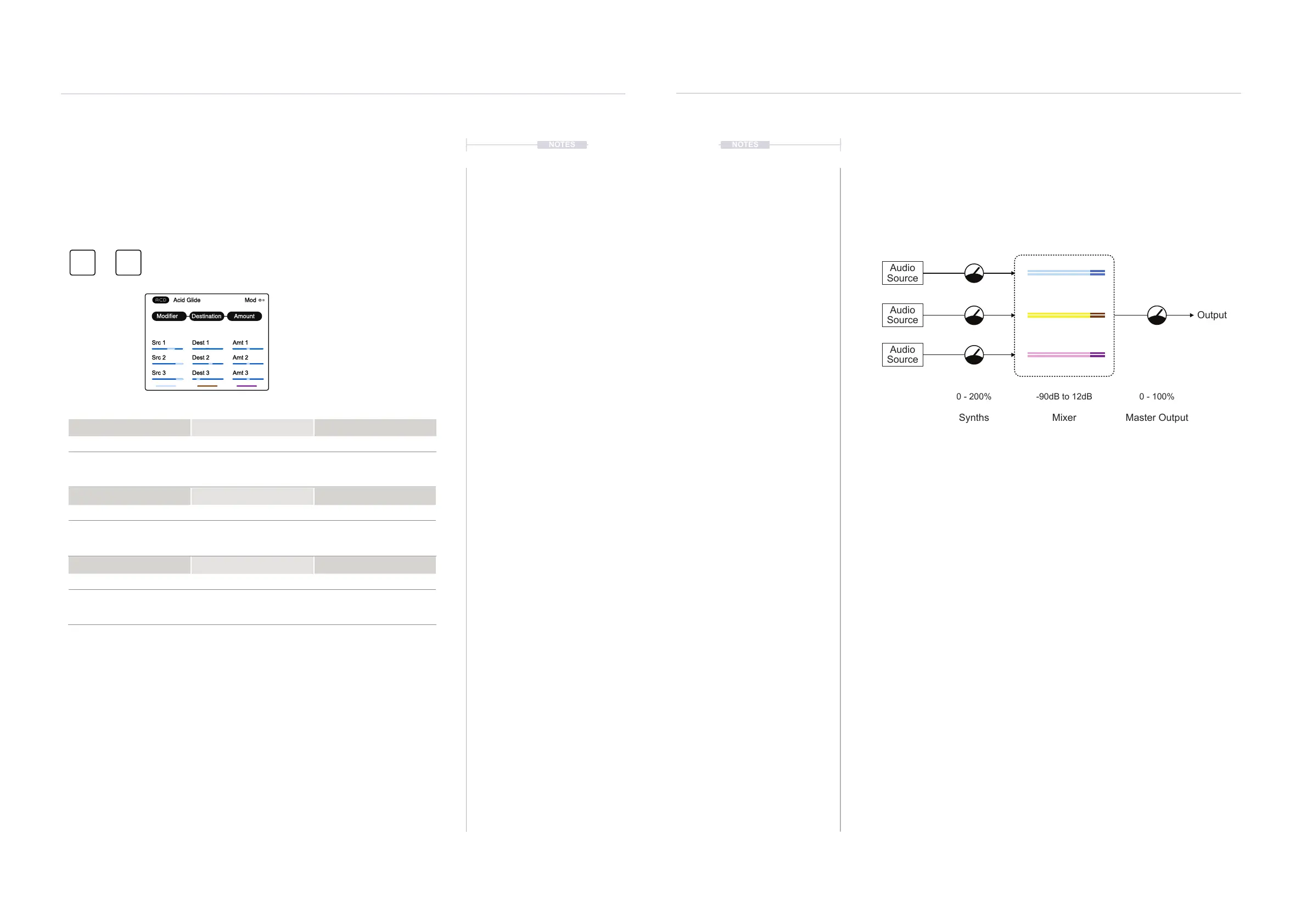
6.10 Levels & Gain Staging
It is an iterative process when gain staging and balancing the volume levels
through the audio path. Going back and forth to ensure the output is loud
enough to be appropriate while avoiding the audio being too ‘hot’ where
clipping distorts the signal.
A good starting point is to set the Master output at around 75% to give a
level of headroom for general volume adjustment. Then, set the Mixer
levels for each Synth to -6dB. The Synth output audio can be adjusted
along with the tweaking and tuning synth parameters. Maybe start at 100%
for each Synth.
Adjusting and iterating between the Synth and mixer is good practice, with
the master output used purely to control the Scene's master volume level.
Audio
Source
Audio
Source
Audio
Source
Mixer
-90dB to 12dB
Synths
0 - 200%
Master Output
0 - 100%
Output



 To Next Page