101
Polyend Synth Manual
100
Polyend Synth Manual
NOTESNOTES
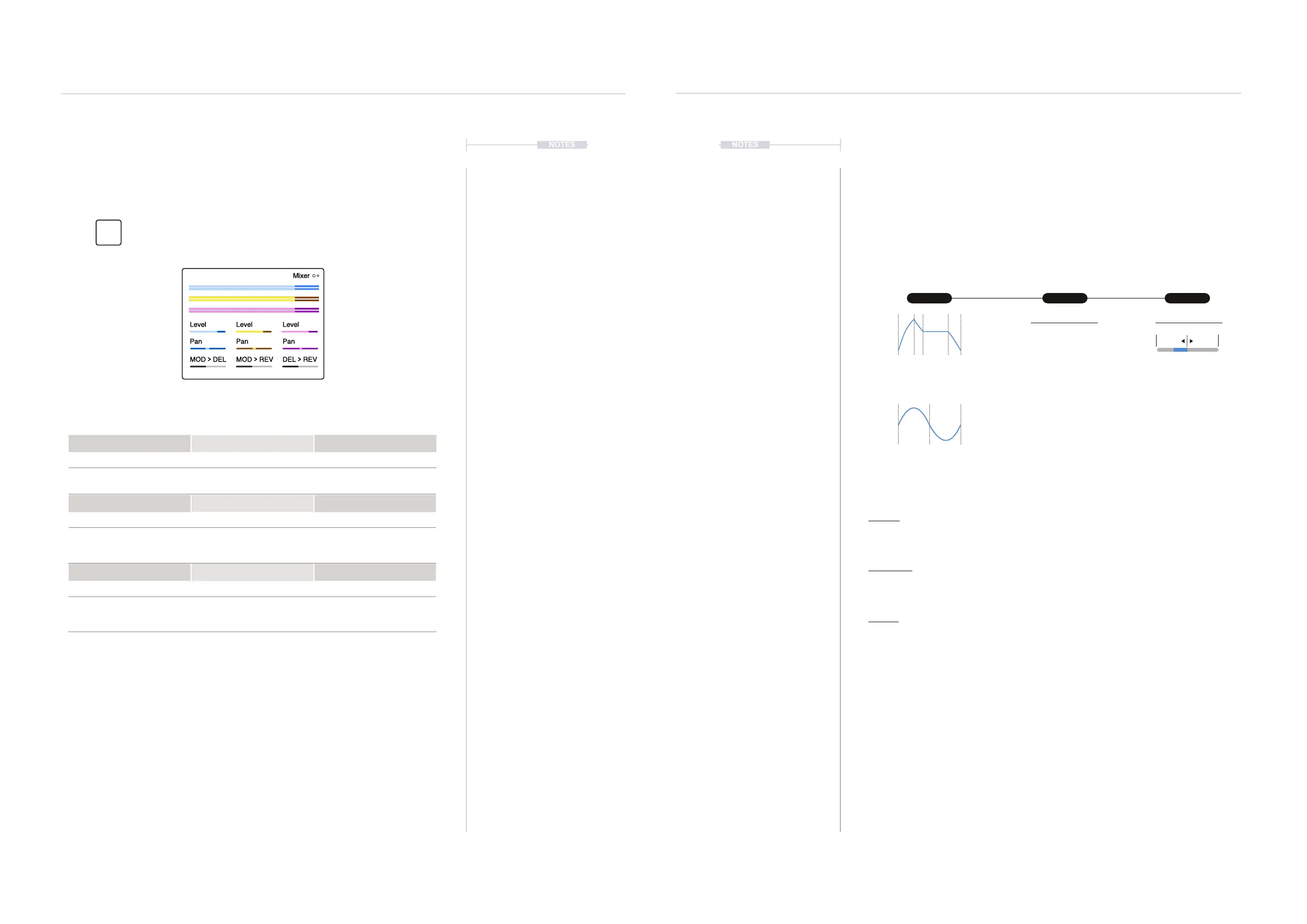
6.7 Mixer Page
The mixer is the central control of the collective audio levels and panning of
each synth output. These settings are on Page 1 of the mixer.
The mixer page will be frequently visited while adjusting the synth balance
of the synth voices during the sound design process. It will also be used to
nalise the output mix when the patch and scene are close to completion.
6.8 Modulation Overview
Modulation is the process of controlling and affecting one or more
parameters from the Behavior of another function. For example, an LFO
can vary the volume in a tremolo-style effect. Some interesting
combinations can contribute to the creative approach to sound and preset
design. Synth has a dedicated modulation matrix that enables the
connection and routing of functions.
Level Level Level
Pan Pan Pan
MOD
>
DEL MOD
>
REV DEL
>
REV
Mixer
Effects & Modulation
6
Effects & Modulation
6
Mixer - Page 1
Level Level Level
-90dB to +12dB -90dB to +12dB -90dB to +12dB
Audio level output for Synth
slot 1 - Blue.
Audio level output for Synth
slot 2 - Yellow.
Audio level output for Synth
slot 3 - Purple.
MOD > DEL MOD > REV DEL > REV
-90dB to +12dB -90dB to +12dB -90dB to +12dB
Amount of audio routed from
the mod effect output and
into the delay effect
Amount of audio routed from
the mod effect output and
into the reverb effect
Amount of audio routed from
the delay effect output and
into the reverb effect
Pan Pan Pan
L100 - C - R100 L100 - C - R100 L100 - C - R100
Audio pan position within the
stereo left to right eld for
Synth slot 1 - Blue
Audio pan position within the
stereo left to right eld for
Synth slot 2 - Yellow
Audio pan position within the
stereo left to right eld for
Synth slot 3 - Purple
Modier Destination Amount
ADSR Envelope
Option Examples Amount Example
Oscillator 1 Pulse Width
Oscillator 2 Pulse Width
Oscillator Mix
Filter Cutoff
Envelope Amp S
Envelope Filter S
Envelope Aux S
Volume
Available options will depend on the
patch and synth engine
Low Frequency Oscillator
Attack - Decay - Sustain - Release
Sources: Env Filter, Env Amp, Env Aux
Sources: LFO1, LFO2
-400% to +400%
Example
Amp Env > Osc1Pitch
Modier:
The Modier is the modulation source and is the function which controls and modies the
destination parameter. For example an LFO - Low Frequency Oscillator or an Envelope.
Destination:
The destination is the specic parameter that will be modulated and affected by the modier. It
is the parameter that is changed. Example Osc1 Pitch.
Amount:
The amount of modulation applied to the destination parameter. Typically a Bipolar range.
Affects how much impact on the destination from the modulator.
Press [Mixer] button to open the effect sends page.
Mixer
Effects



 To Next Page