65
Polyend Synth Manual
64
Polyend Synth Manual
Synths
5
Synths
5
Notes for user WAV les
SD Card Storage
Wavetables are stored in plain WAV les (16-bit mono, sample rate is not
relevant) in the Samples/WAVS folder of the SD Card.
Wavetable Format
A wavetable le should contain one or more waves - each being a full
oscillator cycle.
• Each wave should be aligned to a size that is power of 2 - typical sizes
are 128, 256, 512, 1024, 2048. For instance, a wavetable with 5 waves
of 256 samples will have 5 * 256 = 1280 samples.
• The synth will automatically establish the number of waves in the le,
but the size of the wave has to be given in its name, prexed with a
dash, for instance "epiano-1024.wav". If no number is provided in the
name, a default of 256 is used.
• All factory waves are using 256 samples and so don't have a size in the
name.
Wavetable Guidelines
• Do not add too many waves - usually 2, 3 or 5 is enough. The engine
interpolates in between the waves so that the sound transitions
smoothly. Using a long wavetable le will take more time to load.
• Be conservative with wave size. Usually 256 is optimum for high range
of notes. For low bass with higher harmonics included you may want to
go larger - up to 1024. But then the higher harmonics may cause
aliasing if you play high. You want to keep the wave size close to typical
frequency range for the sound, otherwise you risk aliasing at higher or
lower notes (the synth uses interpolation).
• Examples:
• C1 note = 32,7 Hz = full cycle ts in 1349 samples (so wave of
1024 samples is best t).
• C2 note = 674 samples
• C4 note = 169 samples
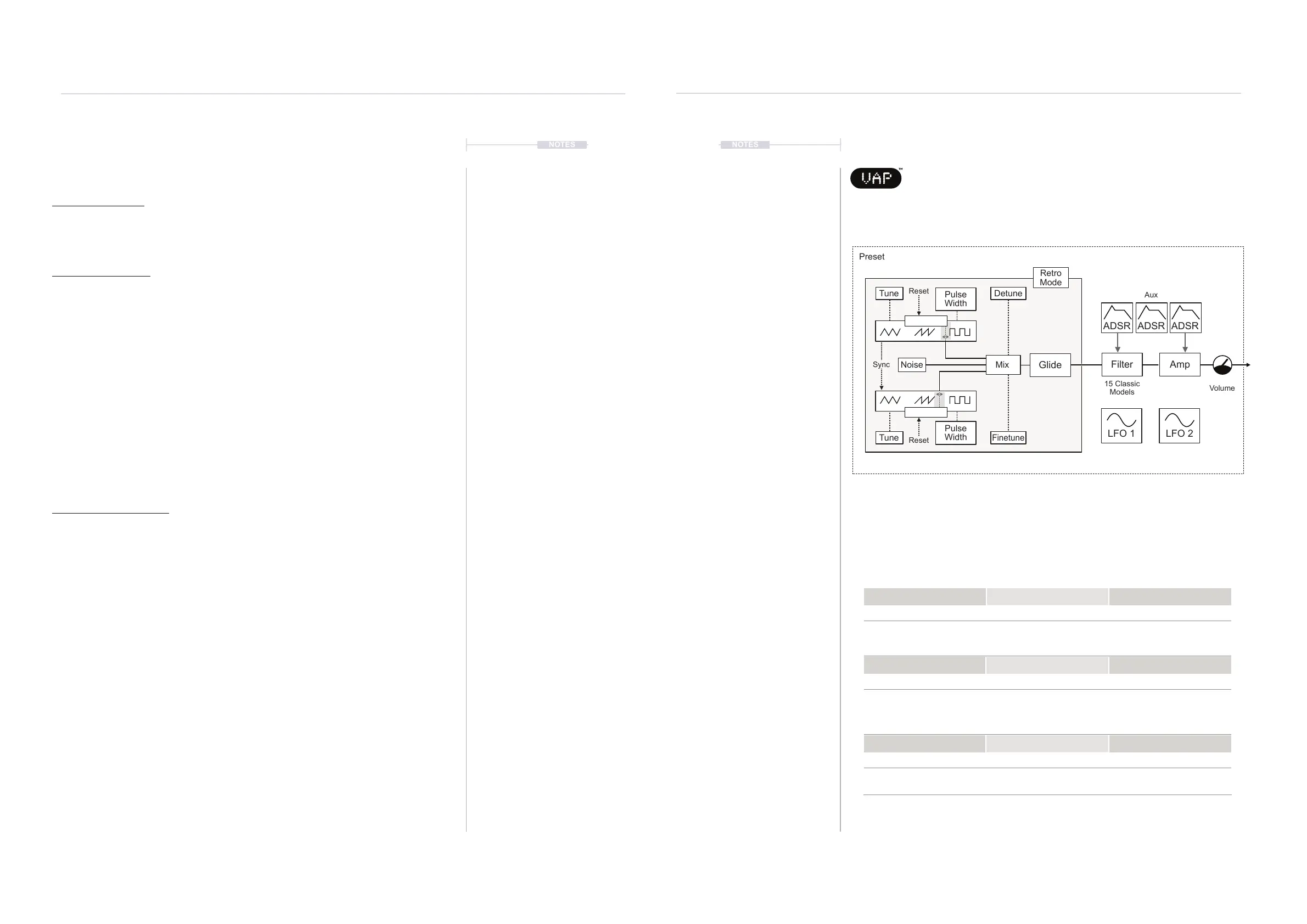
5.8 VAP Synth Voice
VAP is a dual oscillator virtual analog polysynth with some deep
and interesting pulse width modulation options. Inspired by the
OB-8 and Prophet, VAP is an ideal engine to use when shaping sounds and
creating ambient textures or making complex patterns.
Patching options for the LFOs and Envelopes are possible using the
Modulation function accessed using [Shift] + [Mod]. For PWM effects, the
LFOs can be patched to the Pulse Width parameter.
15 Classic
Models
Volume
Aux
LFO 2
LFO 1
Preset
Glide
Tune Detune
Finetune
Tune
Pulse
Width
Noise
Pulse
Width
Mix
Shape 1
Sync
Reset
Reset
Shape 2
Engine Oscillator Page 1
Shape 1 Shape 2 Mix
0-100 0-100 -100% to +100%
Oscillator 1 shape. Setting
morphs between triangle,
saw and square.
Oscillator 2 shape. Setting
morphs between triangle,
saw and square.
Oscillator 1 & 2 mix
PW 1 PW 2 Sync
-50 to +50 -50 to +50 On - Off
Oscillator 1 Pulse Width Oscillator 2 Pulse Width When set to On, Oscillator 2
resets on each cycle of
Oscillator 1 (Osc 1 controls
pitch).
Tune 1 Tune 2 Detune
-36 to + 36 st -36 to + 36 st 0-100 Cents
Oscillator 1 Tuning in
semitones
Oscillator 2 Tuning in
semitones
Oscillator mix detuning in
cents
Filter Amp
ADSRADSR ADSR
Retro
Mode
NOTESNOTES



 To Next Page